FinOps Inform
Engineers: Score and Verify Cloud Savings with AI Assisted Execution
Engineering playbook to find and verify cloud savings: prioritise effort vs impact, use AI analysis, and lock savings on the bill.

Most cloud savings do not come from a discount code or a better negotiated rate. They come from fixing how workloads were built in the first place: oversized compute, orphaned storage, and architecture that was never revisited after launch. The first move is not to shop for commitments. It is to switch on full cost and usage visibility, then score every opportunity you find by effort versus impact, so the small wins fund the bigger ones.
TL;DR:
- Most cloud savings originate from addressing architecture inefficiencies like oversized compute resources, orphaned storage, and unreviewed cost drivers, not from discounts or negotiated rates.
- Effective savings efforts focus on quick wins such as deleting unused storage, rightsizing resources, and reducing networking costs before tackling complex architectural changes.
- Prioritizing high-impact, low-effort actions and continuously monitoring cloud usage maximizes savings, while deep rearchitectures should be scheduled with dedicated planning and rollback strategies.
- Constant analysis using AI tools identifies re-emerging waste due to environment changes, avoiding the pitfalls of one-off audits that fail to sustain savings over time.
- Successful cost optimization depends on ongoing governance, clear ownership, and phased execution, supported by automation, policies, and regular review rather than one-time efforts.
Where cloud savings actually come from
Cloud bills grow in the same handful of places across almost every organisation. Knowing the categories before you audit means you spend your time finding waste instead of guessing where it might be.
Compute is usually the biggest line item and the biggest opportunity. Instances get provisioned for peak load and never resized. Development and test environments run around the clock. Spot capacity and ARM-based instance families sit unused because nobody has tested the workload against them.
Storage waste is quieter but persistent. Snapshots pile up, volumes stay attached to nothing, and data sits on premium tiers long after anyone reads it.
Networking costs are the ones teams forget to check at all. NAT gateway traffic, public egress that should have stayed inside a VPC, and duplicated load balancers all add up without showing up on anyone's dashboard until finance asks questions.
- Compute: rightsize instances, shut down idle resources, enable autoscaling, adopt spot instances for fault-tolerant jobs, and test Graviton or other ARM migrations.
- Storage: apply lifecycle policies, move cold data to cheaper tiers, migrate gp2 volumes to gp3, delete unattached volumes, and deduplicate where possible.
- Networking: review NAT gateway spend, cut unnecessary public egress, consolidate load balancers, and route traffic through VPC or S3 endpoints instead of the public internet.
- SaaS and licensing: audit for duplicate subscriptions, unused seats, and plans that no longer match actual usage.
- Data and AI: match model hosting to actual inference load, separate training and inference instance sizing, and check whether inefficient data formats are inflating storage and compute costs together.
Scoring opportunities by effort versus impact
Not every saving is worth chasing first. A five-minute fix that saves £50 a month matters less than most engineers think, and a six-week rearchitecture that saves £5,000 a month is worthless if it never gets scheduled. Score everything you find on two axes before you touch a single resource.
- Estimate impact as the monthly saving in pounds, based on current usage and pricing.
- Estimate effort as engineering hours plus the risk surface: does this touch production, does it need a rollback plan, does it require downtime.
- Combine the two into a score and rank the backlog from highest impact per hour of effort to lowest.
- Run low-effort, high-impact items first. These build trust and free up budget.
- Schedule medium-effort items next, using the savings from phase one to justify the engineering time.
- Reserve deep architectural work for a dedicated phase with its own approval and rollback process.
Pro Tip: Treat every commitment purchase and architectural change as requiring sign-off from whoever owns the budget, not just whoever owns the code.
A practical playbook from discovery to verified savings
Turning a list of opportunities into money back on the bill takes a sequence, not a single sprint.
Discovery comes first. Activate detailed cost and usage reporting, enforce tagging so every resource maps to a team or product, and pull that data into whatever reporting tool your finance and engineering teams both trust.
Quick wins follow immediately, usually within the first one or two weeks:
- Delete unattached storage volumes and stale snapshots.
- Stop or schedule idle development and test resources outside working hours.
- Apply lifecycle policies to ageing data.
- Migrate gp2 volumes to gp3 where compatible.
- Consolidate duplicate load balancers.
Medium-effort work comes next: rightsizing guided by provider compute optimiser tools, moving fault-tolerant workloads onto spot instances, and replacing expensive NAT gateway traffic with VPC or S3 endpoints where the architecture allows it.
Deep work is the final phase: architectural consolidation, container scheduler tuning, and multi-architecture migrations to Graviton or similar instance families. These need their own rollback plans and a testing window before they touch production traffic.
One organisation cut AWS costs substantially in under three months by sequencing optimizations this way, running quick wins first and using the freed budget and confidence to justify architectural changes (AWS case study). Verification is not optional: measure the realised saving against the actual bill, not the estimate, and lock the change in with policy-as-code so nobody reverses it by accident six months later.
Getting rate commitments right without overcommitting
Reservations and savings plans both trade flexibility for discount, but they are not interchangeable. Reservations lock you to a specific instance family and region in exchange for the deepest discount. Savings plans trade some of that discount for the flexibility to shift spend across instance types and services as workloads change.
Azure's own guidance shows reservations and savings plans can cut compute costs significantly compared with pay-as-you-go for eligible resources, but only when the SKU, region and scope are matched correctly and utilisation is monitored afterwards (Azure reservations guidance). Buy the wrong commitment and you can end up paying for capacity you never use.
- Start with the provider's own recommendations and recent utilisation data rather than guessing at future need.
- Favour savings plans for workloads that shift shape month to month, and reservations only for resources you are confident will stay stable.
- Set utilisation alerts and review them monthly, not just at renewal.
- Plan renewals and expiries six to twelve months ahead so nothing lapses onto full pay-as-you-go rates by accident.
- Centralise purchasing decisions with one team or owner so commitments do not overlap or contradict each other across departments.
Making savings stick instead of drifting back
A one-off audit fixes a moment in time. The waste creeps back within a quarter unless the process that created it changes too. The State of FinOps Report 2025 found that optimisation was a top priority for 50% of practitioners that year, with scope now expanding beyond public cloud into SaaS, data platforms and AI spend.
The FinOps Framework's core capabilities give a workable structure: understand usage and cost as an ongoing practice, quantify the business value of what you are spending, and treat optimisation as continuous rather than an annual event.
- Automate recommended actions so low-risk changes, such as resizing or cleanup, run on a schedule rather than waiting for someone to notice.
- Enforce guardrails in CI/CD and at the organisation-unit level so new resources come in tagged and sized correctly from day one.
- Run a monthly cost retrospective alongside sprint-level checks, with clear ownership and showback or chargeback so teams see their own numbers.
Pro Tip: Assign one named owner per cost category. A savings initiative with no owner reverts to waste within two quarters.
Why continuous analysis catches what one-off audits miss
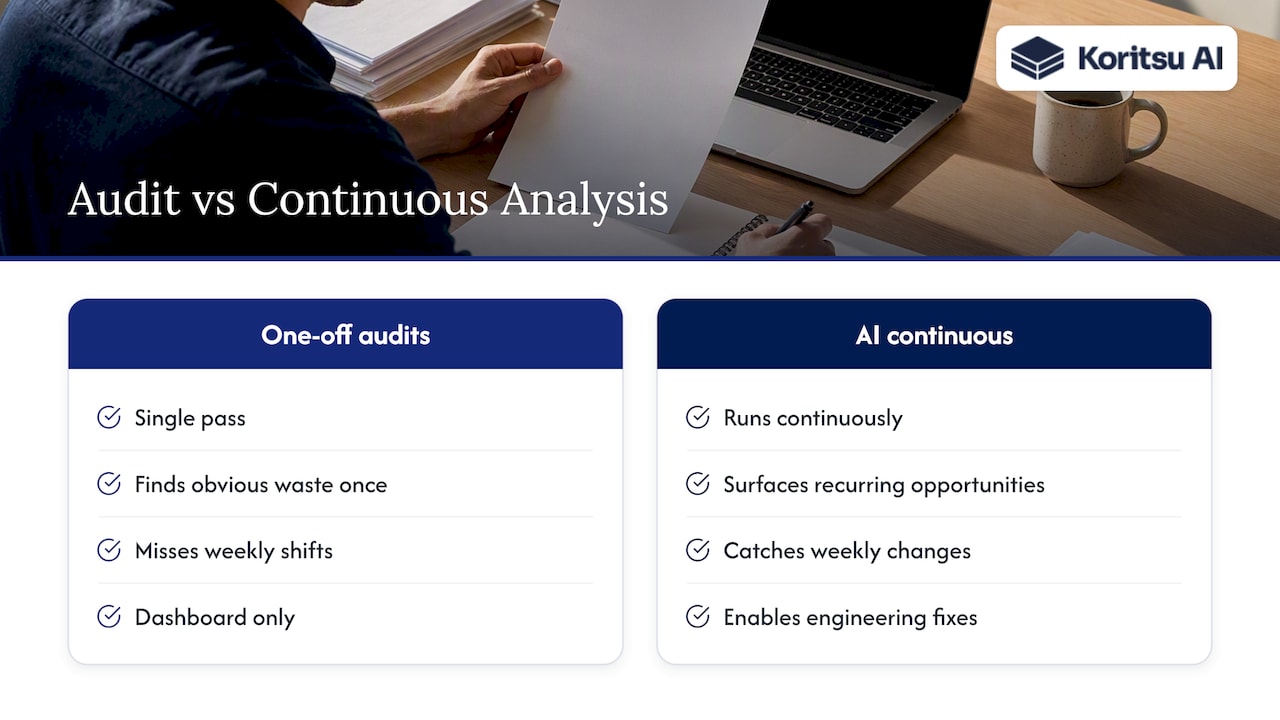
Most savings audits find the obvious waste once and stop looking. Cloud environments change weekly, so opportunities reappear as fast as they are closed. An AI agent can run continuous analysis of cloud spend rather than a single pass, surfacing new high-confidence opportunities as workloads shift, while engineering teams work directly to implement fixes that a dashboard alone cannot execute. A typical Savings Opportunity Report breaks spend down by team, service and feature, so an engineering lead can see exactly which product line is driving the bill rather than a single aggregated number.
Three mistakes that waste time or money
Teams chase small one-off fixes while architecture-level waste compounds untouched. Others buy large commitments without utilisation monitoring or an exit plan. The quietest failure is weak governance: new teams onboard and reintroduce the exact waste you already cleared.
How Koritsu turns findings into money back on the bill
Most teams know they are overspending. What they lack is the engineering time to prove it and fix it, which is where a success-fee model changes the calculation: Koritsu's Savings Opportunity Report identifies where money is being lost across compute, storage and architecture, and the success fee is only charged against savings verified on the actual bill, not an estimate.

- Start with a free assessment to see where your own spend is leaking.
- Move to a Savings Opportunity Report for a full, team-by-team breakdown.
- Continue with an ongoing Monitor or Advisor subscription through FinOps as a Service once quick wins are locked in.
If you want a second set of eyes on your bill before your next budget review, request the report and see what it surfaces.
Where to go deeper on implementation
For governance foundations, see the FinOps Framework 2025 and provider guidance on spot VMs and rate optimisation. Teams automating recommended-action pipelines often pair this work with review tooling such as Veridical or agentic assistants like Otto to speed up execution.
Sources
- The State of FinOps Report 2025
- Save compute costs with Azure reservations
- How one organisation cut AWS costs by 39% in 12 weeks
FAQ
How much does cloud cost per month?
Cloud spend varies enormously by company size and workload, so there is no single typical figure worth quoting. What matters more than the raw number is tracking it by team and service so you can spot the categories driving your own bill.
What are the 7 types of cloud services?
Definitions vary across providers and analysts, so there is no single agreed list of seven. Most frameworks group cloud services into categories such as compute, storage, networking, databases, and increasingly SaaS and AI or machine learning platforms, all of which fall inside modern FinOps scope.
Who are the top 3 public cloud providers?
AWS, Microsoft Azure and Google Cloud are the three providers most commonly referenced in cloud cost management and FinOps guidance, including the provider documentation on reservations and spot instances used throughout this article.
What are cloud cost savings and how can they be achieved?
Cloud cost savings come from eliminating waste and matching spend to actual usage, primarily through rightsizing, storage cleanup, rate commitments and architectural changes rather than one-off discounts. They are best achieved by combining continuous visibility with a prioritised, phased plan, an approach Koritsu applies through its AI-driven analysis and hands-on execution support.