FinOps Inform · Concurrency
Concurrency cost in cloud: a 2026 guide for engineers
Discover what is concurrency cost cloud in our 2026 guide for engineers. Learn how to optimize costs and avoid billing surprises.

Concurrency cost in cloud computing is defined as the ongoing financial expense of supporting multiple simultaneous operations, driven primarily by provisioning strategies, resource contention, and billing model mechanics. The industry term you will encounter most often is provisioned concurrency, which refers to pre-warmed execution environments kept ready regardless of actual request volume. Understanding cloud costs at this level matters because concurrency is where billing surprises hide. A service that handles 1,000 requests per second does not cost the same as one handling 1,000 sequential requests, even if the total compute time appears identical. Engineers who treat concurrency as a performance concern only, and not a financial one, routinely overspend on AWS Lambda, Google Cloud Run, and Azure Container Apps without realising it.
What is concurrency cost in cloud computing?
Concurrency cost is the charge your cloud bill accumulates from keeping resources ready or active to serve simultaneous requests. It is not simply the cost of running more code. It is the cost of the state your infrastructure must maintain to handle parallel load.
The distinction matters most in serverless and managed container platforms. In a traditional VM model, you pay for the instance whether it is busy or idle. In serverless, the billing model is more granular, but concurrency introduces its own version of that idle-cost problem. AWS Lambda's provisioned concurrency, for example, bills continuously from the moment you enable it to the moment you disable it, regardless of how many requests actually arrive. That is a fundamentally different cost structure from on-demand invocation billing.
Cloud resource allocation costs in this context break into three layers: the capacity you reserve, the requests you serve, and the duration of each execution. Each layer has its own pricing unit, and concurrency affects all three simultaneously. That is why calculating concurrency costs requires more than multiplying request count by execution time.
How do cloud providers charge for concurrency?
Cloud concurrency pricing varies by platform, but the underlying logic is consistent: you pay more when you need resources to be ready faster or in greater quantity.
Provisioned concurrency billing
AWS Lambda's provisioned concurrency pricing illustrates the model clearly. There are three separate charge components:
- Provisioned capacity charge. Billed continuously at a rate per GB-second, this covers the cost of keeping execution environments warm. The US East region rate is $0.0000041667 per GB-second.
- Request charge. Billed at $0.20 per million requests, this applies to every invocation regardless of whether provisioned or on-demand concurrency handles it.
- Duration charge. Provisioned concurrency duration is billed at a lower rate than on-demand ($0.0000097222 per GB-second in US East), but it applies on top of the capacity charge.
The critical point: provisioned concurrency is billed even when idle. Enabling it for 30 seconds costs the same as enabling it for 5 minutes, because billing rounds up to the nearest 5-minute increment. A brief test or a misconfigured deployment schedule can generate charges that look disproportionate to actual usage.
Reserved versus provisioned concurrency
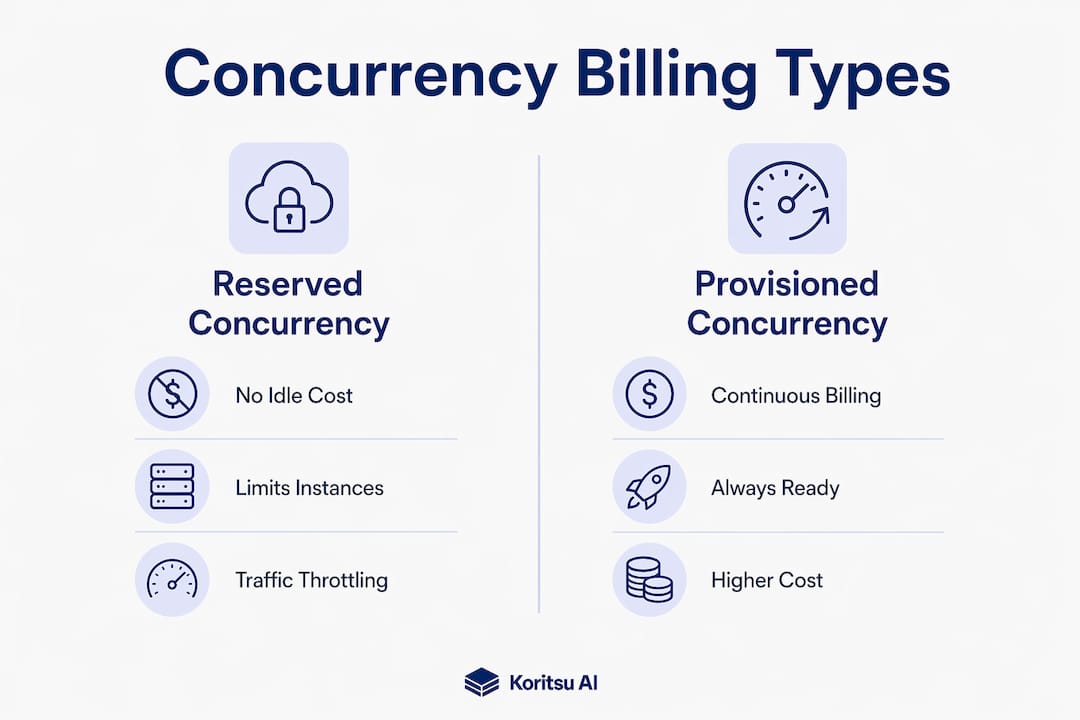
Reserved concurrency and provisioned concurrency are often confused, but their cost implications differ sharply.
| Factor | Reserved concurrency | Provisioned concurrency |
|---|---|---|
| Idle cost | None | Continuous charge |
| Cold start prevention | No | Yes |
| Billing unit | Per invocation | GB-second (capacity) + invocation |
| Use case | Traffic throttling | Latency-sensitive workloads |
| Cost risk | Over-throttling | Over-provisioning |
Reserved concurrency caps how many instances run simultaneously. It carries no idle charge but can throttle traffic if set too low. Provisioned concurrency eliminates cold starts but generates continuous charges. Choosing between them is a cost-performance trade-off, not a purely technical one.
What technical factors drive concurrency costs up?
Concurrency raises costs beyond what request volume alone would predict. The mechanism is resource contention: when multiple executions compete for the same CPU cycles, memory bandwidth, cache lines, or database connections, each execution takes longer. Longer execution means more billable GB-seconds.
The performance impact is measurable. Concurrent executions can increase execution duration by a factor of 1.43 compared to sequential execution, due to context switching and cache misses. That 43% increase in duration translates directly into a 43% increase in compute cost for those requests, with no corresponding increase in useful work.
The problem compounds under load through a set of phenomena engineers call consumption spikes:
- Cache stampedes. Multiple concurrent requests find a cache empty simultaneously and all query the database at once, causing a spike in both latency and database cost.
- Retry storms. Slow responses trigger client retries, which add more concurrent requests, which slow responses further.
- Connection pool exhaustion. Concurrent requests queue waiting for a database connection, holding compute resources open and accumulating billable time.
Doubling traffic can triple your cloud bill. Concurrency-triggered contention in shared resources causes requests to queue and hold compute resources longer than the raw request volume would suggest. The relationship between traffic and cost is not linear once contention takes hold.
CPU-bound workloads suffer most. Two CPU-bound requests running concurrently each take approximately double the execution duration compared to running sequentially, because they share the same physical core. The total billable time is the same, but the latency penalty can trigger retries, timeouts, and error-rate increases that add further cost. Monitoring p95 latency and error rates is not optional when tuning concurrency. It is the only way to know whether a concurrency increase is saving money or creating a more expensive problem.
How does concurrency affect cloud pricing in serverless versus containers?
The cost mechanics differ between serverless functions and managed container platforms, and the difference changes how you should think about concurrency limits.

In serverless platforms, concurrency is the number of simultaneous function executions. Each execution runs in its own isolated environment. Increasing the concurrency limit does not reduce per-execution cost directly. What it does is determine how many provisioned environments you need to keep warm, which is where the continuous charge accumulates.
In managed container platforms like Google Cloud Run, concurrency works differently. Each container instance can handle multiple simultaneous requests. Raising the concurrency limit per instance means fewer instances are needed to serve the same traffic volume. Increasing concurrency from the default of 80 to values between 200 and 500 is common for I/O-bound services, and it directly reduces instance count and therefore cost.
| Cost factor | Serverless functions | Managed containers |
|---|---|---|
| Concurrency unit | Simultaneous executions | Requests per instance |
| Primary cost driver | Provisioned environments | Instance count |
| Idle cost | Provisioned concurrency only | Per-instance minimum billing |
| I/O-bound benefit | Moderate | High |
| CPU-bound risk | High (duration increase) | High (latency degradation) |
| Tuning lever | Concurrency limit per function | Max concurrency per instance |
The trade-off is consistent across both models: higher concurrency reduces instance or environment count, but only if the application can absorb the load without latency degradation. I/O-bound services, where requests spend most of their time waiting on network or database responses, benefit significantly from higher concurrency. CPU-bound services do not. Pushing concurrency too high on a CPU-bound workload triggers scale-out events that eliminate any savings from reduced instance count. You can read more about this pattern in the context of compute inefficiency types that affect cloud bills.
Pro Tip: Before raising concurrency limits, profile your service to confirm it is I/O-bound. A simple test: if CPU utilisation stays below 50% under load, higher concurrency will likely reduce costs. If CPU is saturating, it will not.
How to optimise concurrency settings for cost efficiency
Concurrency tuning is not a one-time configuration change. It is an iterative process that requires measurement at each step.
- Establish a baseline. Record current instance count, p95 latency, error rate, and monthly cost before making any changes. Without a baseline, you cannot tell whether a change helped or hurt.
- Identify workload type. Determine whether your service is I/O-bound or CPU-bound. I/O-bound services can handle concurrency settings of 200 to 500. CPU-bound services should stay at lower values and be tested carefully.
- Increase concurrency in small increments. Do not jump from 80 to 500 in one step. Increase by 20–30% at a time. Small increments prevent triggering scaling events that offset savings.
- Monitor for at least 24 hours. Post-adjustment monitoring for a minimum of 24 hours is necessary to capture the full range of traffic patterns, including off-peak periods where contention may appear unexpectedly.
- Watch error rates, not just latency. A concurrency setting that looks acceptable at p50 latency may be generating errors at p95. Errors trigger retries, which add cost. Check both metrics before declaring a change successful.
Common pitfalls in cloud cost management at this stage include ignoring the API-level cost implications of concurrency changes, and misreading a temporary latency spike as a permanent degradation. Give each adjustment time to stabilise before reverting.
Pro Tip: Use your cloud provider's native cost calculator to model the expected bill before and after a concurrency change. The numbers often reveal that the savings are smaller than expected, which is useful information before you spend engineering time on the change.
For provisioned concurrency specifically, schedule it to match actual traffic patterns. Enabling it 24 hours a day for a service that only receives traffic during business hours means paying for idle capacity overnight. Scheduled scaling, available on AWS Lambda and similar platforms, eliminates that waste without sacrificing cold-start performance during peak hours.
Key takeaways
Concurrency cost in cloud computing is a billing structure problem as much as a performance problem, and the two cannot be tuned independently.
| Point | Details |
|---|---|
| Concurrency cost definition | The ongoing charge for maintaining simultaneous execution capacity, not just per-request compute time. |
| Provisioned concurrency billing | Charges accrue continuously, including idle time, with a minimum 5-minute billing increment on AWS Lambda. |
| Contention multiplies cost | Resource contention can increase execution duration by 1.43x, raising billable GB-seconds beyond what traffic volume predicts. |
| Workload type determines strategy | I/O-bound services benefit from higher concurrency limits; CPU-bound services require lower settings and careful monitoring. |
| Iterative tuning is required | Monitor p95 latency and error rates for at least 24 hours after each concurrency adjustment before making further changes. |
Concurrency cost is harder than it looks
I have reviewed cloud bills across dozens of engineering teams, and the pattern is consistent. Teams that understand concurrency at a conceptual level still get caught out by the billing mechanics. They enable provisioned concurrency for a Lambda function, run a quick test, disable it, and assume the cost was minimal. Then the invoice arrives and they discover that five separate test cycles, each lasting under a minute, were each billed as five minutes. That is not a mistake. That is the pricing model working exactly as documented.
The deeper issue is that concurrency cost is not a technology problem in isolation. It is a process problem. Teams that tune concurrency once and move on will find their settings drifting out of alignment as traffic patterns change, new features ship, and database schemas evolve. What worked at 500 requests per second may generate contention spikes at 2,000. The workload changes; the settings do not.
My honest view is that most teams should treat concurrency settings as a living configuration, reviewed on the same cadence as capacity planning. Automation helps, but only if the monitoring signals feeding it are correctly defined. An AI-driven platform like Koritsu AI can surface the patterns that manual review misses, but the underlying principle remains: you cannot manage what you do not measure. Start with the metrics, then build the automation around them.
— Kori
How Koritsu AI can help with concurrency cost management

Concurrency costs are rarely visible in a standard cloud bill. They are buried in GB-second charges, instance counts, and provisioning schedules that require cross-referencing multiple cost dimensions to interpret correctly. Koritsu AI's platform continuously analyses your cloud spending to surface exactly these patterns, attributing cost to concurrency decisions rather than leaving them hidden in aggregate line items.
Koritsu AI's specialists work alongside engineering teams to act on those findings, not just report them. The UK Bidding Platform case study shows what that looks like in practice: a 52% reduction in cloud costs through targeted infrastructure changes. If you want to understand where concurrency is costing you more than it should, start with a free assessment from Koritsu AI. There is no charge until savings are confirmed.
FAQ
What is concurrency cost in cloud computing?
Concurrency cost is the financial charge incurred by maintaining simultaneous execution capacity in cloud environments, including provisioned environments kept warm and compute time extended by resource contention.
How does provisioned concurrency billing work on AWS Lambda?
AWS Lambda bills provisioned concurrency continuously from the moment it is enabled, rounded up to 5-minute increments, with separate charges for capacity, requests, and duration, even when no requests are being processed.
Why does higher concurrency sometimes increase cloud costs?
Higher concurrency increases costs when workloads are CPU-bound, because concurrent executions compete for the same resources, extending execution duration and billable GB-seconds beyond what sequential processing would require.
What is the difference between reserved and provisioned concurrency?
Reserved concurrency caps simultaneous executions and carries no idle charge, while provisioned concurrency keeps environments pre-warmed and generates continuous charges regardless of actual traffic volume.
How long should I monitor after changing concurrency settings?
Monitor p95 latency and error rates for at least 24 hours after any concurrency adjustment to capture the full range of traffic patterns before deciding whether the change was beneficial.