FinOps Inform
Cut Data Pipeline Costs Within Weeks With Execution Aware Telemetry
Cut data pipeline costs within weeks by using execution aware telemetry, workload tiers and rightsizing. Start with a free Koritsu assessment.

Measure pipelines at query and job level, then enforce workload tiers: that single shift uncovers most of the avoidable spend hiding in a typical cloud data estate. Teams that move from invoice-level guessing to execution-aware telemetry usually find their first round of savings within weeks. From there, the priority order is simple: measure, find your top consumers, then apply rightsizing or retention rules before you touch anything else.
TL;DR:
- Reducing compute over-provisioning by resizing clusters and implementing autoscaling with performance caps can cut costs significantly, especially for peak but infrequent loads.
- Enforcing precise tagging and ingesting detailed telemetry allows teams to assign costs accurately and take immediate action on high-spend pipelines.
- Switching storage formats to Parquet or ORC, and partitioning data effectively, can lower both storage costs and query scan volume, yielding noticeable savings.
- Routing batch workloads into lower-cost, off-peak windows and utilizing spot instances with proper fallback guarantees prevents unnecessary expenses.
- Prioritizing measurement, rightsizing, and tagging before heavier architectural redesigns ensures quick wins with minimal risk and effort.
Where the money actually goes: hidden cost drivers in data pipelines
Most pipeline spend is not where teams expect it. Compute is oversized because nobody revisited the original sizing decision once the workload matured. SQL jobs scan far more data than the query needs, often because a partition strategy from eighteen months ago no longer matches how the data is queried. Replication and cross-region egress quietly compound with every replica and every dashboard refresh. Small files and metadata overhead slow down every job that touches them, and replays or backfills after a schema change or an incident can cost more than the original pipeline run.
Batch jobs and streaming jobs fail differently and cost differently. A batch job that overscans wastes money once per run. A streaming job with the same inefficiency wastes money continuously, because it never stops.
- Over-provisioned compute: check for clusters sized for peak load that run at low utilisation most of the day.
- Inefficient SQL and large scans: look for jobs with high bytes-scanned-to-bytes-returned ratios.
- Replication and egress: check cross-region transfer line items against actual downstream consumers.
- Small-file and metadata overhead: watch for job time dominated by file listing rather than processing.
- Replays and backfills: track how often the same data is reprocessed after failures or schema drift.
Start with whichever workload has the largest bill and the least recent engineering attention. That combination is where the biggest, easiest wins tend to sit.
Measure and attribute: telemetry, tagging and unit economics
You cannot manage what you only see once a month on an invoice. Leading data teams ingest query history, job logs and orchestration events, then enforce runtime metadata so that spend can be tied back to the specific pipeline, team or feature that generated it, a practice the FinOps Foundation's data cloud platform guidance describes as the shift from coarse invoice views to execution-aware unit economics. That shift is what lets engineers act on cost while the job is still running rather than after the bill lands.
- Ingest query history, job logs and orchestration events into a single store, even a simple one, so cost data and execution data live together.
- Normalise platform-specific units (Databricks DBUs, Snowflake credits, BigQuery slots) into a common currency figure so pipelines on different platforms can be compared directly.
- Compute cost-per-pipeline and cost-per-model-run as standing metrics, not one-off reports.
- Enforce mandatory tags or labels (team, environment, pipeline name) at the orchestrator level so untagged spend cannot ship to production.
- Run control loops on a cadence that matches the risk: intraday checks for high-cost streaming jobs, daily for batch, weekly for storage and retention.
The governance rule is short: no tag, no deploy. Everything else follows from having that data in one place.
Rightsize compute and place workloads: instance choice, autoscaling and spot capacity
The instinct to reach for the largest available instance is usually the most expensive habit in a pipeline's lifecycle. Match the instance family to the actual bottleneck: CPU-bound transforms need compute-optimised instances, memory-heavy joins need memory-optimised ones, and network-bound ingestion needs bandwidth headroom more than raw cores. Research on cloud query processing shows that instance choice tied to workload shape, rather than to cheapest hourly rate, can cut costs by an order of magnitude for certain query patterns.
Autoscaling needs two signals, not one. Scaling on performance alone invites runaway costs during traffic spikes; pairing it with a financial ceiling keeps growth bounded.
- Set sensible maximum worker counts and review them quarterly, not once at launch.
- Size initial workers to typical load, not peak load, and let autoscaling handle the rest.
- Use spot or preemptible capacity for batch and non-critical tasks, with checkpointing and a fallback to on-demand for anything that cannot tolerate interruption.
Pro Tip: Tag every spot-eligible job explicitly. An untagged job that quietly depends on spot capacity will fail in ways that are hard to diagnose six months later.
Data management: tiering, formats, partitioning and retention policies
Storage and scan costs respond quickly to a handful of low-risk changes. Switching to Parquet or ORC with splittable compression cuts both storage footprint and the volume scanned per query, a pattern confirmed in AWS Glue's best practice guidance for building cost-effective pipelines.
Partitioning by date or another high-selectivity key lets queries prune irrelevant data before they scan it, though over-partitioning creates thousands of small files that slow every job that touches them. The fix is usually consolidation: fewer, larger partitions aligned to actual query patterns.
- Move to Parquet or ORC with splittable compression for anything queried regularly.
- Partition on the field your queries filter by most, and consolidate small files periodically.
- Automate lifecycle rules that move cold data from hot storage to cool or archive tiers, a practice Azure's Well-Architected cost guidance recommends alongside deduplication and dataset summarisation.
Start with a simple rule: anything untouched for 90 days moves to a cheaper tier automatically.
Orchestration and scheduling: workload tiers, batching and time-based routing
Not every pipeline deserves the same budget. Defining workload tiers, critical, important and experimental, and enforcing them through orchestrator labels or policies stops experimental jobs from quietly consuming production-grade resources.
Scheduling is the cheapest lever most teams ignore. Google Dataflow's FlexRS option, for example, trades a longer scheduling window for materially lower batch pricing, and combining that with committed-use discounts compounds the saving, as described in Dataflow's pricing documentation.
- Tag every pipeline with a tier and enforce the tier through orchestrator policy, not convention.
- Route flexible batch work into lower-cost, off-peak windows or FlexRS-style discounted batch options.
- Group related jobs and reduce start and stop frequency, since startup overhead compounds when short jobs run separately.
A pipeline that runs every five minutes but could tolerate hourly batching is paying for convenience it may not need.
Operational controls: monitoring, anomaly detection and pairing performance with cost SLOs
Cost control only sticks when it is continuous, not a quarterly exercise. Pair technical service levels, latency and p95 response time, with financial ones, cost-per-run and cost-per-query, so a team cannot hit its performance target by quietly overspending to get there.
- Alert on cost-per-run deviations the same way you alert on latency regressions.
- Sweep for orphaned resources: idle clusters, unattached storage and forgotten test environments.
- Apply cost lints and admission controls (OPA/Gatekeeper-style policies) to block obviously oversized deployments before they reach production.
- Run a regular showback cadence so each team sees its own spend, with an executive roll-up summarising trends.
Operational hygiene extends beyond infrastructure. Recurring checks on access and configuration, the kind covered in operational security checklists for SaaS environments, often surface forgotten resources that show up as unexplained line items on the cloud bill.
How an engineering-grade FinOps engagement acts on these levers
Diagnosing these issues is one thing, fixing them across dozens of pipelines is another. Koritsu's approach pairs continuous telemetry ingestion with hands-on engineering remediation, verified against the actual bill rather than estimated savings.
- The AI agent continuously analyses cloud spend and surfaces where inefficiencies are concentrated.
- Specialist teams review the highest-impact findings and implement the fixes directly with engineering teams.
- Savings are verified against billing exports rather than estimated projections.
- Engagements start with a free assessment, and payment is based on a share of the savings actually delivered.
Teams without an external partner can replicate the same loop: instrument first, prioritise by dollar impact, then fix and verify against the next bill.
Automation strategies to reduce operational toil costs
Every hour an engineer spends manually resizing a cluster, chasing an orphaned resource or reprocessing a failed job is a cost that never appears on the cloud invoice but shows up in headcount and delayed roadmap work. Automation is what converts one-off savings into a durable baseline.
Infrastructure-as-code is the foundation: if scaling policies, retention rules and instance choices live in version-controlled templates, they get reviewed like any other code change and cannot silently drift back to an expensive default. Scheduled jobs that sweep for orphaned resources, unattached volumes, idle clusters, forgotten test environments, remove a category of waste that otherwise needs a human to notice it.
Auto-remediation is the next step up. Instead of alerting an engineer that a cluster has been idle for six hours, a policy engine can scale it down automatically and log the action for review. This works well for well-understood, low-risk cases: idle compute, unused storage snapshots, expired feature branches. It works less well for anything with ambiguous ownership, which is why tagging discipline from earlier in the pipeline matters here too.
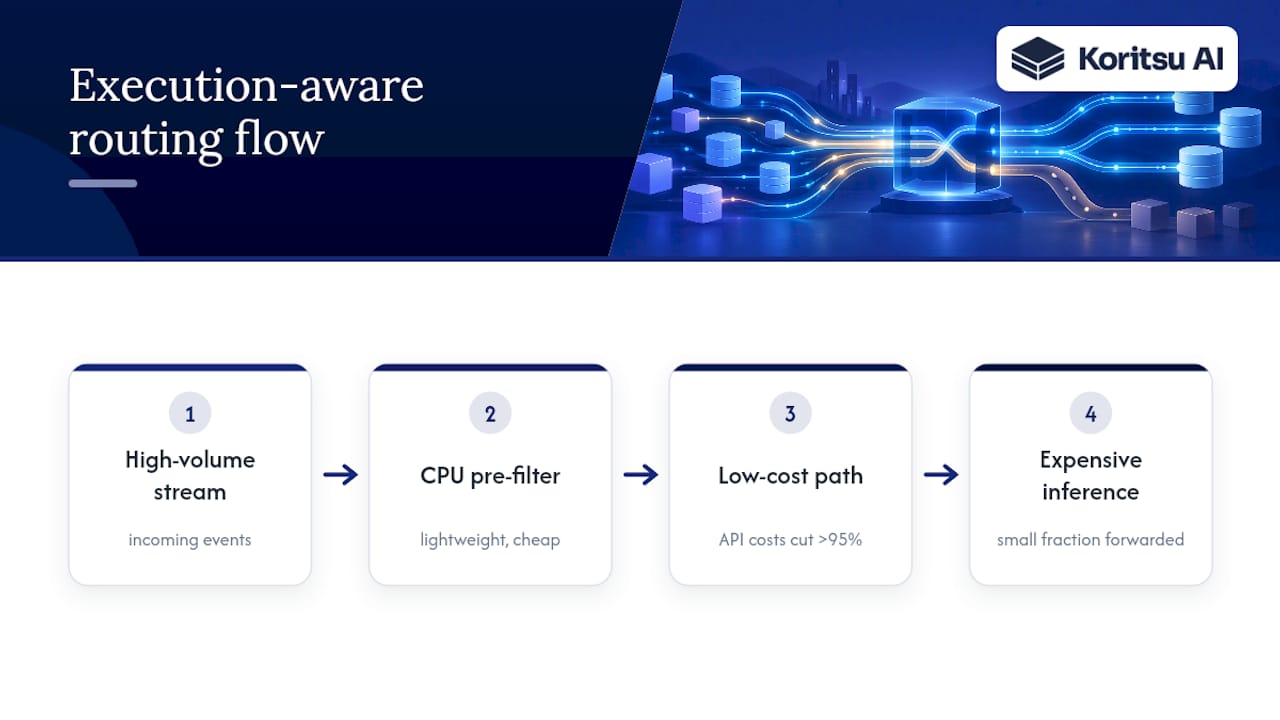
The GenAI and ML layer of a pipeline is a specific case worth automating early. Routing every event through an expensive model call is rarely necessary. Lightweight, CPU-bound pre-filters can keep the bulk of events on a cheap path and forward only a small fraction to costly inference, an approach that has cut API costs by more than 95% for high-volume streams in Google Dataflow. Automating that filter once removes a recurring cost that would otherwise scale with every new event source.
Cost-benefit analysis of optimization techniques to prioritize efforts
Not every lever is worth pulling first. The right way to prioritise is to weigh expected saving against engineering effort and risk, then work down the list.
Rightsizing compute and enforcing workload tiers sit at the top: the engineering effort is moderate, the risk is low when done with proper autoscaling guardrails, and the saving applies continuously across every run of the pipeline. Data format and partitioning changes are similarly high-value and low-risk, since they touch storage and scan costs without altering business logic.
Retention and lifecycle automation take slightly longer to design correctly, since deleting or archiving data too aggressively is a real risk, but the ongoing saving compounds every month once the rules are in place. Spot and preemptible capacity for batch workloads offers a large discount but needs proper fallback design, so it belongs in the second wave of changes rather than the first.
Architectural changes, rebuilding an orchestration layer or migrating a streaming platform, sit at the bottom of the priority list despite sometimes offering the largest theoretical saving, because the effort and risk are proportionally higher and the payback period is longer. The practical rule: fix measurement and tiering first, because everything else becomes easier to evaluate once you can see cost-per-pipeline clearly. Then work through rightsizing, data hygiene and scheduling before considering anything that touches core architecture.
Impact of data pipeline architecture changes on cost optimization
Architecture sets the ceiling on how much smaller tactical fixes can push the bill. A pipeline built entirely on always-on streaming infrastructure, for instance, carries a cost floor that rightsizing alone cannot remove, because the FinOps Foundation's field guide for streaming platforms notes that these workloads carry always-on baselines and replication multipliers that batch pipelines never see.
Moving a workload from streaming to micro-batch, where near-real-time is acceptable but true streaming is not required, is one of the more consequential architecture changes available, since it removes the always-on cost entirely in exchange for a small increase in latency. Consolidating multiple small, similar pipelines into a single parameterised pipeline reduces both the operational toil of maintaining many near-identical jobs and the fixed startup overhead each one carries.
On the compute side, moving GPU-heavy workloads onto shared, fractional infrastructure rather than dedicated nodes per job can meaningfully change the cost profile. Guidance on scaling Kubernetes for AI and ML workloads recommends isolating expensive accelerators into tainted node pools with fractional sharing, which lets several smaller jobs share hardware that would otherwise sit idle between larger ones. None of these changes are quick, but each one shifts the underlying cost structure rather than trimming a single line item.
Case studies or benchmarks illustrating typical cost savings
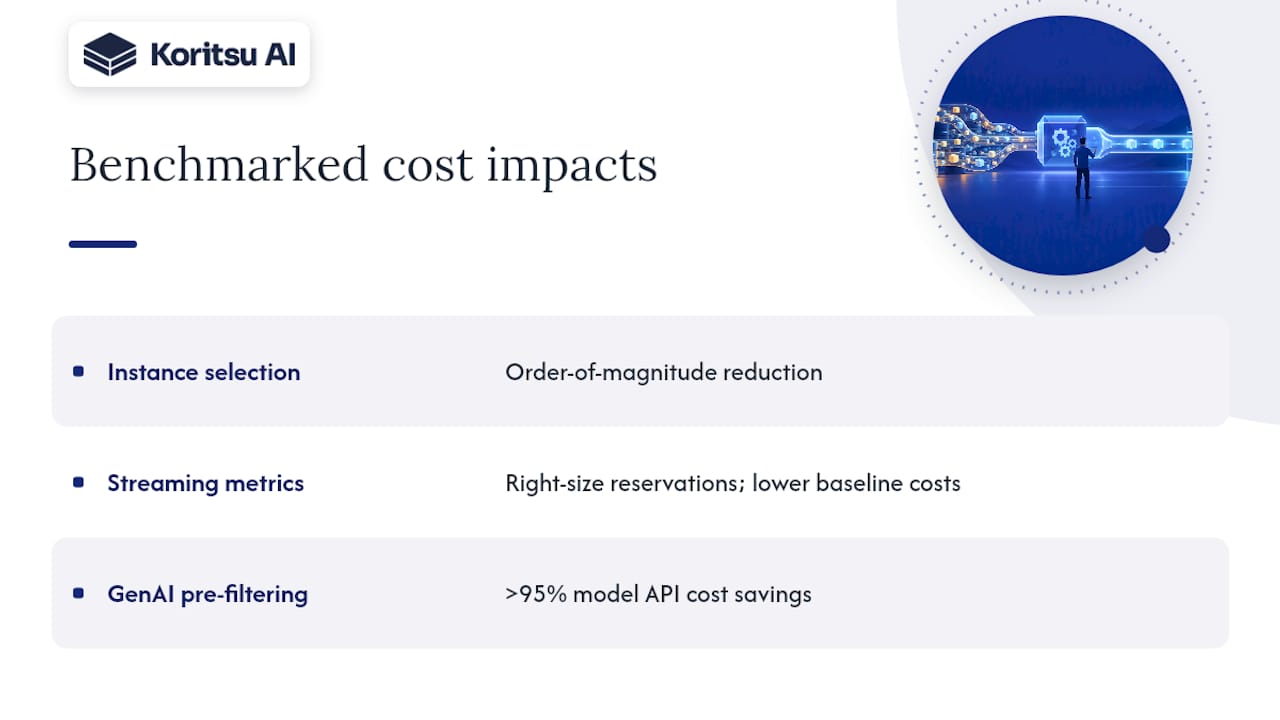
Concrete numbers are harder to come by than vendor marketing suggests, but the patterns are consistent across the available benchmarks. Instance selection tied to workload shape, rather than to habit, has been shown in academic benchmarking of cloud query processing to cut costs by an order of magnitude for certain query patterns, because the cheapest instance per hour is rarely the cheapest instance per query.
On the streaming side, teams that build cost-per-million-messages or cost-per-gigabyte-retained metrics, rather than relying on a single monthly platform bill, are better placed to right-size reservations against actual throughput, a discipline the FinOps Foundation's streaming field guide ties directly to controlling the always-on baseline costs specific to real-time platforms. For GenAI-heavy pipelines specifically, the pre-filtering pattern that keeps most events on a cheap CPU path and forwards only a fraction to expensive model inference has delivered savings of more than 95% on model API costs in documented Dataflow implementations, a scale of saving specific to that architecture pattern rather than a general benchmark for every pipeline.
The consistent thread across these examples is that the largest savings come from changing how work is measured and routed, not from negotiating a better hourly rate. A pipeline that scans less data, runs on the right instance shape and only calls expensive services when it truly needs to will beat one that simply moved to a cheaper region.
First-person perspective: lessons from engineering teams who cut pipeline cost
The teams that make lasting progress share three habits: they instrument before they optimise, they automate hygiene rather than repeating it manually, and they enforce guardrails instead of relying on individual engineers to remember them. The teams that struggle usually skip straight to the third habit without the first two.
How Koritsu can help: free assessment and success-fee savings engagements
Finding these inefficiencies across dozens of pipelines and hundreds of jobs takes more engineering time than most teams can spare, which is exactly the gap Koritsu is built to close. Koritsu combines an AI platform that continuously analyses cloud spend with hands-on FinOps specialists who implement the fixes directly, and every saving is checked against the actual billing export rather than an estimate.

Engagements start with a free assessment that produces a Savings Opportunity Report, a concrete breakdown of where spend is concentrated and what fixing it is worth. From there, Koritsu is paid on a success-fee basis, a share of the savings actually delivered rather than an upfront retainer. Teams that want ongoing coverage can move onto FinOps as a Service, with Monitor, Advisor, Embedded and Premium tiers depending on how much hands-on support they need. If your pipelines have grown faster than your visibility into what they cost, the assessment is the place to start.
Sources
- FinOps for Data Cloud Platforms | FinOps Foundation
- AWS Glue best practices: building a performant and cost-optimised data pipeline
- Dataflow pricing | Google Cloud
- Optimize data costs | Microsoft Azure Well-Architected
FAQ
How do you optimize a data pipeline for cost?
Start by measuring cost at the query or job level rather than relying on the monthly invoice, then rank pipelines by spend and enforce workload tiers so experimental jobs cannot consume production-grade resources. From there, apply rightsizing, format and partitioning fixes, and retention automation in that order.
What are the four pillars of cost optimization in the cloud?
Definitions vary by framework, but most describe measurement and attribution, rightsizing and workload placement, data lifecycle management, and continuous governance through monitoring and alerts as the core pillars. Each pillar depends on the one before it: you cannot rightsize what you have not measured.
Can you give an example of a data pipeline?
A typical data pipeline ingests raw events from an application, transforms them through a batch or streaming job, and loads the result into a warehouse or lakehouse for reporting or model training. Cost tends to concentrate in the transform step, particularly when queries scan more data than the report actually needs.
What is cost optimization in DevOps?
In a DevOps context, cost optimization means treating infrastructure spend as a metric to monitor alongside performance and reliability, rather than a finance-only concern reviewed after the fact. It typically involves autoscaling policies, infrastructure-as-code reviews and automated sweeps for idle or orphaned resources.
How much can data pipeline cost optimization typically save?
Savings vary widely by architecture and how much waste has accumulated, so there is no single reliable figure across all pipelines. The most consistent pattern in the available benchmarks is that instance selection and pre-filtering unnecessary model calls can each cut specific cost categories substantially, though the overall bill impact depends on how much of that category the pipeline actually uses.