FinOps Inform
Cut dev environment cloud costs up to 70% with FinOps and engineers
Engineer led FinOps combines continuous cost analysis and hands-on engineering to cut dev environment cloud costs and verify savings against the invoice.

The fastest, most reliable savings on dev environment cloud costs come from three levers: scheduling non-production instances to stop outside office hours, rightsizing and shifting eligible workloads to spot or preemptible capacity, and tightening CI runner usage. Start there, measure the result on the actual bill, and involve engineering early so the changes don't slow anyone down.
TL;DR:
- Focusing on scheduling non-production instances outside office hours can cut costs by up to 70 percent for those resources.
- Rightsizing VMs and migrating suitable workloads to spot or preemptible capacity provide high-impact savings with medium effort.
- Automating tagging, segmentation, and environment management helps sustain savings beyond a one-time cleanup.
- Continuous monitoring and AI-powered analysis can reveal hidden waste that manual audits may miss, ensuring ongoing cost optimization.
- Koritsu offers a free savings assessment and shares in the verified cost reductions, making it a low-risk way to identify overlooked savings opportunities.
Quick checklist: eight high-impact actions you can start this week
Most engineering teams already know their dev and staging environments run idle overnight and on weekends. The gap is rarely awareness. It's execution. Here's where to start.
- Deploy tag-driven start/stop schedules for dev and test instances and databases.
- Run a rightsizing sweep across dev VMs and move long-running, interruption-tolerant workloads to spot or preemptible capacity.
- Decide whether CI agents should be self-hosted or hosted, then configure caching so it actually saves time rather than adding overhead.
- Segment accounts or subscriptions by environment so chargeback and cost allocation stop depending on manual tagging.
- Enforce tagging through policy automation rather than asking engineers to remember.
- Use infrastructure-as-code to spin up and tear down ephemeral environments instead of leaving them running.
- Set budget alerts and a bill-back KPI so you can prove savings landed, not just that you made changes.
- Prioritise the low-effort, high-impact items first and leave the complex architectural work for later.
None of this requires a platform rebuild. It requires discipline, automation, and someone accountable for checking the bill against the plan.
Prioritisation and roadmap: choose the right first project to unlock savings fast
Start with the billing data, not a hunch. Pull spend by account, service and environment tag for the last 90 days and find where non-production spend concentrates. That's your shortlist.
Score each candidate on effort versus impact versus risk:
- High impact, low effort: tag-driven scheduling on idle dev VMs and databases.
- High impact, medium effort: rightsizing sweeps and spot migration for CI runners.
- Medium impact, higher effort: account segmentation and allocation model redesign.
- Lower impact, low effort: storage lifecycle policies on snapshots and logs.
Pick a pilot that sits in the top 20% of non-production spend but touches only one or two teams, which keeps coordination costs low while the savings are still meaningful, a selection rule drawn from FinOps Foundation usage optimisation guidance. Scheduling office-hours-only instances can cut runtime costs by up to 70% for those resources, according to AWS Instance Scheduler documentation, which makes it the natural pilot.
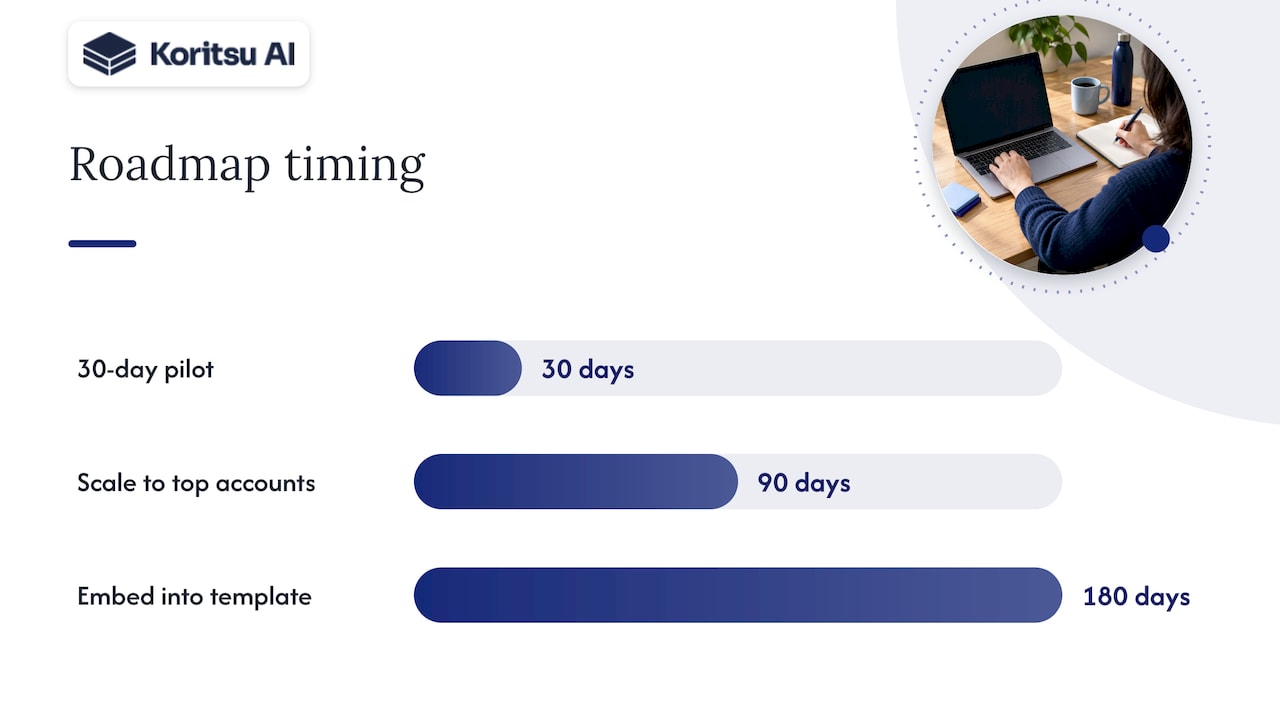
Set guardrails before you flip the switch: a rollback plan, engineering sign-off on which environments are safe to pause, and defined test windows so nobody loses a debugging session mid-afternoon. A reasonable roadmap runs a 30-day pilot on one or two teams, scales to the top-spend accounts by day 90, and embeds scheduling and rightsizing into the standard environment template by day 180. Report non-production spend as a percentage of total cloud spend, the percentage of resources still untagged, and realised savings verified against the invoice, not the estimate.
Technical tactics: how to implement the biggest levers
Scheduling is the easiest win, but the mechanics matter. AWS Instance Scheduler automates tag-driven start and stop for EC2 and RDS using EventBridge and Lambda, and it scales across multiple accounts through a single deployment. The default check runs every five minutes, which is fine for a handful of instances but becomes an unnecessary Lambda cost at scale. AWS's own cost guidance recommends reducing that frequency and grouping targets once you're scheduling hundreds of resources, since invocation count drives the scheduler's own running cost.
For serverless and container-based dev workloads, Cloud Run behaves differently from a VM. Google's configuration guidance recommends setting a maximum instances limit and tuning concurrency so a traffic spike in a staging environment doesn't silently scale into a billing surprise. Fewer instances handling more concurrent requests is usually cheaper, provided the code tolerates parallel execution.
- Rightsizing: audit dev VM families against actual CPU and memory usage, not the size a developer picked two years ago.
- Spot and preemptible capacity: use it for CI runners, batch jobs and anything that can restart cleanly, never for stateful dev databases you can't afford to lose mid-write.
- CI/CD: self-hosted agents retain machine-level caches between runs, which can speed up pipelines, but only when restore time is shorter than the rebuild it replaces, per Azure DevOps caching guidance. Hosted agents trade that speed for less operational overhead.
- Storage: apply lifecycle policies to snapshots and test data, and clean up unattached volumes on a schedule rather than waiting for someone to notice.
Watch for the failure modes: scheduled instances that fail to start because of capacity shortages in a region, spot instances reclaimed mid-build causing CI flakiness, and caches that go stale and quietly slow pipelines instead of speeding them up.
Pro Tip: Benchmark AMD-based VM families against your current Intel instances before switching. Some AMD options run materially cheaper for equivalent dev workloads, but only testing your actual workload confirms it's a fair swap.
Organisational controls: tagging, segmentation and FinOps workflows that make savings stick
A one-off cleanup saves money for a month. The savings that stick come from controls built into how environments get created.
- Prefer separate accounts or subscriptions over tagging alone once dev, test and production spend becomes hard to untangle; FinOps Foundation research on segmentation notes that dedicated accounts turn chargeback into accurate billing rather than a tagging exercise, though it still needs automated onboarding to scale.
- Enforce tagging through policy automation, with clear exception tags for the handful of environments that genuinely need to run continuously.
- Automate workload management: scheduled stop and start, a grace period before shutdown so a developer can finish a task, and a documented exception process for anyone who needs an override.
- Report three numbers regularly: non-production spend as a share of total spend, the percentage of untagged resources, and savings confirmed against the actual bill.
- Bring engineering in early and keep the ask small: a tag on a Terraform module, not a new process to learn.
The FinOps Foundation's guidance on cost-aware product decisions makes the underlying point clearly: involving FinOps at design time, not after deployment, aligns architecture with actual usage and produces savings that last longer than any single cleanup sprint.
Why continuous analysis plus hands-on engineering finds the hidden savings
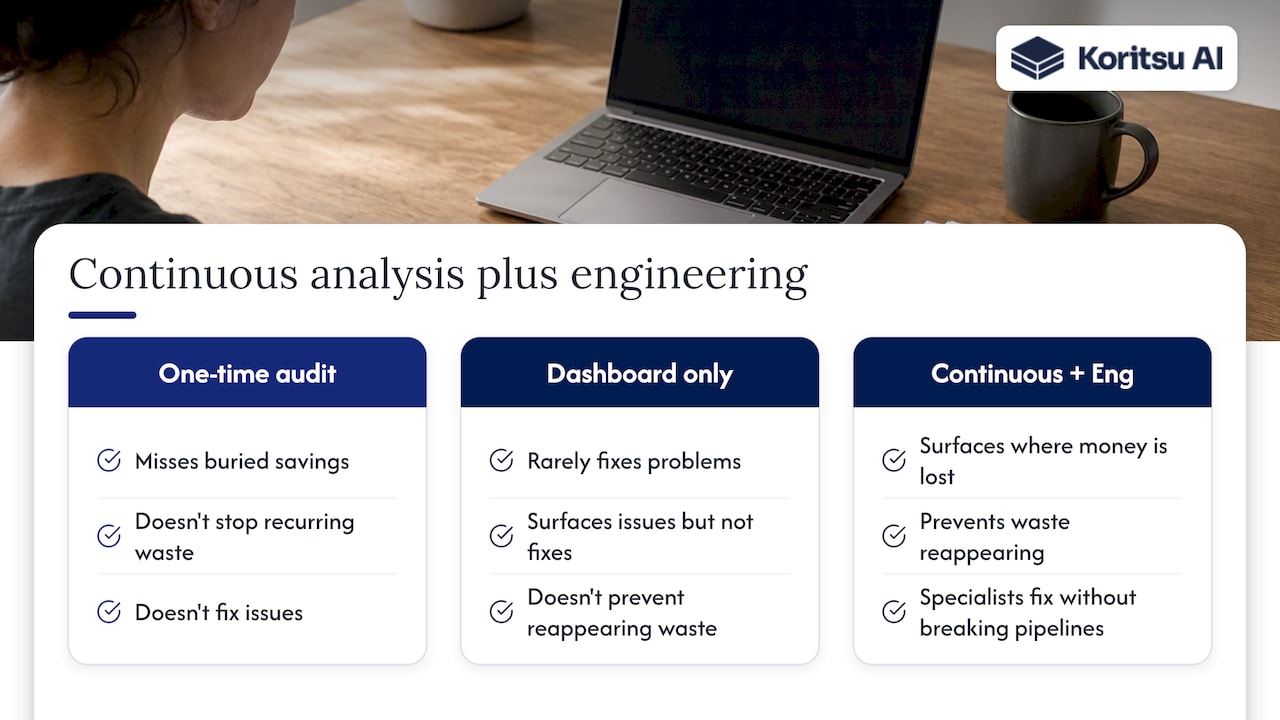
Koritsu exists because the biggest savings opportunities are rarely in the obvious place. They're not in a reserved-instance discount. They're buried in how the software and infrastructure were actually built, which is why a one-time audit tends to miss them and a dashboard alone rarely fixes them.
Our view is that cloud cost is not a technology problem, it's a process problem: the waste reappears every time a new environment gets spun up unless something is watching continuously. That's why an AI platform that continuously analyses spend can surface where money is being lost, while specialists help engineering teams fix it, because surfacing a problem and fixing it without breaking a pipeline are different skills.
How Koritsu can help: free assessment and the Savings Opportunity Report
If your team has the time and the FinOps muscle to run scheduling, rightsizing and CI optimisation in-house, do it. The checklist above is a genuine starting point. If spend has outgrown what one platform team can watch continuously, or you want the savings verified against the bill rather than estimated, that's where Koritsu fits.

- Start with a Savings Opportunity Report, a free assessment that identifies specific, bill-backed savings in your dev, staging and CI spend.
- Engagements run on a success fee: Koritsu takes a share of the savings actually realised, detailed on the pricing page.
- For ongoing monitoring once the initial fixes land, FinOps as a Service offers tiered subscriptions, from lighter monitoring to embedded support.
There's no upfront cost to find out what's there. That alone makes it worth a look before you commit a platform engineer's quarter to building scheduling and rightsizing automation from scratch.
Implementers' runbooks and FinOps guidance
For hands-on implementation, consult AWS Instance Scheduler for scheduling, Cloud Run max instances configuration for serverless limits, Azure Pipelines caching for CI tuning, and the FinOps Foundation for broader cost optimisation practice. Teams also tackling tool sprawl alongside cloud spend may find this tool sprawl reduction playbook useful, and those weighing the cost of always-on monitoring services can compare approaches in this AI monitoring cost analysis.
Sources
FAQ
What's the fastest way to cut dev environment cloud costs?
Scheduling non-production instances to stop outside working hours is usually the fastest win, since it requires no architectural change and can reduce runtime costs significantly for office-hours-only resources, according to AWS Instance Scheduler documentation. Pair it with a rightsizing sweep for the next layer of savings.
Should we use spot or preemptible instances for dev workloads?
Spot and preemptible capacity works well for CI runners, batch jobs and other interruptible workloads, but it's a poor fit for stateful dev databases that can't tolerate an unplanned restart. Treat it as a tool for ephemeral, restartable work rather than a blanket policy.
How do we stop CI caching from slowing down our pipelines?
Caching only helps when restoring the cache is faster than rebuilding dependencies from scratch, a distinction Azure DevOps guidance makes explicitly. Self-hosted agents can retain caches between runs, which often speeds things up, but they need ongoing management to avoid stale or bloated caches.
Is tagging or account segmentation better for cost allocation?
Tagging works for smaller environments, but FinOps Foundation research found that separate accounts or subscriptions per environment turn chargeback into accurate billing rather than a manual tagging exercise as spend grows. Most teams end up using both: segmentation for the major boundaries and tags for the detail within them.
What does Koritsu charge to review our cloud costs?
Koritsu starts with a free Savings Opportunity Report and charges a success fee, a share of the savings actually realised and verified against the bill, with full detail on the pricing page.