FinOps Inform
For Engineers: Cut Redis Costs Up to 60% by Fixing the Data Layer
Engineering first FinOps to cut Redis bills. Shrink the working set, enable tiering, reserve capacity, and track metrics to verify savings.

Start by shrinking your working set and enabling tiered storage. Together, these two levers typically cut Redis spend far more than moving to a cheaper instance family alone. Follow that with right-sizing against reserved or committed capacity, trimming unnecessary replicas and snapshot retention, and a continuous monitoring habit using tools like Redis Flex. Fix the data layer first: infrastructure buys only lock in savings that already exist.
TL;DR:
- Most Redis cost spikes align with configuration changes such as replica adjustments or snapshot schedule modifications, not organic growth.
- Shrinking the working set through key analysis, TTLs, and data structure optimization often yields larger savings than infrastructure discounts.
- Tiered storage and reserved capacity can reduce Redis costs by up to 60%, with tiering cutting RAM needs and reserved nodes offering 30-55% discounts.
- Regularly auditing memory usage, setting appropriate TTLs, and testing tiering on replicas prevent waste and ensure sustained cost efficiency.
- Ongoing monitoring of key metrics like cache hit ratio, memory fragmentation, and network egress supports continuous cost management.
Where the bill comes from: RAM, replication, snapshots, egress and over-provisioning
Most Redis invoices break down into a handful of repeatable line items, and almost every one traces back to a configuration decision rather than genuine demand.
- Memory per node: oversized instances bought to cover peak load rather than typical working set.
- Replica count: each replica doubles (or triples) the RAM bill for the same dataset.
- Snapshot retention: BGSAVE frequency and retention windows quietly accumulate storage costs.
- Cross-AZ egress and private connectivity: traffic between availability zones or through private endpoints adds per-GB charges that rarely show up until the bill lands.
Data model inefficiencies make all of this worse. A fragmented keyspace, oversized string blobs or poor serialisation choices inflate the working set, which then forces a larger node than the actual hot data needs. High mem_fragmentation_ratio readings often masquerade as genuine memory pressure, pushing teams to resize when the real fix is compaction or a MEMORY DOCTOR pass.
A quick correlation check works well here: overlay billing spikes against deployment timestamps, replica count changes and snapshot schedule edits. Most cost surprises line up with one of those three events rather than organic traffic growth.
Shrink the working set: key-level analysis, TTLs, compact data types and compression
The cheapest gigabyte of Redis memory is the one you never allocate. Before touching infrastructure, find out what is actually sitting in RAM and why.
- Sample the keyspace. Use
SCANwithRANDOMKEYsampling orredis-cli --bigkeysto find oversized keys, then cross-reference againstMEMORY USAGEto rank the worst offenders. - Measure hot slices. Track access frequency over a rolling window (Redis
OBJECT FREQunder an LFU eviction policy, or application-level logging) to separate genuinely hot keys from cold ones you are paying to keep warm. - Switch data structures. Small, related fields stored as separate string keys cost far more in overhead than the same fields packed into a hash; avoid large JSON blobs where a compact serialisation format would do.
- Apply TTLs deliberately. Every cache key without an expiry is a long-term lease on RAM. Set TTLs based on actual staleness tolerance, not a default copied from another service.
- Choose an eviction policy that matches the use case.
volatile-lruorallkeys-lfusuit most caching workloads better than the conservative defaults teams often leave in place. - Use negative caching carefully. Caching the absence of a result avoids repeated expensive lookups, but needs a short TTL so it doesn't mask data that has since appeared.
For very small, frequently read datasets, moving the cache into the application process or a language-level local cache removes the network hop entirely and takes pressure off the shared Redis footprint.
Pro Tip: Run a one-week MEMORY USAGE audit on your top 100 keys before any infrastructure change. It usually tells you more than a month of dashboard-watching.
Use platform features and buying levers: tiering, reserved capacity and instance families
Once the data layer is lean, the biggest remaining wins come from how you buy and store memory, not just how much of it you use.
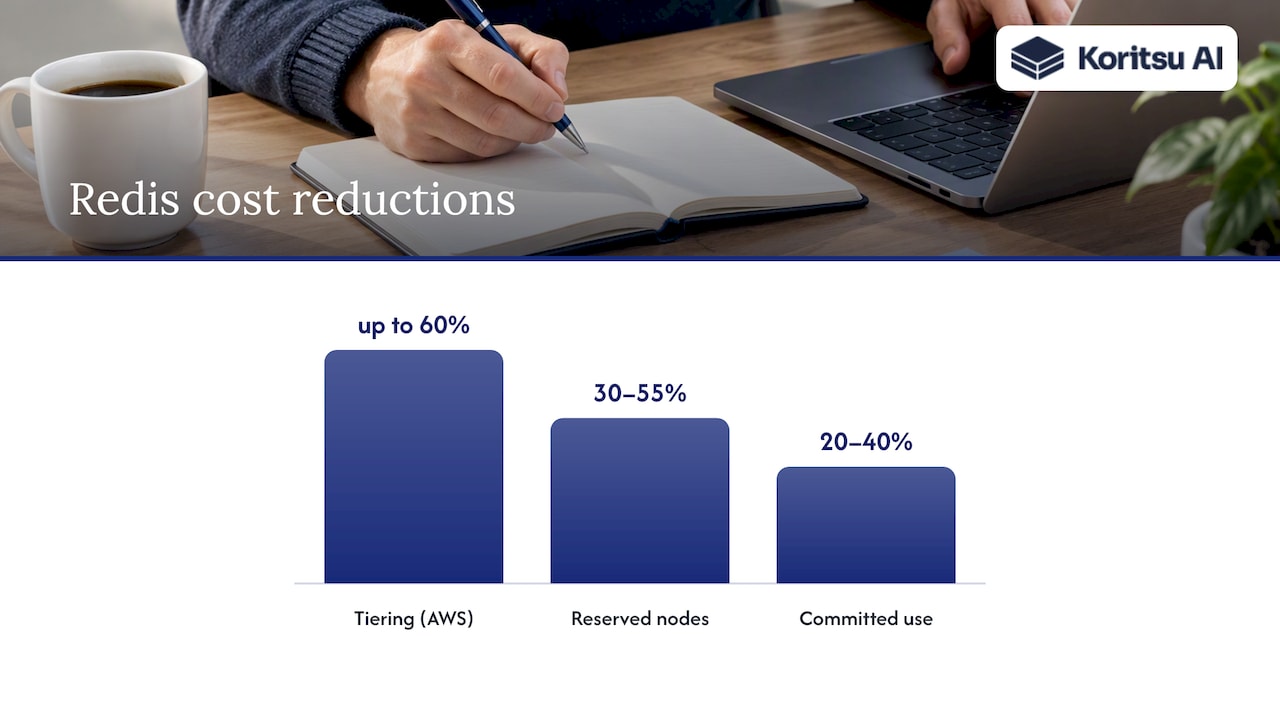
Tiered storage is the standout feature here. Redis Flex keeps a small hot slice in RAM, typically 10% to 50% of the dataset, and places cold keys on SSD while preserving the same Redis API and semantics. Amazon ElastiCache offers an equivalent with data tiering on Graviton-based R6gd nodes, available from Redis 6.2 onwards, which AWS reports can cut costs by up to 60% for suitable workloads where roughly 20% of the dataset is genuinely hot. The trade-off is latency: SSD-backed access runs at roughly 300 to 450 microseconds on average, acceptable for most caching patterns but worth testing against latency-sensitive paths first.
- Reserved nodes on ElastiCache can reduce costs by 30% to 55% against on-demand pricing, with size-flexible options inside a node family so a reservation still applies even as you resize.
- Google Memorystore offers committed use discounts of roughly 20% to 40% across one- or three-year terms, layered on top of its tiered capacity pricing.
- Graviton-based instance families generally improve price-performance over equivalent x86 nodes for the same memory footprint.
Combine tiering and reserved buys for the largest effect: tier first to shrink the RAM you need, then commit to a term on whatever is left.
Right-sizing, sharding and autoscaling patterns that prevent waste
Sizing decisions made once at launch rarely match the workload a year later. A repeatable method beats a one-off guess.
- Calculate working set plus buffer. Take your measured hot-data size, add headroom for BGSAVE (write-heavy clusters can briefly need close to double memory during a snapshot, per ElastiCache sizing guidance), and size to that, not to peak-ever traffic.
- Decide between fewer large nodes or more small ones. More, smaller shards reduce blast radius on failover and ease horizontal scaling, but add per-node overhead; fewer large nodes simplify operations at the cost of a bigger single point of failure.
- Set autoscaling on target tracking, not raw CPU alone: memory utilisation and connection count are usually better triggers for cache workloads, with scheduled scaling for predictable daily or weekly patterns.
- Add throttles to avoid flapping. A cooldown window after each scaling event prevents oscillation when traffic hovers near a threshold.
- Review replica count against actual failover needs. Multi-AZ replication is valuable for availability, but a third or fourth replica kept "just in case" is often pure cost with no measurable resilience gain. Reduce it on lower-tier environments first and measure the impact before touching production.
Architectural patterns that reduce Redis load and memory needs
Some of the largest savings come from calling Redis less often, not from making each call cheaper.
- Read-through and write-through caching keep Redis in sync with the source of truth automatically, reducing manual cache invalidation bugs that otherwise lead to over-caching as a safety net.
- Memoisation of expensive computed values avoids recomputation and keeps the cached payload small and purposeful rather than sprawling.
- Negative caching stops repeated misses from hammering a backend, provided the TTL matches how quickly the underlying data can appear.
- Request coalescing collapses many concurrent requests for the same key into one origin call, cutting both Redis operations and backend load during traffic spikes.
- Stale-while-revalidate serves a slightly outdated value while refreshing it in the background, which smooths load without needing a larger cache tier.
For LLM-backed applications, caching prompts and responses by a normalised key can cut repeat inference calls substantially, since many prompts recur with only minor variation. Deciding whether to cache centrally in Redis or locally in the application process depends on how many instances need the same data: centralise it when sharing matters, keep it local when a single process sees most of the repetition.
Metrics, alerts and a repeatable FinOps lifecycle for Redis
Redis costs drift as workloads change, so a one-time optimisation pass will not hold. A small set of metrics, watched consistently, keeps it under control.
- Hit/miss ratio and eviction rate, to spot an undersized cache before it starts thrashing.
- Memory used versus
maxmemory, and fragmentation ratio, to catch false memory pressure early. - Snapshot storage growth and cross-AZ network egress, the two hidden-cost categories that most often explain a surprise invoice.
- Per-shard utilisation, to find imbalance before it forces an unnecessary scale-up.
Map these metrics to owning teams or features wherever your allocation model allows it. Chargeback by service turns "Redis is expensive" into "this feature's cache footprint tripled last month", which is a much easier conversation to act on.
Pro Tip: Review reserved or committed capacity quarterly, not annually. Workloads shift faster than most procurement cycles assume.
A quarterly cadence works well: review utilisation, decide whether to commit further capacity, and measure realised savings against the previous quarter's bill rather than against a theoretical baseline.
Koritsu's approach: continuous AI analysis plus hands-on engineering to capture Redis savings
We combine an AI platform that continuously analyses cloud spending with hands-on expert advice, helping engineering teams reduce cloud costs. For Redis workloads specifically, the quick wins we find most often are the same ones outlined above: hot-slice identification paired with tiered storage, reserved-capacity right-sizing once the working set is known, and snapshot or replica policy changes that were never revisited after launch.
Our report typically surfaces these findings early, giving engineering leaders a concrete, prioritised list rather than a generic audit. We only take a share of the savings we verify, so the incentive stays aligned with results rather than hours billed.
A short ordered checklist engineers can execute in the next week
- Run a two-hour audit: capture current working set size, top memory-consuming keys, recent snapshot costs and cross-AZ egress spend.
- Apply safe TTLs to any key without an expiry, starting with the largest and least-frequently-accessed.
- Test data tiering on a replica before touching production, and measure tail latency under realistic load.
- Run a reserved-instance cost model against your trailing three months of usage.
- Bring billing data and topology to an expert review if the numbers still do not add up.
Best practices for cost-effective backup and disaster recovery strategies
Backup strategy is one of the most overlooked cost levers in Redis operations, partly because snapshot costs accumulate slowly and rarely trigger an alert.
Start with retention: most teams keep far more BGSAVE snapshots than their recovery point objective actually requires. A daily snapshot with a seven-day retention window covers the overwhelming majority of recovery scenarios; anything longer belongs in cheaper cold storage rather than the primary snapshot tier.
Snapshot frequency itself has a memory cost, not just a storage one: BGSAVE on a write-heavy cluster can briefly require close to double the node's working memory, so frequent snapshots on undersized nodes risk both performance degradation and unplanned scaling. Spacing snapshots further apart, or shifting them to off-peak windows, avoids both.
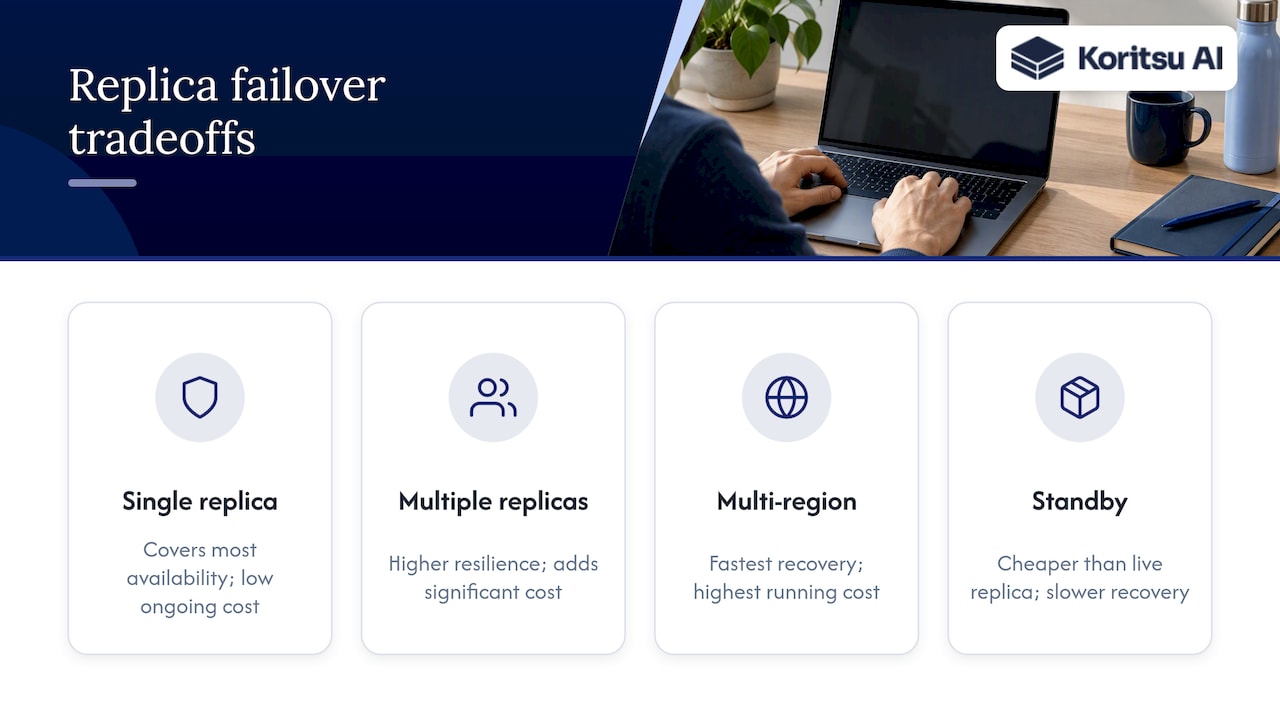
For disaster recovery, replica count should match genuine failover requirements rather than habit. A single cross-AZ replica covers most availability needs; a second or third adds cost without a proportional resilience gain unless your recovery time objective demands near-instant multi-region failover. Where multi-region recovery is genuinely required, consider whether a cheaper, periodically-synced standby meets the requirement instead of a fully live replica set running around the clock.
Test restores periodically. A backup strategy that has never been restored from is a cost with no verified benefit.
Author perspective: trade-offs between cost, latency and operational complexity
Fix the data layer first. Tiering and reserved purchases amplify savings that already exist; they don't create savings on their own, and buying cheaper infrastructure around an inefficient keyspace just locks in the waste at a lower price. Latency-sensitive workloads deserve genuine caution: test tiering and eviction changes on a replica before production, and measure tail latency, not just averages. The teams that keep costs down long-term are the ones that treat this as a continuous, measured habit rather than a single clean-up.
Koritsu offer: free Redis cost assessment and success-fee optimisation
We start every engagement with a free assessment that becomes your Savings Opportunity Report, identifying where your Redis spend and broader cloud footprint are carrying unnecessary cost.

There's no upfront cost: we take a share only of the savings we verify against your actual bill, detailed on our pricing page. From there, teams can move onto an ongoing FinOps as a Service plan for continued monitoring and support.
FAQ
Is Redis expensive to use?
Redis itself is open source and free to run, but managed hosting, replication and over-provisioned memory can make the operating cost significant for large datasets. Costs concentrate in RAM, replica count and snapshot retention rather than the software licence, which is why data-layer optimisation and tiered storage, as offered through Redis Flex, tend to deliver the largest reductions.
Is Redis end of life?
Redis remains an actively maintained, widely used project with ongoing releases and vendor support across major cloud platforms. There is no indication of the core project reaching end of life; organisations should instead track the lifecycle of their specific managed service version.
Is Redis free for commercial use?
Redis's open source core can be used commercially under its licensing terms, while managed offerings such as Redis Cloud or cloud provider services charge for hosting, support and additional features. Pricing for managed tiers varies by plan, as shown on the Redis pricing page.
Does Netflix use Redis?
Public information on which specific caching technologies individual companies use at any given time is not something we can confirm from available sourcing. What is well documented is that in-memory caching layers like Redis are common at large-scale streaming and technology companies for session storage, rate limiting and request caching.