FinOps Inform
Engineers: Show Bill Savings with 6 Serverless Cost Optimizations
Engineering FinOps playbook for serverless cost optimization. Six high-impact, bill verifiable fixes you can measure in days and automate.

You can typically cut the compute portion of a serverless bill by making three changes: tuning memory allocation, batching invocations instead of firing one function per event, and moving hot functions to ARM. Each change is measurable within days, not months. The trade-off is engineering time against latency risk, so treat this as a lifecycle: optimise, measure the actual bill, then repeat.
TL;DR:
- Optimizing serverless costs requires focusing on high-impact areas like memory tuning, batching, and migrating hot functions to ARM, which can yield measurable savings within days.
- The main drivers of bills include invocation counts, duration and memory, API gateway requests, data transfer, downstream services, and logging, all of which should be monitored and optimized.
- Cost-effective capacity planning depends on workload patterns, with spiky traffic favoring consumption plans and steady high traffic benefiting from reserved or premium capacity.
- Measuring actual costs involves tracking key metrics like invocation volume, duration percentiles, GB-seconds, and gateway requests, paired with automated benchmarking and thresholds.
- Real savings often lie in architectural and operational decisions, such as query patterns, legacy settings, and default log retention, which require ongoing process and engineering judgment beyond surface-level fixes.
What actually drives a serverless bill
Serverless pricing looks simple until you open the invoice. Most bills are made up of several line items stacked on top of each other, and teams usually optimise the one they understand best while ignoring the rest.
The core components are:
- Invocations: a flat charge per function call, regardless of what the function does.
- Duration and memory (GB-seconds): how long the function runs multiplied by how much memory you allocated to it.
- API gateway requests: a separate charge for every request that hits your gateway before it even reaches the function.
- Data transfer: moving data out of the region or across services costs money that never shows up in a function's own metrics.
- Downstream services: database read/write capacity units, storage retrieval and third-party API calls triggered by the function.
- Logging and retention: ingestion and storage of logs, often billed separately from compute entirely.
A function allocated 1,024MB that runs for 500 milliseconds consumes 0.5 GB-seconds per call. At scale, that number compounds fast, and it compounds faster when hidden patterns creep in, such as downloading entire objects from storage when only a fragment is needed, or a retry policy that silently triples your invocation count during a downstream outage.
High-impact optimisation techniques engineers should try first
Not every fix carries the same weight. Some changes shave a few percent off the bill; others cut a category of spend in half. Start with the highest-leverage items.
- Right-size memory and CPU together. In many providers, CPU allocation scales with memory, so a CPU-bound function can run faster, and cost less overall, at a higher memory setting. Benchmark this with a power-tuning approach rather than guessing, and wire the sweep into your CI/CD pipeline so it reruns whenever the function's logic changes materially.
- Batch and go async wherever the workflow allows it. Replacing one invocation per event with batched processing through a queue or stream can reduce invocation counts by a large factor, since practitioner examples show batching cuts invocation costs by orders of magnitude when events are grouped rather than processed individually.
- Switch your gateway where you can. HTTP APIs are typically cheaper than REST APIs for the same traffic, and internal-only traffic often does not need a gateway at all: a direct function URL removes that charge entirely.
- Migrate CPU-bound, high-invocation functions to ARM. Prioritise the functions with the highest invocation volume first, since that is where a per-invocation saving compounds fastest.
- Reserve provisioned concurrency for latency-sensitive public endpoints only. A pragmatic pattern is to provision to median (P50) traffic and let bursts scale on demand, rather than provisioning for peak and paying for idle warm instances around the clock.
- Cut data movement at the source. Use selective retrieval, such as S3 Select, instead of downloading full objects, and keep processing in the same region as your data to avoid transfer charges.
Pro Tip: Run the memory sweep and the ARM migration together: since both change duration, testing them separately wastes a benchmarking cycle you only need to run once.
Operational practices and the optimisation lifecycle
Cost optimisation is not a project you finish. The AWS Well-Architected Serverless Applications Lens frames it as four ongoing practices: choosing cost-effective resources, matching supply to demand, staying aware of spend, and optimising continuously, and that framing holds regardless of provider.
Build the following into your process rather than treating them as one-off audits:
- Estimate cost at design time, comparing a synchronous call pattern against an async one before you build either.
- Automate benchmarking, integrating power-tuning-style tests into your CI pipeline so memory drift gets caught before it ships.
- Set monitoring thresholds on duration, invocation volume and unit cost, not just on errors.
- Write runbooks and assign ownership, so engineering and FinOps both know who acts when a cost anomaly fires.
- Decide platform versus code changes deliberately: a capacity change, such as moving to a premium plan, solves a different problem than a code fix does, and the two are not interchangeable.
Choosing hosting plans and capacity models
Pay-per-use billing rewards spiky, unpredictable traffic. It punishes workloads that run almost continuously, because every invocation and every GB-second is charged individually with no volume discount built in.
Azure's Premium and Dedicated plans illustrate the alternative: you pay for allocated capacity rather than per execution, which becomes cheaper once your workload approaches near-continuous or stable high concurrency. Below that threshold, consumption-based billing usually wins, since you are paying for idle capacity you do not need.
To find your break-even point, estimate what your current consumption-plan bill would cost at your busiest sustained hour, then compare that against the flat cost of reserved or premium capacity for the same period. A few workload attributes should guide the decision:
- Traffic shape: spiky and unpredictable favours consumption; flat and continuous favours premium.
- Latency sensitivity: cold-start-intolerant endpoints often justify premium regardless of traffic shape.
- Concurrency ceiling: consumption plans can hit scaling limits that premium plans avoid.
Observability and metrics you need to trust the numbers
You cannot optimise what you cannot measure on the actual invoice, and runtime dashboards alone will not tell you that.
- Track the runtime metrics that predict cost: invocation count, P50/P95/P99 duration, GB-seconds consumed, gateway request volume and downstream database capacity units.
- Pair billing exports with runtime telemetry. Cost Explorer or an equivalent billing export gives you the ground truth; CloudWatch or Azure Monitor gives you the near-real-time signal that predicts where that truth is heading.
- Build a unit-cost metric, such as cost per successful transaction, by dividing a period's billed spend for a service by its successful transaction count over the same period.
- Alert on three conditions: a duration spike on a function that previously ran consistently, an invocation surge with no matching traffic increase, and cost growth that outpaces your usage growth.
Cutting cold start costs beyond provisioned concurrency
Provisioned concurrency solves cold starts by paying for constant warmth, but it is not the only lever, and it is often the most expensive one.
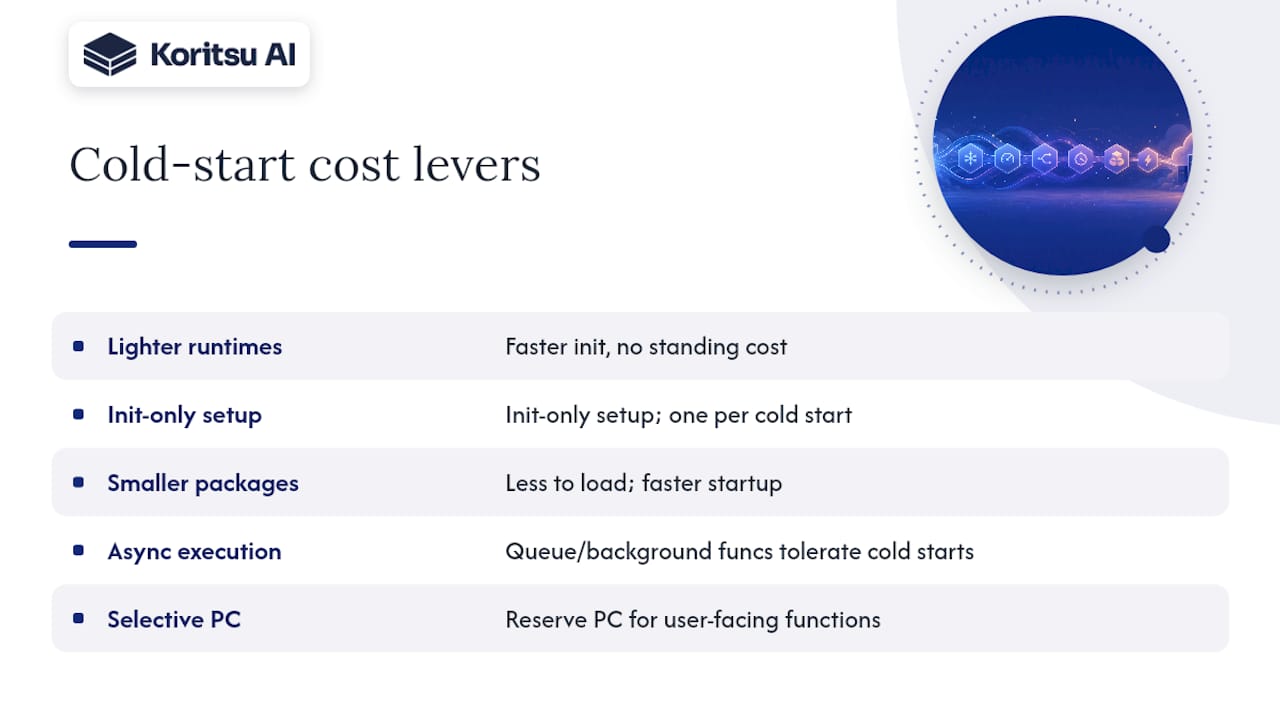
Lighter runtimes start faster by nature. A function written in a compiled or lightweight interpreted language typically initialises quicker than one running on a heavier managed runtime, which shortens the cold-start window without any standing cost. If you control the runtime choice for a new function, that decision alone can remove the need for provisioned concurrency altogether.
Lifecycle hooks and initialisation tricks help too. Moving expensive setup work, such as opening database connections or loading large dependencies, outside the main handler and into initialisation code means that work only happens once per cold start rather than on every warm invocation, which keeps your steady-state duration low even if the first call is slow.
Smaller deployment packages start faster because there is less to load before execution begins. Trimming unused dependencies, avoiding oversized libraries, and packaging only what a function actually needs all shrink that initialisation window.
Finally, consider whether the function needs to be synchronous at all. A cold start on a background, queue-triggered function rarely matters to a user; a cold start on a customer-facing API call does. Spend your cold-start budget, whether that is provisioned concurrency, a lighter runtime or a smaller package, on the functions where the delay is actually felt.
Using third-party and managed services without inflating your bill
Every managed service you plug into a serverless function brings its own billing model, and that model rarely lines up neatly with your function's invocation pattern.
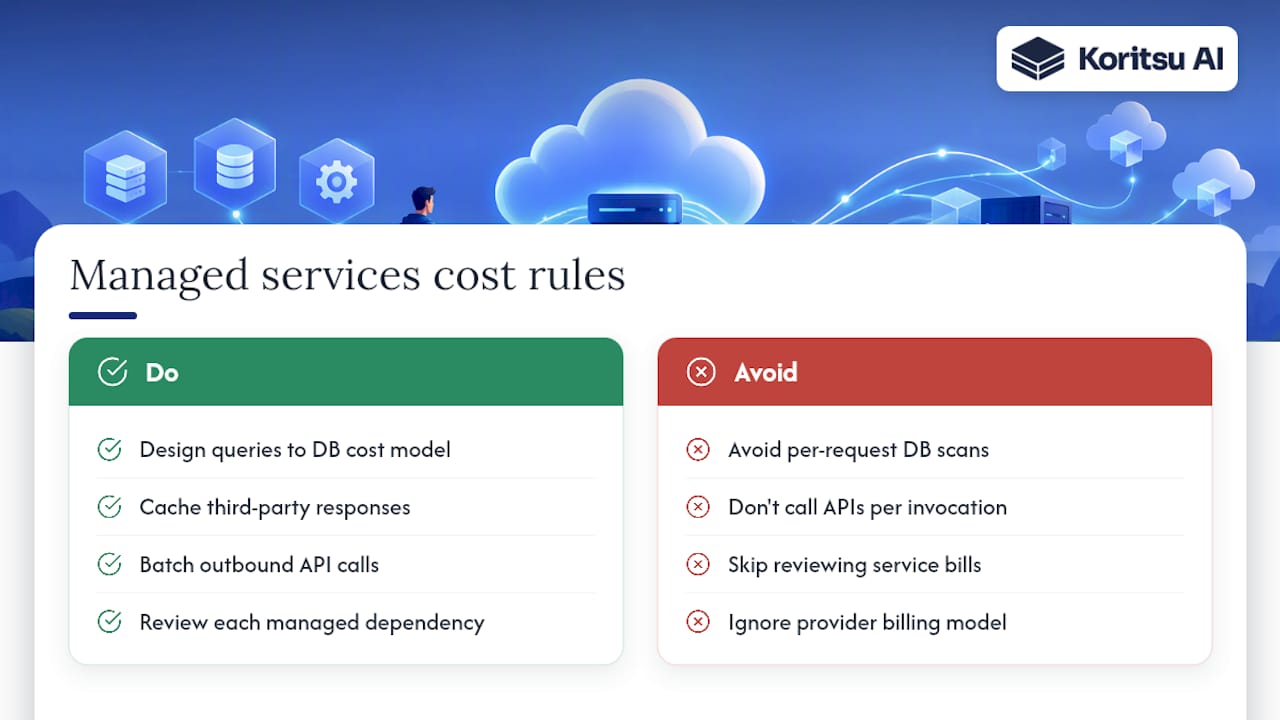
Database capacity is the most common trap. A function that reads and writes to a managed database on a per-request-unit basis can rack up charges that dwarf the compute cost of the function itself, particularly if the access pattern involves scans rather than targeted lookups. Design queries around the database's own cost model, not just around what is convenient to write.
Third-party APIs called from within a function add both latency and cost that you do not control. Cache responses where the data allows it, and batch outbound calls where the provider supports it, rather than calling out once per invocation.
Managed queues and event buses charge per message or per request, which usually makes them cheaper than the invocation reduction they enable. The net effect of routing events through a queue is almost always a lower total bill than firing a function directly per event, even after the queue's own charges are added.
Treat every managed dependency as a line item worth reviewing on its own, separate from the function that calls it. A cost review that only looks at compute will miss where a meaningful share of the spend is actually going.
Automating cost alerts and enforcing budgets
Manual bill reviews catch problems weeks after they started. Serverless spend can spike within hours, so alerting needs to work on the same timescale.
Set budget thresholds at the service or function level, not just at the account level, so a runaway function shows up before it drags the whole account over budget. Most cloud providers support budget alerts tied to forecasted spend, which catches a trend before it becomes an overspend rather than after.
Tie alerts to the unit-cost metrics described earlier rather than to raw spend alone. A rising bill that matches rising successful traffic is healthy; a rising bill with flat or falling traffic is the anomaly worth paging someone for.
Where the platform supports it, enforce hard limits, such as concurrency caps or budget-triggered automation that disables a misbehaving function, rather than relying on someone reading an alert in time. A soft alert that nobody actions overnight is the same as no alert at all.
Cost trade-offs across providers and multi-cloud strategies
Serverless pricing structures differ enough between providers that a workload's ideal home can change depending on its shape.
Consumption-based pricing exists across the major providers, but the specifics diverge: how memory maps to CPU, how gateway requests are priced, and where premium or dedicated capacity plans kick in all vary by vendor. A function that is cheap on one provider is not automatically cheap on another once you account for its actual traffic pattern.
Multi-cloud serverless strategies add a genuine cost lever, choosing the cheapest provider per workload, but they also add data transfer charges between clouds, duplicated tooling, and the engineering overhead of maintaining deployment pipelines for more than one platform. That overhead is real money, even though it never appears on a cloud bill.
For most teams, the practical approach is to pick a primary provider and optimise deeply within it, then consider a second provider only for a specific workload with a specific cost or resilience justification, rather than running multi-cloud as a default strategy.
Avoiding surprise charges from logging and monitoring
Logging is one of the easiest places for a serverless bill to grow without anyone noticing, because the charge sits on ingestion and storage rather than on compute.
Set log retention periods deliberately rather than accepting a provider's default, and route verbose debug logging so it only fires in non-production environments. Structured, leveled logging, where you can turn verbosity up or down without a redeploy, keeps ingestion volume proportional to what you actually need rather than to what a function happens to print.
Sample high-volume logs rather than capturing every line at full traffic, particularly for functions that run thousands of times per minute. Full-fidelity logging on a low-traffic function costs little; the same approach on a high-traffic function can become one of the largest line items on the bill.
Review log group sizes and retention settings on the same cadence you review compute spend. A systematic literature review identifies packaging and execution parameters as measurable levers on serverless cost effectiveness, and logging configuration belongs on that same checklist even though it rarely gets the same attention as memory or invocation tuning.
Why most teams stop at the easy fixes
The uncomfortable truth about serverless cost optimisation is that the biggest savings rarely sit where engineers look first. Memory tuning and ARM migration get attention because they are visible in a function's own configuration screen. The larger inefficiencies, a database access pattern that generates ten times the necessary read capacity, a retry policy that triples invocation count during a partial outage, a logging default nobody has revisited since launch, live in the gaps between services where no single team feels fully responsible.
Cloud cost is not a technology problem, it is a process problem. Tools will flag a function running with too much memory allocated. They will not tell you that the function only exists because of an architectural decision made two years ago that nobody has revisited since. That gap between what a dashboard can see and what actually needs fixing is where most unclaimed savings sit, and closing it takes engineering judgement, not another chart.
Getting hands-on help from Koritsu
Koritsu finds the inefficiencies described above by combining an AI platform that continuously analyses your cloud spending with specialists who act on what it finds. Our AI agent, Kori, surfaces where money is being lost across your infrastructure, and our engineers work with your team to fix it.

You start with a free assessment, and we only take a share of the savings we actually deliver, verified against your own bill. From there, teams typically move onto ongoing support.
- Savings Opportunity Report: a quantified discovery of where your bill can shrink, available through our savings report.
- FinOps as a Service: ongoing monitoring and expert support across Monitor, Advisor, Embedded and Premium tiers, detailed on our FinOps as a Service page.
- Success fee model: no upfront cost, explained on our pricing page.
Sources
- Cost optimization pillar - Serverless Applications Lens
- Azure Functions Premium plan
- A survey of research studies related to the cost-effectiveness of serverless approach (systematic literature review)
- Serverless architecture cost optimization strategies
FAQ
Is serverless always cheaper than running your own servers?
Not always. It depends heavily on traffic shape and consistency, and a systematic literature review identifies 17 parameters, including memory allocation, execution time and concurrency, that determine whether serverless is the cost-effective choice for a given workload.
When should I use provisioned concurrency?
Reserve it for latency-sensitive, customer-facing endpoints where a cold start is felt directly by a user. For background or queue-triggered work, provisioned concurrency is usually a persistent cost with low return, according to AWS pricing guidance.
Does migrating to ARM actually save money?
It can, particularly for CPU-bound, high-invocation functions, since ARM-based instances often run the same workload for a lower per-invocation cost. Prioritise your highest-volume functions first, since that is where the saving compounds fastest.
What is the fastest way to start optimising serverless costs?
Run a memory-tuning benchmark on your highest-invocation functions and check whether batching can reduce your invocation count, since practitioner examples show batching can cut invocation costs by orders of magnitude. Measure the result against your actual bill before moving to the next change.
How does Koritsu help with serverless cost optimisation?
Koritsu pairs its AI agent, Kori, which continuously analyses cloud spending, with hands-on engineering support to find and fix inefficiencies beyond simple discount strategies. Engagements start with a free assessment, and Koritsu is paid as a share of the savings it actually delivers.