FinOps Inform · Cloud Compute
Spot instance cloud computing: a guide for architects
Discover what spot instance cloud computing is and how it can help architects reduce costs by up to 90%. Unlock savings now!

Spot instance cloud computing is defined as a pricing model that grants access to spare, interruptible virtual compute capacity at 60–90% below on-demand prices. The industry terms you will encounter across providers are AWS EC2 Spot Instances, Google Cloud Spot VMs, and Azure Spot VMs. All three follow the same core principle: the provider sells unused capacity at a steep discount, but reclaims it when demand rises. For cloud architects managing cost at scale, this is not a minor discount mechanism. It is a structural way to reduce compute spend, provided your workloads are built to tolerate interruption.
What is spot instance cloud computing and how does it work?
A spot instance is not a separate instance type. It is a pricing option on standard EC2 and equivalent virtual machines that grants access to spare capacity within a provider's data centres. When that capacity is needed for on-demand or reserved customers, the provider reclaims it.
Pricing is set dynamically by the provider based on supply and demand within each capacity pool. Each pool is defined by instance type, availability zone, and operating system. AWS no longer uses a bidding model. Instead, it sets a market price that fluctuates with supply and demand per pool, meaning your cost can shift between sessions but is generally stable within a session.

The interruption mechanism is what separates spot from every other instance type. On AWS, you receive a 2-minute interruption notice before the instance is reclaimed. This notice arrives via the instance metadata service and can be consumed by AWS EventBridge to trigger automated shutdown logic. Google Cloud Spot VMs and Azure Spot VMs offer comparable signals, though the exact timing and delivery mechanisms differ.
Key operational facts about spot instance behaviour:
- Spot capacity is not guaranteed at launch or during a running session.
- Interruption frequency varies by instance family, region, and time of day.
- AWS also publishes rebalance recommendations before the final 2-minute notice, giving you an earlier signal to act.
- Pricing history is publicly available per pool, which helps you select lower-interruption-risk instance types.
- Spot instances run on identical hardware to on-demand instances in the same pool.
Pro Tip: Select instance types with historically low interruption rates using the AWS Spot Instance Advisor. Diversifying across multiple instance families and availability zones further reduces the probability of simultaneous interruptions across your fleet.
Spot instance vs on-demand: benefits and limitations
The core trade-off is straightforward. Spot instances deliver 60–90% cost savings but carry no uptime SLA and no capacity guarantee. On-demand instances cost more but are available on request and will not be reclaimed mid-workload. That gap in cost is significant enough to change the economics of large-scale compute entirely.
For a team running 1,000 vCPUs of batch processing continuously, the difference between on-demand and spot pricing can represent hundreds of thousands of pounds annually. That is not a rounding error in a cloud budget. It is a structural cost decision that belongs in your architecture review, not your finance reconciliation.
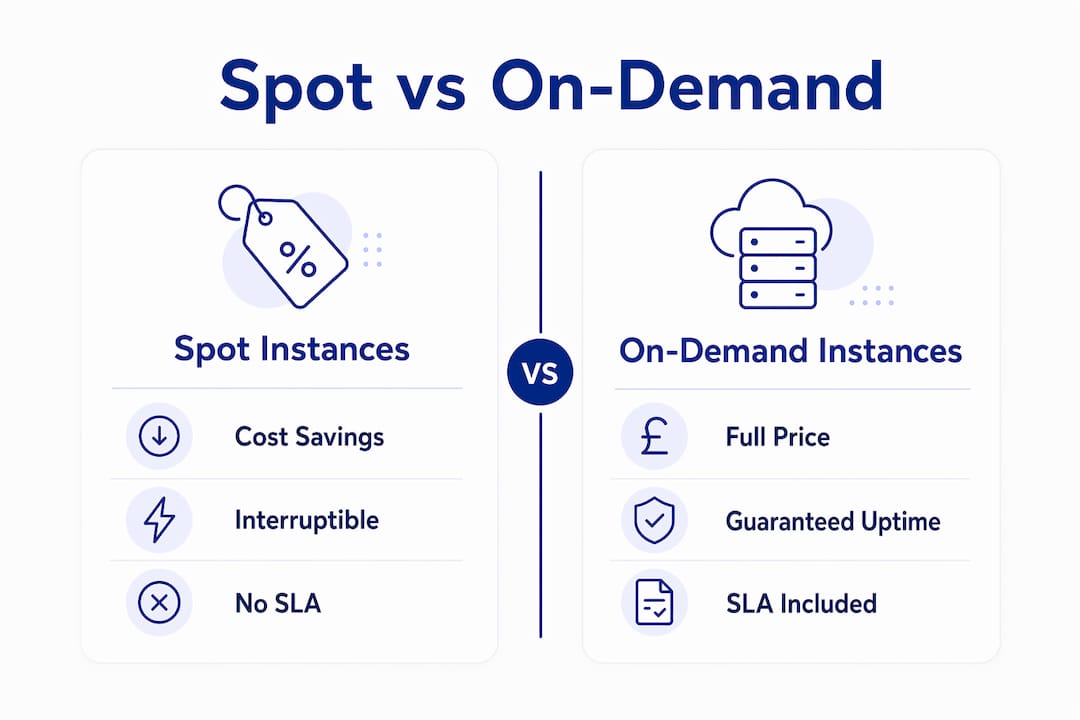
The limitation is equally structural. Spot instances are best suited for fault-tolerant, stateless workloads that can handle interruption without data loss or service degradation. If your workload requires persistent state on local disk, guaranteed uptime, or uninterrupted long-running processes, spot is the wrong tool without significant re-architecture.
| Attribute | Spot instances | On-demand instances |
|---|---|---|
| Cost | 60–90% below on-demand | Full list price |
| Capacity guarantee | None | Yes, subject to limits |
| Uptime SLA | None | Provider SLA applies |
| Interruption risk | Yes, with 2-minute notice | None |
| Best workload fit | Batch, stateless, fault-tolerant | Latency-sensitive, stateful |
| Billing granularity | Per second (AWS) | Per second (AWS) |
The absence of an SLA does not make spot instances unreliable for the right workloads. It means reliability must be engineered into the application layer rather than assumed from the infrastructure layer. That distinction matters enormously when you are advising engineering teams on where spot fits in a production architecture.
How to architect applications for spot instances
Designing for spot interruption is not optional. It is the entire discipline. The best practice requires checkpointing, automated rescheduling, and external state storage to handle interruptions without losing work. Here is how to approach it systematically.
-
Externalise all state immediately. Local instance storage is lost on interruption. Write checkpoints to Amazon S3, Google Cloud Storage, or Azure Blob Storage at regular intervals. For queue-based workloads, use SQS, Pub/Sub, or Service Bus so that incomplete tasks are requeued automatically.
-
Consume interruption signals proactively. Poll the instance metadata endpoint every 5 seconds to detect the 2-minute notice. Wire this into your shutdown logic to drain connections, deregister from load balancers, and flush in-flight state before termination. AWS EventBridge can route these signals to Lambda functions or Step Functions for fully automated responses.
-
Use rebalance recommendations as an early warning. AWS rebalance recommendations arrive before the final interruption notice, giving you additional time to migrate workloads proactively. Integrating this signal into your fleet manager means you can replace capacity before it is forcibly reclaimed.
-
Mix spot with on-demand in autoscaling fleets. Production-grade spot usage involves fleet management tools that automatically replace interrupted spot capacity. AWS EC2 Auto Scaling groups, EKS managed node groups, and Karpenter all support mixed instance policies that maintain a baseline of on-demand capacity while filling the remainder with spot.
-
Diversify instance types and availability zones. A fleet locked to a single instance type in a single zone is exposed to correlated interruptions. Spreading across m5.xlarge, m5a.xlarge, m4.xlarge, and equivalent types across three availability zones dramatically reduces the probability of fleet-wide disruption.
Pro Tip: Never rely on local NVMe or ephemeral disk for anything you cannot afford to lose. Even if your application does not explicitly write to local disk, check whether your runtime, logging agent, or container runtime does. This is one of the most common causes of data loss in spot deployments.
Understanding cloud API cost mistakes that compound spot instance expenses is equally worth your attention, particularly around over-provisioned fleet sizes and redundant data transfer costs.
Which workloads are best suited for spot instances?
The defining criterion for spot suitability is interruption tolerance. A workload is spot-compatible when an interruption causes a delay, not a failure. That covers a wide range of common cloud workloads.
- Batch processing. Data transformation pipelines, ETL jobs, and report generation are natural fits. Each job unit is discrete, checkpointable, and retriable. Interrupting a batch job mid-run costs you the work since the last checkpoint, not the entire pipeline.
- CI/CD pipelines. Build and test runners are stateless by design. A failed build job is simply retried. Teams using GitHub Actions, GitLab CI, or Jenkins with spot-backed runners routinely cut compute costs by 70% or more on their build infrastructure.
- Machine learning training. Distributed training jobs on frameworks like PyTorch and TensorFlow support checkpoint-and-resume natively. Running training on spot instances across AWS p3 or g4 families can reduce GPU compute costs substantially on long training runs.
- Big data analytics. Apache Spark and Apache Flink on EMR or Dataproc are designed for distributed, fault-tolerant execution. Spot instances are the default recommendation for worker nodes in these frameworks.
- Rendering and simulation. Visual effects rendering, finite element analysis, and Monte Carlo simulations are embarrassingly parallel and trivially restartable, making them ideal candidates.
The workloads that do not belong on spot without significant re-architecture include primary database instances, real-time API backends without redundancy, and any process holding distributed locks or coordinating stateful transactions. The cloud total cost of ownership calculation changes materially when you correctly segment workloads between spot and on-demand rather than defaulting everything to on-demand.
Key takeaways
Spot instances deliver the largest available discount in cloud computing, but only for teams who engineer interruption tolerance into their workloads from the start.
| Point | Details |
|---|---|
| Cost savings potential | Spot instances offer 60–90% savings versus on-demand, making them the highest-leverage pricing option available. |
| Interruption handling | A 2-minute termination notice requires automated checkpointing and draining logic wired into your shutdown process. |
| Workload selection | Batch jobs, CI/CD runners, ML training, and big data analytics are the strongest candidates for spot usage. |
| Architecture requirement | Externalise all state to durable storage such as S3 or SQS; never rely on local instance disk for persistent data. |
| Fleet design | Mix spot with on-demand in autoscaling groups and diversify across instance types and availability zones to reduce correlated interruption risk. |
Why spot instances reward architects who think in systems
Working with spot instances across dozens of cloud environments, the pattern I see most often is not a technology failure. It is a design assumption failure. Teams adopt spot for the cost savings, skip the interruption-handling work, and then abandon it after the first production incident. The savings are real. The discipline required to capture them is equally real.
The most durable spot deployments I have seen share one characteristic: they treat interruption as a normal operating condition, not an edge case. Checkpointing is not bolted on after the fact. It is part of the initial design. Shutdown hooks are tested in staging. Fleet managers are configured before the first spot instance launches, not after the first interruption.
The tooling ecosystem has matured considerably. Karpenter on Kubernetes, EC2 Fleet with mixed policies, and managed node groups on EKS all make spot integration far less bespoke than it was three years ago. The enterprise automation patterns that underpin reliable spot usage, particularly around event-driven lifecycle management, are now well-documented and reusable.
Where I see teams leave money on the table is in the monitoring layer. Interruption rates, spot savings versus on-demand baseline, and fleet composition over time are metrics that belong in your cost dashboard alongside CPU utilisation and memory. Without visibility, you cannot tune. And without tuning, you are guessing at whether your spot strategy is actually delivering the savings you expect.
The cost problem in cloud is almost never about the list price. It is about how infrastructure is built and operated. Spot instances are one of the clearest examples of that principle. The discount is available to everyone. Capturing it consistently requires engineering.
How Koritsu AI helps you capture spot savings consistently
Most teams know spot instances exist. Fewer have the visibility to know whether their current spot strategy is actually working. Koritsu AI continuously analyses your cloud spend across AWS, Google Cloud, and Azure, surfacing exactly where spot adoption is underperforming and where workloads are still running on on-demand unnecessarily. A UK bidding platform achieved a 52% reduction in cloud costs working with Koritsu AI, with spot instance optimisation forming a core part of that result. The assessment is free, and Koritsu AI only charges on savings actually delivered. Start your free assessment and find out what your current architecture is leaving on the table.
FAQ
What is a spot instance in cloud computing?
A spot instance is a discounted, interruptible virtual machine that uses spare capacity from a cloud provider such as AWS, Google Cloud, or Azure. Discounts typically reach 60–90% below on-demand pricing, with the trade-off that the provider can reclaim the instance with a short warning notice.
How much notice do you get before a spot instance is interrupted?
AWS provides a 2-minute interruption notice via the instance metadata service and AWS EventBridge. Google Cloud Spot VMs and Azure Spot VMs offer comparable signals, though the exact delivery mechanism varies by provider.
What workloads should not run on spot instances?
Stateful workloads without external checkpointing, primary database instances, and latency-sensitive APIs without redundancy are poor candidates for spot. Any process that cannot tolerate a sudden termination without data loss or service failure requires on-demand or reserved capacity instead.
How do you prevent data loss on spot instances?
Externalise all critical state to durable storage such as Amazon S3, SQS, or equivalent services before an interruption occurs. Poll the instance metadata endpoint every 5 seconds to detect the 2-minute notice and trigger graceful shutdown logic automatically.
What is the difference between spot and on-demand instances?
On-demand instances are available on request with a provider SLA and no interruption risk, billed at full list price. Spot instances access the same hardware at a steep discount but carry no capacity guarantee and can be reclaimed by the provider when demand rises.