FinOps Inform · Cost Optimisation
What is cloud capacity reservation: a 2026 guide
Discover what is cloud capacity reservation and how it secures essential compute resources for your workloads. Learn more in our 2026 guide!

Cloud capacity reservation is a paid guarantee that a cloud provider will hold a defined quantity of compute resources in a specific region or availability zone for your exclusive use. It is an operational mechanism, not a financial discount programme. Where reserved instances and committed-use discounts reduce what you pay per compute hour, a capacity reservation ensures the physical resources are actually there when you need them. For cloud architects managing critical workloads on AWS, Google Cloud, or Azure, that distinction matters enormously. FinOps teams increasingly treat capacity reservations as a core pillar of cloud capacity management alongside rightsizing and committed discounts.
What is cloud capacity reservation and how does it work?
A capacity reservation is a paid operational guarantee that compute resources will be available in a chosen region or zone for a defined period. The cloud provider sets aside physical hardware matching your specification. You pay the reservation fee whether or not you run instances against it.
The workflow follows a clear sequence:
- Define the resource specification. Choose the SKU (instance type), region or availability zone, and the quantity you need. On Azure, SKU quantities may be restricted to powers of two: 1, 2, 4, 8, and so on. This is a platform-level constraint that architects must account for during planning.
- Submit the reservation request. Use the cloud provider’s console or API to create the reservation. The provider returns a reservation ID upon successful allocation.
- Associate your provisioning process with the reservation ID. This step is where most teams go wrong. Infrastructure-as-code (IaC) templates, autoscaling group configurations, and deployment scripts must explicitly reference the reservation ID. Without that association, your workloads spin up on standard on-demand capacity, and you pay the reservation fee for nothing.
- Monitor usage against the reservation. Track how much reserved capacity is actually consumed. Idle reserved blocks still incur charges.
- Release or modify when requirements change. Reservations are not permanent. You can cancel or resize them as your workload profile evolves.
Billing works in two layers. You pay the reservation charge continuously. When an instance runs against the reservation, you also pay the normal compute rate for that instance. The reservation does not discount your compute cost. It guarantees supply.
Pro Tip: Always validate your IaC templates by checking that every autoscaling launch configuration references the correct reservation ID before deploying to production. A mismatch is invisible until your bill arrives.

How does capacity reservation differ from reserved instances and autoscaling?
This is the most common source of confusion in cloud capacity management, and it has real financial consequences.
Capacity reservation vs reserved instances
A reserved instance (or committed-use discount on Google Cloud) is a financial instrument. You commit to a certain usage level over one or three years, and the provider reduces your per-hour compute rate. The provider does not guarantee that the specific physical capacity will be available. During a regional surge, you could hold a reserved instance commitment and still receive an “out-of-capacity” error when trying to launch.
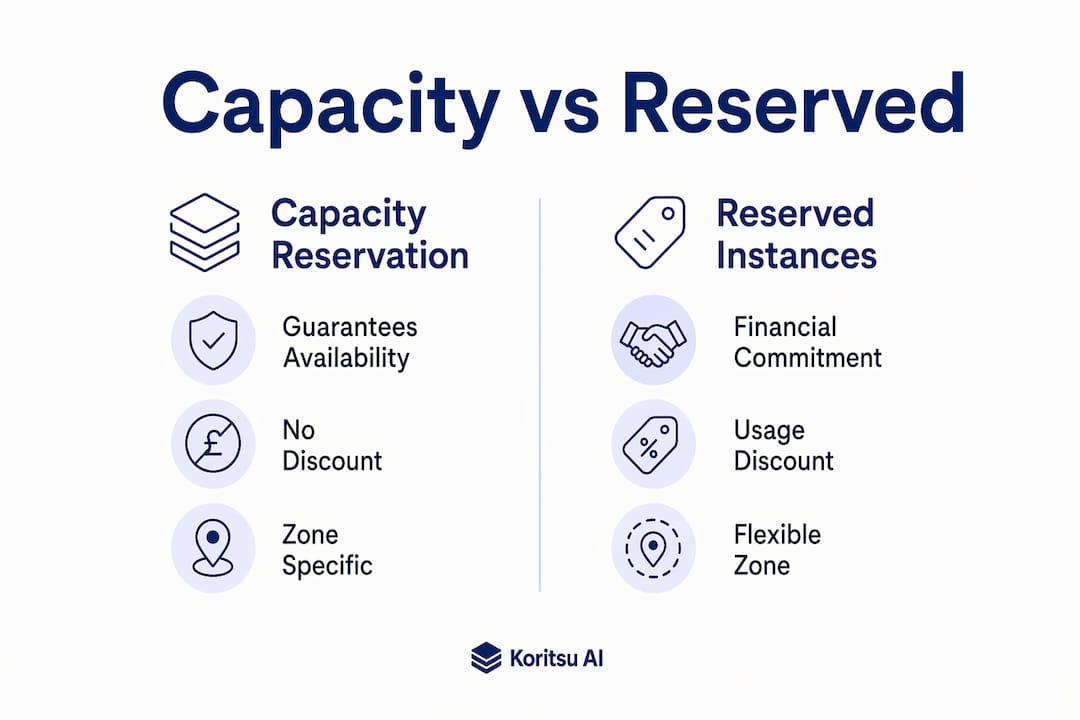
A capacity reservation is the opposite. It guarantees physical availability in a specific zone. It does not reduce your compute rate. The two mechanisms solve different problems and can be used together.
Capacity reservation vs autoscaling
Autoscaling adapts your running instance count dynamically based on load metrics. It does not create or expand reserved capacity. Autoscaling operates within provisioned limits. If you scale beyond what the cloud provider can supply in that zone at that moment, the scale-out fails. A capacity reservation is the envelope that autoscaling depends on.
The practical implication is this: reservations provide the headroom, autoscaling fills it. Architectural best practice recommends maintaining 30–50% headroom above your baseline using reservations so that autoscaling has room to respond during demand spikes without hitting allocation limits.
The key distinctions at a glance:
- Capacity reservation: guarantees physical resource availability, no compute discount, pay reservation fee plus compute rate
- Reserved instance / committed-use discount: financial discount on compute rate, no physical availability guarantee, pay reduced compute rate
- Autoscaling: dynamic instance count adjustment, no capacity guarantee, operates within whatever capacity the provider can supply
A common pitfall is assuming that buying reserved instances removes the need for capacity reservations. For non-critical batch workloads, that assumption is acceptable. For customer-facing services with strict uptime requirements, it is not.
What are the benefits and costs of cloud capacity reservation?
The primary benefit is eliminating “out-of-capacity” errors during rapid scale-outs. This is a hidden cloud failure mode that catches large deployments off guard. A service that scales reliably in normal conditions can fail silently during a traffic spike if the underlying zone has no spare capacity. A reservation removes that risk entirely for the resource types and quantities you have specified.
The secondary benefit is reduced cold-start latency. When capacity is pre-allocated, instance launch times are more predictable. For latency-sensitive workloads, this matters operationally, not just financially.
The cost structure is the honest trade-off. You pay for reserved capacity whether you use it or not. Industry analysts frame this correctly: treating unused reserved blocks as insurance rather than waste is the right mental model. The question is not “am I paying for idle capacity?” The question is “what does an outage cost me compared to the reservation fee?”
For cloud architects and FinOps teams, the decision framework looks like this:
- Calculate the cost of downtime for the workload in question (revenue loss, SLA penalties, engineering recovery time).
- Calculate the monthly reservation fee for the capacity block you need.
- If downtime cost exceeds reservation cost by a meaningful margin, reserve the capacity.
Organisations that combine committed discounts with capacity reservations can save 30–60% versus on-demand pricing when managing baseline versus burst workloads effectively. That saving comes from the discount layer, not the reservation itself. The reservation is the reliability layer.
Pro Tip: Weigh cloud infrastructure ROI before committing to large reservation blocks. The financial case depends entirely on your workload’s criticality and your organisation’s downtime tolerance.
How to implement an effective cloud capacity reservation strategy
Effective implementation requires coordination across cloud architecture, FinOps, and site reliability engineering (SRE) teams. A reservation created in isolation, without connecting it to provisioning workflows, is money wasted.
Align IaC with reservation IDs from day one. Every Terraform module, CloudFormation template, or Bicep file that provisions instances in a reserved zone must reference the reservation ID. This is the single most common implementation failure. Teams create reservations, forget to update their IaC, and discover the problem when reviewing their bill. Treat the reservation ID as a required input variable in your provisioning templates, not an optional annotation.
Monitor reserved versus used capacity continuously. Set up telemetry that tracks utilisation of each reservation block. A reservation running at 20% utilisation for weeks signals either over-provisioning or a broken IaC association. Both are fixable, but only if you can see them. Monitoring reserved-vs-used telemetry is the operational control that makes reservations cost-effective rather than costly.
Plan your capacity envelope deliberately. Effective cloud capacity management in 2026 requires thinking in terms of a capacity envelope: a combination of reservations for your guaranteed baseline, committed discounts for your predictable usage, and on-demand capacity for genuine bursts. Reservations should cover your minimum viable production footprint. Autoscaling handles the rest within that envelope.
Avoid orphaned reservations. When you decommission a workload or migrate to a different region, cancel the associated reservations immediately. Orphaned reservations are a direct cost with zero operational benefit. Build reservation lifecycle management into your decommissioning runbooks.
Rightsize before you reserve. Reserving the wrong SKU is worse than not reserving at all. You pay for capacity you cannot use, and you still face allocation risk for the capacity you actually need. Rightsizing your instance types before creating reservations is not optional. Avoiding common reserved instance mistakes at this stage saves significant cost downstream.
Pro Tip: Review your reservation utilisation monthly as part of your FinOps cycle. Reservations that consistently run below 70% utilisation are candidates for downsizing or cancellation.
Key takeaways
Cloud capacity reservation is an operational reliability tool, not a cost-reduction mechanism. Its value is in preventing allocation failures, not in lowering your compute rate.
| Point | Details |
|---|---|
| Reservations guarantee supply, not discounts | You pay a reservation fee for assured capacity; compute charges apply separately on top. |
| IaC association is non-negotiable | Provisioning scripts must reference the reservation ID or reserved capacity goes unused and wasted. |
| Autoscaling depends on reservations | Reservations create the capacity envelope; autoscaling operates within it, not beyond it. |
| Treat idle reserved blocks as insurance | The cost of unused reserved capacity is justified when downtime costs exceed reservation fees. |
| Monitor utilisation continuously | Reservations below 70% utilisation should be reviewed, downsized, or cancelled each month. |
Capacity reservation: what most teams still get wrong
The most persistent mistake I see is treating capacity reservation as a cost-saving tool. Teams create reservations expecting a lower bill, then feel cheated when the bill goes up. The framing is wrong from the start. Capacity reservation is reliability infrastructure. Its job is to prevent failures, not reduce spend.
The second mistake is the IaC disconnect. I have reviewed architectures where reservations existed in the console but were invisible to every deployment pipeline. The team was paying for guaranteed capacity and then launching instances on standard on-demand supply anyway. The reservation was a ghost. Fixing it required nothing more than adding a reservation ID variable to the launch template, but nobody had connected the two systems.
What I find genuinely underappreciated is the interplay between reservations and autoscaling reliability. Most SRE teams focus on autoscaling policies and ignore the capacity floor those policies depend on. A perfectly tuned autoscaler fails silently if the zone runs out of supply. Reservations are the foundation that makes autoscaling trustworthy at scale.
The organisational dimension matters too. Reservations sit at the intersection of cloud architecture, FinOps, and reliability engineering. When those teams do not coordinate, reservations get created without IaC integration, monitored without context, and cancelled without understanding the reliability impact. The technical work is straightforward. The coordination is where most organisations struggle.
How Koritsu AI helps you manage capacity reservations and cloud costs
Cloud capacity reservation decisions sit at the intersection of reliability and financial governance. Getting them wrong costs money in both directions: outages from under-provisioning, and idle reservation fees from over-provisioning.

Koritsu AI combines continuous AI-driven analysis of your cloud spending with hands-on expert guidance. Kori, our AI agent, surfaces where reservation fees are generating no operational value and where missing reservations are creating allocation risk. Our specialists help your engineering teams act on those findings. Clients start with a free cloud cost assessment and pay only from the savings we find. For teams managing complex reservation portfolios on AWS, Google Cloud, or Azure, that means measurable results before any ongoing commitment. One UK-based platform achieved a 52% reduction in cloud costs through targeted infrastructure changes, including capacity reservation rationalisation.
FAQ
What is the difference between a capacity reservation and a reserved instance?
A capacity reservation guarantees physical compute availability in a specific zone but does not reduce your compute rate. A reserved instance is a financial discount commitment that lowers your per-hour rate but does not guarantee that capacity will be available.
Does a capacity reservation reduce my cloud bill?
No. A capacity reservation adds a reservation fee to your bill. It does not discount compute charges. Cost savings come from combining reservations with committed-use discounts, not from reservations alone.
What happens if I create a reservation but do not associate it with my IaC?
Your workloads launch on standard on-demand capacity instead of the reserved pool. You pay the reservation fee with no operational benefit. Always reference the reservation ID explicitly in your provisioning templates.
Can autoscaling exceed the capacity I have reserved?
Yes. Autoscaling can attempt to launch instances beyond your reserved quantity, but those additional instances consume standard on-demand capacity subject to zone availability. There is no guarantee those extra instances will succeed.
When should a cloud architect use capacity reservation?
Use capacity reservation for customer-facing or business-critical workloads where an allocation failure during a scale-out event would cause measurable downtime or revenue loss. For non-critical batch or development workloads, on-demand capacity without reservation is usually sufficient.