FinOps Inform · Cloud Compute
What is elasticity in cloud computing?
Discover what elasticity in cloud computing is and how it can automatically scale resources, saving costs while optimizing performance.

Elasticity in cloud computing is defined as a system's ability to automatically adjust computing resources in real time as workload demand rises and falls. Think of it as the difference between paying for a fixed motorway lane and having lanes appear and disappear based on traffic. Google Cloud, AWS Auto Scaling Groups, and Kubernetes Horizontal Pod Autoscaler (HPA) all implement this capability differently, but the goal is identical: provision exactly what you need, release what you do not, and never pay for idle capacity. For cloud architects managing variable workloads, elasticity is not a nice-to-have. It is the mechanism that makes cost-effective cloud operations possible.
How does elasticity work in cloud computing?
Elasticity operates through four sequential steps. Each step must function correctly for the overall system to respond efficiently to demand changes.
-
Continuous monitoring. The cloud platform tracks metrics including CPU utilisation, memory consumption, network throughput, and application-level load. Tools like AWS CloudWatch and Google Cloud Monitoring collect this data at short intervals, typically every 60 seconds or less.
-
Scaling trigger evaluation. The platform compares observed metrics against pre-configured thresholds. When CPU usage exceeds 70% for three consecutive periods, for example, a scale-out event fires. When it drops below 30%, a scale-in event is triggered. HPE describes this process as monitoring CPU, memory, network, and application load, then triggering scaling by defined criteria.
-
Provisioning and deprovisioning. New virtual machines, containers, or storage volumes are created or released. This step relies entirely on automation. Without automatic provisioning and deprovisioning orchestration, elasticity cannot function effectively. Manual intervention defeats the purpose.
-
Load balancing. Traffic is redistributed across the updated resource pool. A load balancer such as AWS Elastic Load Balancing or Google Cloud Load Balancing prevents any single instance from becoming a bottleneck while new capacity comes online.
The entire cycle from detection to provisioned capacity typically completes in under two minutes on mature platforms. That speed is what separates elastic systems from traditional capacity planning, where lead times were measured in days or weeks.
Pro Tip: Set your scale-out threshold lower than you think necessary and your scale-in threshold conservatively at first. Aggressive scale-in policies that release resources too quickly cause oscillation, where the system scales out, scales in, and immediately scales out again, wasting both compute cycles and money.

Elasticity vs scalability in cloud: what is the difference?
These two terms are used interchangeably in most job descriptions and architecture documents. They are not the same concept, and conflating them leads to poor design decisions.
Google Cloud's distinction is precise: elasticity is reactive and automatic in real time, while scalability is a planned, longer-term capacity growth strategy. Scalability answers the question "how large can this system grow?" Elasticity answers "how quickly can this system respond to right now?"
| Dimension | Scalability | Elasticity |
|---|---|---|
| Intent | Planned capacity growth | Real-time demand matching |
| Timing | Long-term, deliberate | Immediate, automatic |
| Automation | Often manual or scheduled | Fully automated |
| Direction | Typically scale-out only | Scale out and scale in |
| Primary benefit | Handles growth | Reduces waste and cost |
| Typical use case | Expanding user base | Fluctuating traffic patterns |
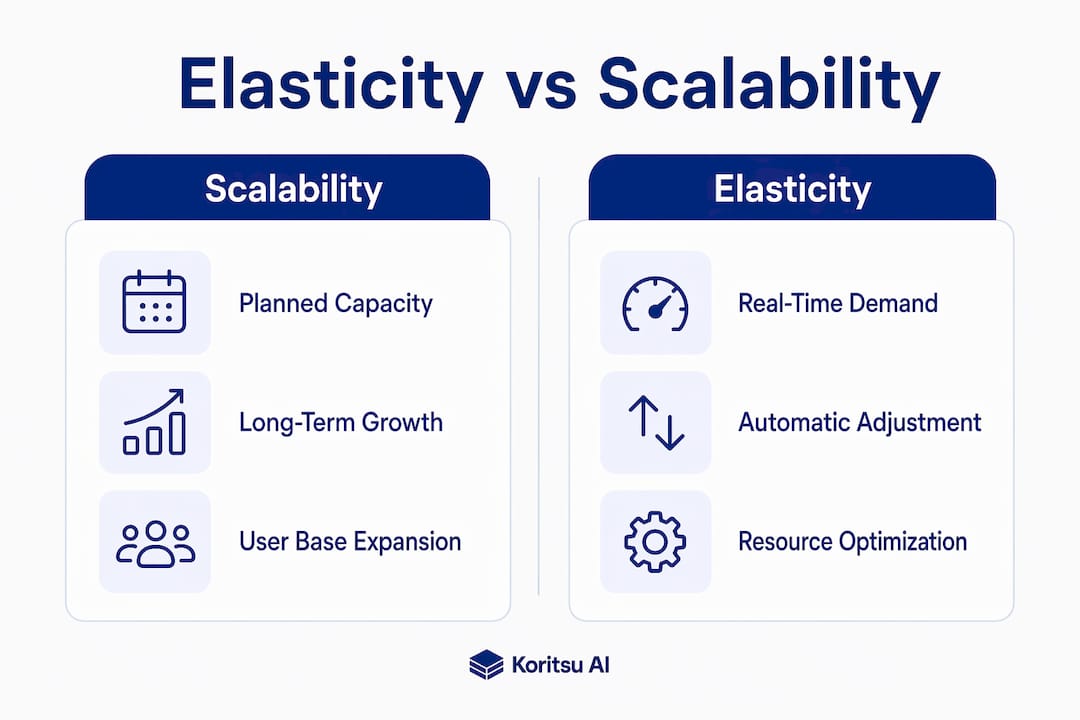
A practical example clarifies the distinction. A SaaS company that doubles its customer base over 12 months needs scalability. It plans additional database capacity, larger instance types, and expanded networking. That same company running a ticket-sale platform that spikes to 50 times normal load for 20 minutes when a concert goes on sale needs elasticity. No amount of pre-planned capacity handles that spike cost-effectively without automatic scale-in afterwards.
DZone clarifies that autoscaling is a subset of elasticity. Autoscaling handles reactive capacity changes, but elasticity encompasses broader workload variation absorption with policies and safeguards. You can have autoscaling without true elasticity if your policies are misconfigured or your application is not designed to handle dynamic resource changes gracefully.
Which tools implement cloud elasticity in practice?
Three platforms dominate real-world elasticity implementation. Each takes a different approach to the same problem.
Kubernetes horizontal pod autoscaler
Kubernetes HPA periodically adjusts pod replica counts based on observed metrics such as CPU and memory utilisation. The controller queries resource utilisation at each sync period, computes the ratio of current to desired usage, and scales the deployment accordingly.
Key features of Kubernetes HPA:
- Scales based on CPU, memory, or custom metrics via the Metrics API
- Configurable minimum and maximum replica bounds prevent runaway scaling
- Stabilisation windows reduce oscillation during rapid demand changes
- Supports external metrics from sources like Prometheus or Datadog
AWS ec2 auto scaling groups
AWS Auto Scaling Groups maintain fleet size between configured minimum, desired, and maximum instance counts. Scaling policies respond to CloudWatch metrics such as average CPU or request count per target.
Key features of AWS Auto Scaling Groups:
- Target tracking policies maintain a specific metric value automatically
- Step scaling policies allow graduated responses to different threshold levels
- Scheduled scaling handles predictable traffic patterns like business-hours spikes
- Instance refresh capability replaces instances with updated launch templates without downtime
Google compute engine managed instance groups
Google Compute Engine managed instance groups use autoscalers that monitor load metrics and adjust the number of VM instances in the group. Autoscaling policies support CPU utilisation targets, HTTP load balancing serving capacity, and Cloud Monitoring metrics.
All three tools share a common dependency: the application running on them must be designed to handle instances appearing and disappearing. A tool cannot make an elasticity-unaware application elastic.
Architectural considerations for elastic cloud applications
Elasticity at the infrastructure layer only delivers its full benefit when the application layer is designed to match. This is where many teams fall short.
Cloud architects must design elasticity-aware applications so that scaling events do not cause state loss, availability degradation, or performance issues. The most reliable pattern is stateless services with externalised state. When a pod or instance terminates during scale-in, no session data, cache, or in-flight transaction should be lost. Storing state in Redis, Amazon ElastiCache, or a managed database outside the compute layer achieves this.
Stateful applications present a harder problem. Dropped sessions, cache churn, and interrupted transactions are common failure modes when instances are removed without proper drain periods. If your application cannot be made stateless, configure longer scale-in cooldown periods and use connection draining on your load balancer to let in-flight requests complete before termination.
Conservative scale-in policies that prevent quick resource release after demand drops are one of the most common and costly misconfigurations in production environments. The system scales out perfectly but never scales back in. The result is a cloud bill that grows with every traffic spike and never shrinks. Elasticity without effective scale-in is just expensive autoscaling.
Pro Tip: In Kubernetes HPA, CPU utilisation is calculated as a ratio of actual usage to requested CPU. If your pod resource requests are set too low, HPA will see artificially high utilisation and scale out aggressively. If requests are set too high, it will scale too slowly. Rightsizing your pod resource requests is a prerequisite for accurate HPA behaviour.
Workload classification matters before you configure any scaling policy. Batch processing jobs, API services, and web front ends are natural candidates for elasticity. Long-running stateful services, databases, and message brokers require careful architectural work before elasticity policies can be applied safely. Reviewing your idle cloud resources regularly reveals where elasticity is failing to release capacity as intended.
Key takeaways
Elasticity in cloud computing delivers cost savings only when both scale-out and scale-in are configured correctly, and when applications are designed to handle dynamic resource changes without disruption.
| Point | Details |
|---|---|
| Elasticity definition | Automatic, real-time adjustment of cloud resources to match workload demand as it fluctuates. |
| How it works | Four steps: monitor metrics, evaluate triggers, provision or deprovision resources, then rebalance load. |
| Elasticity vs scalability | Scalability is planned long-term growth; elasticity is immediate, automated demand matching in both directions. |
| Key tools | Kubernetes HPA, AWS EC2 Auto Scaling Groups, and Google Compute Engine managed instance groups each implement elasticity differently. |
| Biggest pitfall | Conservative scale-in policies prevent resource release after demand drops, negating the cost benefits of scaling out. |
Where most teams get elasticity wrong
I have reviewed cloud architectures across dozens of engineering teams, and the pattern is consistent. Teams invest significant effort in scale-out configuration. They set CloudWatch alarms, tune HPA thresholds, and test traffic spikes in staging. Then they leave scale-in at its default settings and walk away.
The result is a system that responds beautifully to demand increases and barely responds at all to demand decreases. The cloud bill reflects this asymmetry. Costs rise with every traffic event and plateau at a new, higher baseline. The team assumes the cloud is working as intended because nothing broke. What they do not see is the money sitting in instances that should have been terminated hours ago.
True elasticity requires equal attention to both directions. Scale-in is where the cost savings actually live. Scale-out is table stakes. If your architecture review does not include explicit testing of scale-in behaviour under realistic conditions, you are not running an elastic system. You are running an expensive one with a scale-out feature bolted on.
The other consistent gap is application design. Infrastructure elasticity cannot compensate for applications that drop sessions, corrupt state, or fail health checks when instances are replaced. Application refactoring to support stateless patterns is often the highest-leverage investment a team can make before tuning any autoscaling policy.
See how much your elastic architecture is actually saving you
Most teams assume their autoscaling configuration is working correctly because their application stays up. Koritsu AI looks deeper. Our AI agent, Kori, analyses your AWS, Google Cloud, or Azure spending continuously and surfaces where elasticity policies are failing to release capacity, where scale-in is misconfigured, and where idle resources are accumulating costs invisibly. We have helped teams achieve results like a 96% reduction in AWS Lambda costs and a 52% cloud cost reduction for a UK bidding platform. You start with a free assessment, and we only charge when we find real savings. Explore our cloud cost optimisation services to see what your elastic architecture is actually costing you.
FAQ
What is cloud computing elasticity in simple terms?
Cloud elasticity is the ability of a cloud system to automatically add or remove computing resources as demand changes, then release them when demand drops. Google Cloud describes it as a system that stretches for spikes and snaps back automatically afterwards.
How does elasticity differ from scalability in cloud?
Scalability is planned, long-term capacity growth to handle an expanding user base. Elasticity is real-time, automatic adjustment to immediate workload fluctuations, including scaling back down when demand falls.
What tools are used to implement cloud elasticity?
The three most widely used tools are Kubernetes Horizontal Pod Autoscaler, AWS EC2 Auto Scaling Groups with CloudWatch metrics, and Google Compute Engine managed instance groups with autoscalers.
Why is scale-in as important as scale-out for cost control?
Conservative scale-in policies that prevent quick resource release after demand drops mean costs accumulate even when traffic returns to normal. Effective elasticity requires both directions to function correctly.
What types of applications benefit most from cloud elasticity?
Stateless services and applications with externalised state benefit most. Stateful applications risk session loss and cache disruption during scale-in events unless they are specifically designed with drain periods and external state storage.