FinOps Inform
What a FinOps AI agent actually does for engineering teams
Discover how a FinOps AI agent enhances engineering teams by automating cost anomaly triage and providing instant insights for faster decision-making.

A FinOps AI agent automates anomaly triage, answers cost questions from your actual billing data, and creates remediation-ready tasks in your engineering workflow. It suits teams running production workloads at scale who need faster investigations and continuous governance rather than a monthly spreadsheet review. Engineering teams get answers in minutes; FinOps practitioners get a system that never stops watching.
TL;DR:
- Deploying a FinOps AI agent requires proper setup of billing integration, tagging schemas, and usage data to ensure trustworthy recommendations and ticket assignments.
- The agent’s effectiveness depends on existing governance, visibility, and discipline within the team, with explainability and thresholds playing key roles in trust and avoiding alert fatigue.
- Continuous anomaly triage, recurring reports, and optimization insights are the core use cases that justify deploying an agent, especially to reduce investigation and reporting workload.
- Koritsu AI combines anomaly detection with direct implementation of fixes by engineers, proven to reduce costs significantly when FinOps discipline is strong.
- Prioritizing data quality through tagging and ownership mapping is essential before vendor selection, as the agent’s performance heavily relies on clean, accurate input data.
What does a FinOps AI agent actually deliver?
Most vendor demos show a chat window. What matters is what comes out the other end.
An AI FinOps agent bridges static dashboards and automated execution. It investigates cost anomalies down to root cause, answers natural-language questions against your real usage data, and writes tickets in tools your engineers already use. AWS’s FinOps Agent user guide describes agents correlating cost spikes with specific CloudTrail events, which cuts investigation time from days to minutes, when the telemetry is instrumented properly.
In practice, deployments produce a consistent set of outputs:
- Anomaly investigation that traces a spike back to the resource, deployment, or configuration change that caused it, cross-referenced against audit logs.
- Natural-language queries answered against your billing and usage data rather than a generic model’s training set.
- Recurring and on-demand reports delivered as HTML, PDF, or PowerPoint, on a schedule you set.
- Optimisation recommendations with estimated savings and enough implementation detail that an engineer can act without a second meeting.
- Task creation directly into Jira, Slack, or whichever tool your team lives in, rather than a dashboard nobody checks.
The useful distinction is cadence. Some tasks run on a schedule (a Monday morning digest), some run on demand (an engineer asking “why did EC2 spend jump 40% yesterday?”), and some run on events (a billing alert triggers investigation automatically). A capable agent supports all three without forcing you to choose one operating model.
Which use cases actually justify deploying an agent?
Not every FinOps problem needs an agent. Three do, reliably.
- Continuous anomaly triage. Instead of a human noticing a cost spike three weeks later during a monthly review, the agent flags it within hours and starts the investigation immediately, which shortens mean time to resolution and stops drift before it compounds.
- Recurring reporting and chargeback preparation. Building the same cost-by-team report every month is the kind of task that eats a FinOps analyst’s week. Automating it frees that time for the analysis that actually changes behaviour.
- Optimisation surfacing. Rightsizing candidates, idle resources, and Savings Plans coverage gaps get flagged with estimated impact attached, so engineering leads can prioritise by pound value rather than gut feel.
There is a fourth benefit that is easy to overlook: agents enable a genuinely hybrid FinOps model. Instead of every cost question routing through a central FinOps team, engineers can ask the agent directly and get an answer grounded in real data. The FinOps agentic AI view of this is “scale without headcount”: routine diagnostics get automated so senior engineers spend their time on architecture, not spreadsheet archaeology.
None of this works if your tagging is a mess. An agent that cannot map a resource to a team or a feature will produce recommendations nobody trusts and tickets nobody owns. That is not a limitation of the technology. It is a limitation of the data you feed it.
What do you need in place before deploying an agent?
Setup is mostly plumbing, and it is worth doing properly the first time rather than iterating on a shaky foundation.
Start with billing account integration. Each cloud provider has its own prerequisites, and AWS’s FinOps Agent overview notes that implementation typically requires connecting the billing account, ingesting historic usage metrics, and configuring organisational context so recommendations attribute correctly to owners.
The checklist that matters:
- Connect billing and usage data, including historic records so the agent has a baseline to compare against.
- Create two IAM roles, not one: an agent role scoped to read cost and usage data (least privilege, no write access), and a separate operator role for anyone performing UI or automation tasks on the agent’s behalf.
- Set a monitoring cadence — daily, weekly, or event-driven — appropriate to how volatile your spend is.
- Upload context files: your tagging schema, account-to-owner mappings, and team hierarchy. This single step determines whether recommendations land with the right engineer or vanish into a queue nobody watches.
- Connect integrations: Jira for tickets, Slack for alerts, plus whatever optimisation-recommendation source and report storage you already use.
- Test event-triggered workflows before relying on them, so the first real anomaly is not also the first real test.
Pro Tip: Run a one or two sprint tagging clean-up before switching the agent on if your ownership mapping is patchy. Tuning an agent against bad data wastes more time than fixing the data first.
How do agent outputs fit into existing engineering workflows?
An agent that only lives in its own chat window is a novelty. The value shows up when its outputs land inside the tools your team already uses without anyone changing habits.
The most common pattern is event-triggered: a cost anomaly fires, an event bus picks it up, the agent investigates, and the finding lands in Jira or Slack as a ticket with context attached, not a raw alert. Scheduled jobs cover the predictable side. Daily digests, weekly chargeback summaries, and executive-ready PowerPoint decks all run on a timer rather than a person remembering to build them. Vendor documentation from Microsoft’s FinOps toolkit shows this pairing of event triggers and scheduled jobs as a standard integration pattern across FinOps hub configurations.
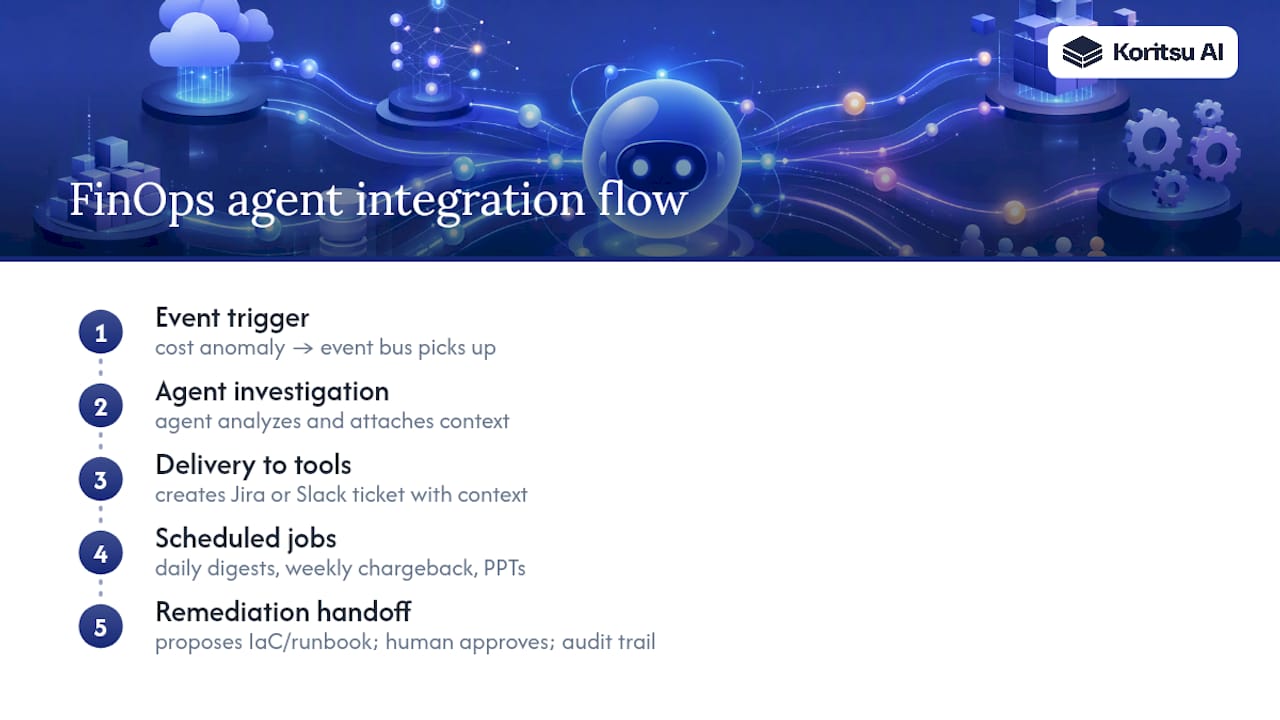
Ad-hoc questions get handled through interactive conversation, either inside the agent directly or through a connected chat interface, so an engineer can ask “what’s driving this bill” without opening a dashboard.
Remediation handoff is where teams should be cautious. The safest pattern is remediation-ready, not remediation-automatic: the agent proposes an infrastructure-as-code change or a runbook, and a human approves it before anything executes. Every action needs an audit trail and a permission scope tight enough that a false positive cannot trigger something destructive.
What separates agents that work from agents that don’t?
FinOps maturity decides the outcome more than the tool does. The FinOps Foundation’s own guidance is blunt about this: agents accelerate teams that already have visibility, governance, and accountability. They don’t create those things from nothing.
Explainability is the second gate. If a recommendation cannot be traced back to a specific event or usage pattern, engineers will ignore it, correctly, because unexplained cost advice from a model is not something you act on with production infrastructure. Trust gets built the same way it always has: through traceable, checkable claims.
- Set dollar thresholds and filters so the agent surfaces high-impact anomalies, not every minor fluctuation.
- Track time-to-resolution, realised savings, and engineer action rate rather than just alert volume.
- Start conservative and iterate using engineer feedback to tighten prompts and cadence.
Alert fatigue is the most common reason agents get switched off, and it is almost always a tuning problem rather than a tool problem: AWS’s own configuration documentation recommends minimum-dollar thresholds specifically to prevent it.
When your team lacks the headcount to build, tune, and act on all of this, a managed partner covering both detection and execution is usually the faster path to realised savings.
How Koritsu AI pairs an agent with hands-on delivery
Most agents stop at the recommendation. Koritsu AI pairs continuous AI analysis with engineers who actually implement the fix, priced as a share of the savings we verify against your billing.
Our agent, Kori, surfaces the same class of inefficiency described throughout this guide: anomalies, idle resources, rightsizing candidates, tagging gaps. The difference is what happens next. Instead of a ticket sitting in a backlog, our specialists either hand engineering teams the infrastructure-as-code change ready to merge, or execute the remediation directly. One UK bidding platform saw a 52% reduction in cloud costs through this model.

This fits best where FinOps headcount is thin relative to workload complexity, production-scale infrastructure, and the pressure to show realised savings rather than a list of suggestions.
Why the “set it and forget it” pitch on FinOps agents is wrong
The marketing around FinOps agents leans hard on autonomy, as though the technology alone closes the savings gap. It doesn’t. The evidence throughout this guide points the other way: agents amplify whatever FinOps discipline already exists and expose the absence of it just as clearly. A team with clean tagging and clear ownership gets genuine leverage. A team without either gets confident-sounding recommendations attributed to nobody, acted on by nobody.
The conventional advice, buy the tool, connect the billing account, wait for savings, skips the part that actually determines outcomes: context files, ownership mapping, and the discipline to review recommendations rather than dismiss them. That is unglamorous work, and it is also the entire difference between an agent that pays for itself and one that gets quietly disabled after a noisy first month.
If you take one thing from this guide, prioritise your tagging and ownership data before you prioritise vendor selection. The agent is only ever as good as what it can see, and what it can see depends entirely on decisions your team makes before deployment, not after.
Get a free assessment before you commit to a platform
You do not need to choose between building an agent yourself and doing nothing. Koritsu AI’s free assessment shows you where your cloud spend is actually leaking, backed by the same continuous analysis this guide has described, before you commit to anything.

The assessment costs nothing upfront. We take a share of the savings we find and verify against your billing, and only move to an ongoing subscription once that value is proven. If your team is running production workloads on AWS, Azure, or GCP with limited FinOps headcount to chase every anomaly manually, this is built for exactly that gap. Our FinOps as a Service model combines Kori’s detection with engineers who implement the fix rather than just flagging it.
Book a free assessment or request a technical pilot, and see what our platform surfaces in your own billing data within days, not quarters.
Sources
- AWS FinOps Agent user guide — what is an agent
- Microsoft: Configure AI agents for FinOps hubs
- FinOps Foundation — AI for FinOps agentic use cases