FinOps Inform · Cost Allocation
What is a cloud cost centre? A practical guide
Learn what a cloud cost centre is and how it empowers your business to control cloud spending effectively. Discover the secrets now!

Most businesses running on AWS, Azure, or Google Cloud have the same frustrating experience: the monthly bill arrives, and nobody can explain where the money went. Cloud costs scale fast, but visibility rarely keeps pace. Understanding what is a cloud cost centre is the first step toward changing that. This guide explains what cloud cost centres are, how they work, and how financial managers and business leaders can use them to take genuine control of cloud expenditure rather than just reacting to it each month.
Key takeaways
| Point | Details |
|---|---|
| Cloud cost centre defined | An organisational unit used to attribute cloud spend to responsible teams using rules, tags, and accounts. |
| Accuracy depends on tagging | Incomplete or inconsistent resource tagging leads directly to misallocated or unallocated costs. |
| Hierarchies reflect structure | Cost centres can be layered to match real business units, from team level up to the whole organisation. |
| Classification is not optimisation | Labelling costs is only the start. Linking cost centres to budgets and alerts is what drives savings. |
| Culture matters as much as tooling | Cost accountability only works when teams own their numbers and are empowered to act on them. |
What is a cloud cost centre?
A cloud cost centre is the organisational unit used to attribute cloud spend to the people or teams responsible for generating it. Think of it as a financial lens applied to your cloud bill. Rather than receiving a single undifferentiated invoice, you can see exactly how much your marketing platform, data engineering team, or customer support infrastructure is costing you each month.
In practice, AWS describes a cost centre as a named cost category mapped to specific values using defined rules. Those rules reference dimensions like AWS accounts, resource tags, regions, and service types. The result is a structured view of spend that maps back to your organisational chart rather than a list of AWS service lines nobody in finance can interpret.
It is worth distinguishing between a few related terms that often get conflated:
- A cost category is the broader business perspective applied to your cost data. A cost centre is one specific realisation of that perspective, shaped by the rules and dimensions you choose.
- A cost unit (used by platforms like Alibaba Cloud) refers to the aggregation mechanism that groups costs under a defined rule set reflecting departments or projects.
- A cost allocation is the act of distributing shared costs to the appropriate owners, often using the cost centre structure as the target.
Alibaba Cloud automates cost aggregation using configurable rules that reflect your organisational structure or business model, whether that means separating costs by department, product line, or billing account. The underlying principle is consistent across providers. You define the rules, the platform applies them, and spend becomes attributable.
Cloud expense tracking at this level is not a luxury. Without it, you are making infrastructure and architecture decisions blind.
Setting up cost centres: rules, hierarchies and attribution
Understanding the concept is straightforward. Getting the implementation right is where most organisations run into trouble.
The mechanics rely on two primary attribution methods: account-based allocation and tag-based allocation. Account-based allocation is the cleaner of the two. If your engineering team runs a separate AWS account, all costs in that account are automatically attributed to them. Tag-based allocation is more flexible but depends entirely on discipline. Every resource must be tagged consistently with the right metadata, for instance team, environment, project, and owner, before the cost centre logic can work correctly.
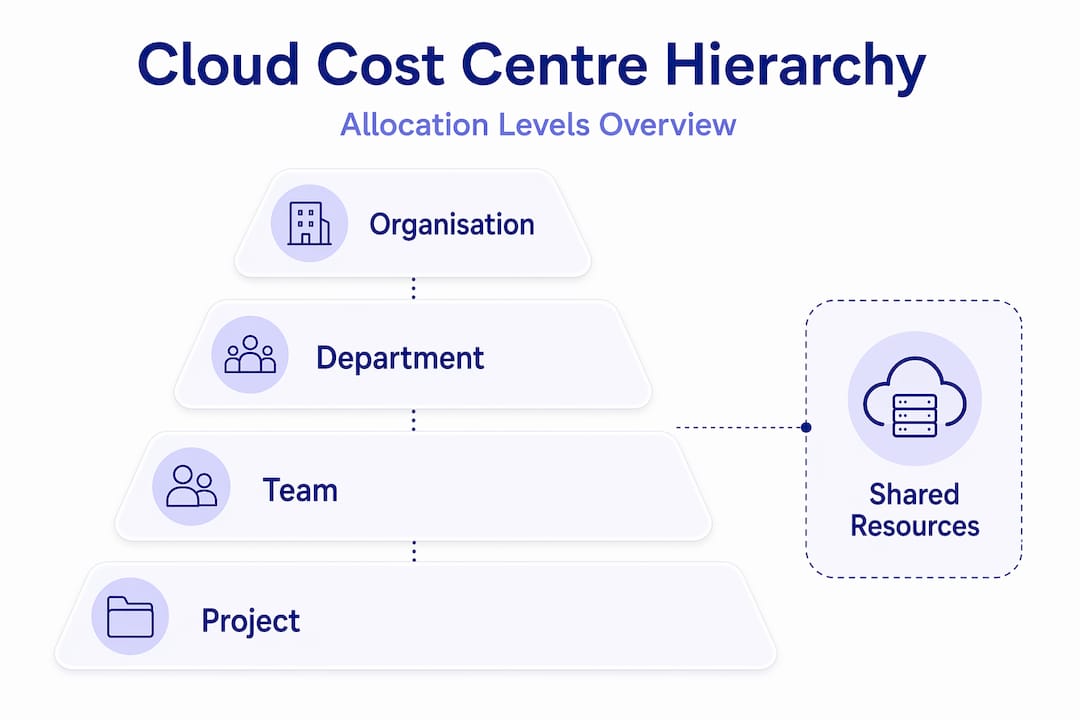
Hierarchical cost centre structures allow executives to view consolidated figures while team leads see granular spend for their specific services. A typical hierarchy might look like this:

| Level | Example | Use |
|---|---|---|
| Organisation | Acme Ltd | Total cloud spend view |
| Department | Engineering | Departmental budget tracking |
| Team | Platform team | Team-level cost accountability |
| Project | Customer portal | Per-project chargeback or showback |
This structure matters because it lets financial managers roll costs up for board reporting while giving engineers the detail they need to act. Multi-level cost categories in AWS make this possible without requiring separate reports for each layer.
Pro Tip: Before configuring cost centre rules, audit your existing resource tags across every account. Identify untagged resources first. A cost centre structure built on a patchy tagging model will produce reports that are misleading at best and useless at worst.
The attribution logic must also account for shared resources, such as a centralised data platform used by multiple teams. You will need a cost-splitting rule, for example by usage percentage or equally across consumers, to avoid dumping all shared costs into a catch-all bucket that nobody feels responsible for.
Benefits for business leaders and financial managers
Cloud cost centres do three things that matter to anyone responsible for a budget: they provide visibility, they create accountability, and they support ongoing optimisation.
Visibility is the most immediate benefit. AWS provides near real-time allocable cost data to teams through Cost Explorer and budget alerts, which means finance teams are no longer waiting for month-end surprises. They can track spend against budget continuously.
Accountability follows from visibility. When a team can see their own costs in near real time, behaviour changes. The question shifts from "why is our cloud bill so high?" to "why did the data processing job cost three times more this week?" That is a much more productive conversation. Empowering teams with cost data is more effective at controlling spend than central policing, because the people closest to the infrastructure are best placed to fix it.
Optimisation is where the real financial gains materialise. Cost centres enable you to:
- Identify which teams or projects are the largest consumers of cloud resource and whether that spend aligns with business value
- Detect anomalies in spend at a granular level, rather than noticing only when the total bill spikes
- Build chargeback or showback models that make the true cost of each product or service visible to business owners
- Tie cloud usage monitoring to departmental budgets so that overspend triggers an alert, not an argument after the fact
Cloud financial management tools like Huawei Cloud's Cost Center include anomaly detection that helps organisations respond swiftly to unexpected cost spikes rather than discovering them weeks later. This is the difference between cloud cost management as a reactive exercise and cloud cost management as a financial discipline.
For financial managers specifically, cost centres provide the data needed for what is cloud budgeting in practice: setting team-level cloud budgets, tracking performance against forecast, and making the case for architectural changes when costs exceed justifiable levels.
Common challenges and how to avoid them
The problems organisations encounter with cloud cost centres are almost always process problems, not technology problems. The platforms are capable. The gaps are in how they are implemented and maintained.
The most prevalent issue is incomplete tagging leading to unallocated spend. If 20% of your cloud resources carry no tags, then 20% of your spend lands in an unattributed bucket. That undermines every accountability model you have built. Tagging governance, enforced through infrastructure-as-code or policy tools, is non-negotiable.
Other challenges worth preparing for include:
- Organisational change: Teams merge, projects end, new product lines launch. Cost centre hierarchies that are not updated quickly produce misleading reports. Build a review cadence into your operating model, ideally quarterly.
- Shared cost allocation: Centralised services like networking, security tooling, or shared databases must be allocated rather than left unassigned. Decisions about allocation method (proportional usage, flat split, or direct charge) should be made explicitly and documented.
- Treating cost centres as the end goal: Classification is not optimisation. AWS explicitly advises linking cost centre data to budget and alert workflows rather than treating cost categories as static labels. A cost centre report that nobody acts on saves nothing.
Pro Tip: Use tag policies and service control policies in AWS Organizations, or equivalent governance tools in Azure and Google Cloud, to enforce mandatory tagging at resource creation. Retrofitting tags to existing infrastructure is painful. Preventing untagged resources from being created in the first place is far more efficient.
Practical steps to get started
If you are ready to build or improve your cloud cost centre model, here is a structured approach that avoids the most common mistakes.
- Map your organisational structure first. Before touching cloud configuration, document which teams, departments, and projects need separate cost visibility. The cost centre model should reflect your business, not the other way around.
- Audit your existing cloud resource metadata. Review tagging coverage across every account and region. Identify gaps and define a mandatory tag set that every resource must carry: at minimum, team, environment, and project.
- Design your cost centre hierarchy. Decide how many levels you need and what dimensions you will use for attribution. Account-based separation is the cleanest foundation. Tag-based rules fill in the gaps.
- Configure cost allocation rules in your cloud provider's financial management tooling. AWS Cost Categories, Azure Cost Management, and Google Cloud Billing all support rule-based attribution. Set up your rules and validate the output against known spend before relying on the reports.
- Link cost centres to budgets and alerts. A cost centre without a budget target is just a label. Set budget thresholds at the team or project level and configure alerts so owners are notified before they breach, not after. Connecting anomaly detection to your cost centres adds another layer of protection against unexpected spikes.
- Communicate the model to the business. Engineering leads, product managers, and department heads all need to understand what their cost centre covers and what they are expected to do when the alerts fire. Optimising cloud spend is a team sport.
My take: what most organisations get wrong
I have worked with enough engineering and finance teams to say this plainly: the technical setup of cloud cost centres takes a week. Getting the organisation to actually use them takes months.
In my experience, the biggest mistake leaders make is treating the cost centre configuration as the finish line. You spend time mapping rules, cleaning up tags, getting the hierarchy right, and then the reports start running. That moment feels like success. It is not. It is the start.
What I have seen consistently is that cost centre data sits in a dashboard that finance reviews once a month and engineering never opens. The classification is working. The accountability is not. The two things are not the same, and confusing them is expensive.
The organisations that genuinely reduce their cloud spend through cost centres do one thing differently: they make cost data part of the weekly engineering conversation, not a monthly finance audit. When the platform team sees their cost centre trend in the same meeting where they discuss deployment frequency, the behaviour changes. Cost becomes a quality metric, not a financial abstraction.
I would also push back on the idea that more sophisticated tooling automatically solves this. AI-driven cost analysis, which Koritsu does well, adds genuine value in anomaly detection and savings identification. But it amplifies a good process. It cannot substitute for one.
The cloud cost problem is a process problem. The cost centre is a tool. The culture is the work.
How Koritsu helps you go beyond cost visibility

Setting up cost centres gives you visibility. What comes next is where the real savings live. Most businesses running on AWS, Azure, or Google Cloud are overspending not because they lack reports, but because the inefficiencies are buried in how the infrastructure was built.
Koritsu combines an AI platform with hands-on expert advice to find those inefficiencies and help engineering teams fix them. Kori, the AI agent, continuously analyses your cloud spending and surfaces where money is being lost. Our specialists then help you act on it. You can explore a 52% cost reduction case study to see what that looks like in practice, or start a free assessment with no upfront cost. Koritsu only charges when savings are found.
FAQ
What is a cloud cost centre?
A cloud cost centre is an organisational unit used to attribute cloud spend to responsible teams or departments using rules based on accounts, tags, and service dimensions. It provides a structured financial view of cloud usage aligned to your business structure.
How are cloud cost centres different from cost categories?
A cost category is the broader business perspective applied to cloud cost data. A cost centre is a specific realisation of that perspective, defined by the rules and dimensions you configure to attribute spend to particular owners.
Why does tagging matter so much for cost centres?
Incomplete tagging leads directly to unallocated or misallocated spend, which undermines every accountability model built on top of the cost centre structure. Consistent, enforced tagging is the foundation of accurate cost attribution.
Can cloud cost centres help with cloud budgeting?
Yes. Cost centres enable team-level or project-level budget targets to be set and monitored continuously. Linking cost centre data to budget alerts means overspend is flagged in near real time rather than discovered at month end.
What is the biggest mistake when implementing cloud cost centres?
Treating the configuration as the goal. Linking cost centre data to active workflows, such as budgets, anomaly alerts, and engineering reviews, is what drives savings. Cost centres that feed static reports with no follow-up process deliver very little value.