FinOps Inform · Storage
What is cold storage cloud tier? A guide for engineers
Discover what is cold storage cloud tier and how to optimize costs in your enterprise. Learn about the different tiers and their benefits!

Cold storage cloud tiers are frequently misunderstood. Many engineers treat “cold” as a single category meaning “slow and cheap,” then get surprised by retrieval latency that breaks recovery objectives, or an unexpected invoice from bulk egress fees they never planned for. Understanding what is cold storage cloud tier, and how the different tiers within that category actually differ, is where real cost optimisation begins. This article covers definitions, tier mechanics, performance trade-offs, lifecycle policies, and practical strategies for getting cold storage right in enterprise environments.
Key takeaways
| Point | Details |
|---|---|
| Cold storage is not one tier | Cloud providers offer cool, cold, archive, and deep archive tiers, each with distinct costs and retrieval speeds. |
| Lifecycle policies cut costs significantly | Automating data movement to colder tiers can reduce storage costs by 30 to 40%. |
| Retrieval fees are the hidden risk | API, egress, and early deletion fees are often overlooked and can undermine the cost benefit of cold storage. |
| Tier selection depends on compliance needs | Regulatory mandates, retention periods, and Recovery Time Objectives must drive your tier selection, not just price per GB. |
| Hybrid architectures reduce latency | Combining NVMe caching with HDD cold storage pools can maintain responsiveness whilst keeping bulk data costs low. |
Cold storage cloud tier fundamentals
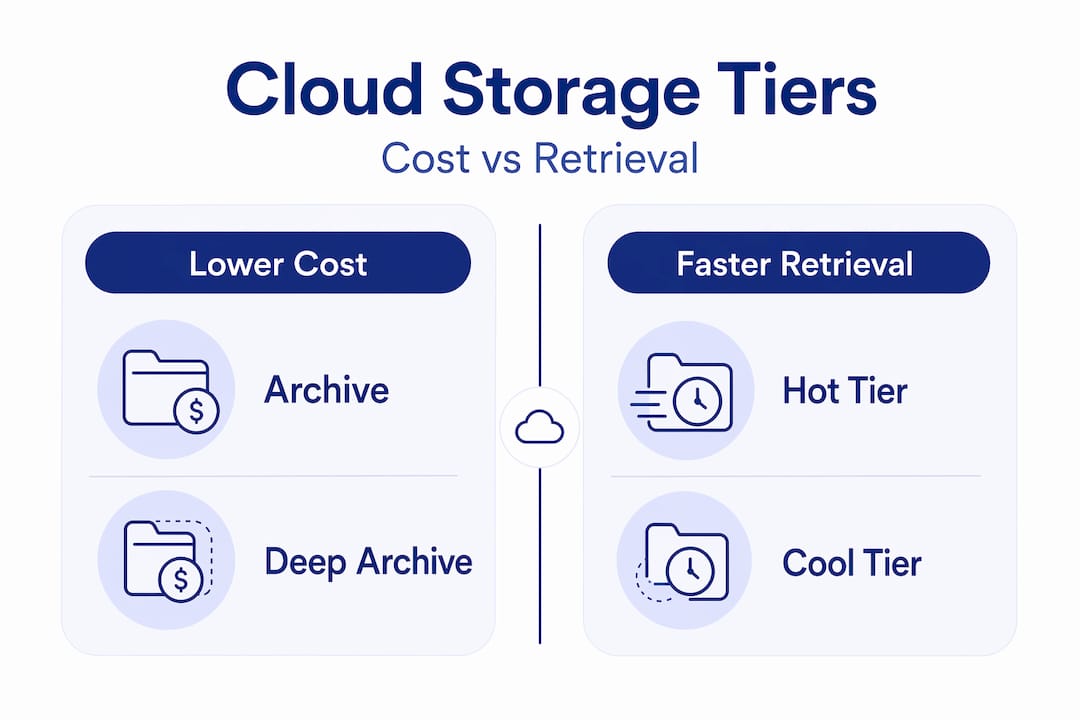
Cold storage in cloud computing refers to storage designed for data that is accessed infrequently, typically less than once per quarter, in exchange for significantly lower per-GB costs. It sits at the far end of the standard cloud tier structure, which runs from frequent access (hot) through infrequent access (cool or warm) to archive and deep archive at the coldest end.
Where engineers often go wrong is treating “cold” as monolithic. In practice, the spectrum within cold storage alone is wide.
| Tier | Typical cost per GB/month | Retrieval speed | Minimum retention | Common use case |
|---|---|---|---|---|
| Cool / infrequent access | Moderate | Milliseconds to seconds | 30 days | Backup copies, monthly reports |
| Cold | Low | Minutes | 90 days | Compliance archives, DR secondaries |
| Archive | Very low | Minutes to hours | 90 to 180 days | Long-term regulatory retention |
| Deep archive | Lowest | Up to 24 hours | 180 days | Legal holds, multi-year compliance data |
The minimum retention rules matter operationally. If you delete data before the minimum duration expires, the provider charges you for the remainder of that period. A 30-day minimum on cool tier is easy to plan around; a 180-day minimum on deep archive is not, especially if your data classification processes are immature.
Each tier also carries different API request pricing. Retrieving a terabyte of data from an archive tier costs far more per GB than writing it there did. This asymmetry is deliberate and is the primary reason organisations underestimate total cost of ownership for cold storage data management.
How cold storage works: lifecycle policies and access patterns
The mechanism that makes cold storage practical at scale is the lifecycle policy. Rather than manually auditing and migrating infrequently accessed objects, you define rules that automatically move data down the tier hierarchy based on age or access frequency.

A typical rule set follows the natural data access curve: data is heavily accessed in its first 30 days, tapers off significantly through months two and three, and reaches near-zero access beyond 90 days. A well-designed lifecycle policy maps directly onto that curve.
A common transition sequence looks like this:
- Days 0 to 30: active storage (hot tier), full access speed
- Days 31 to 90: infrequent access tier (cool), slight retrieval latency, reduced cost
- Days 91 to 180: cold tier, minutes retrieval time, significantly lower storage cost
- Days 181 to 365: archive tier, hours retrieval time, near-minimal storage cost
- Day 365+: deep archive or deletion, depending on retention policy
There is a critical operational constraint that catches teams out. Lifecycle transitions are unidirectional. The policy moves data from hot to cold automatically, but moving it back requires a manual copy operation. That copy triggers retrieval charges from the cold tier and write charges on the hot tier. If an incident response or forensics need forces you to pull large volumes from archive unexpectedly, the bill that follows can be substantial.
Automatic tiering features, such as Azure’s Smart Tier and AWS S3 Intelligent-Tiering, observe actual access patterns and adjust tier placement dynamically. They reduce the risk of misclassifying data but add a monitoring cost per object per month, which becomes expensive at very high object counts with small file sizes.
Pro Tip: Before enabling object-level intelligent tiering, calculate the per-object monitoring fee against your average object size and projected access frequency. For objects under 128 KB, the monitoring fee often exceeds the storage savings.
Trade-offs: cost versus performance and compliance
Cold storage is not slow by accident. The architecture is optimised for durability and low-cost capacity, not access speed. Retrieval speeds vary from expedited (one to five minutes) through standard (several hours) to bulk (up to 24 hours), and the speed you choose directly affects the retrieval fee you pay. Expedited retrieval costs significantly more per GB than bulk.
The performance implications matter most when cold storage intersects with Recovery Time Objectives. If your disaster recovery plan relies on data that lives in a deep archive tier, and your RTO is four hours, you have a structural problem that no amount of lifecycle optimisation will fix. Tier selection must be driven by business requirements, not just price per GB.
Beyond performance, there are several cost dimensions that organisations routinely miss:
- API request charges: both PUT and GET operations carry per-request fees that accumulate at scale
- Egress fees: data transferred out of cloud storage to compute or external destinations is billed separately, often at rates far exceeding storage costs
- Early deletion fees: removing data before the minimum retention period ends triggers charges for the remaining days
- Retrieval tier premiums: choosing expedited over bulk retrieval can increase per-GB retrieval cost by a factor of ten or more
Compliance adds another layer of complexity. Cold tiers can enforce WORM policies via Object Lock combined with lifecycle policies, enabling tamper-proof archival for regulations such as SEC 17a-4 and FCA record-keeping requirements. This is where cold storage stops being merely a cost tool and becomes a compliance instrument.
Cold storage tier selection should be treated as a business decision informed by technical constraints, not a technical decision made in isolation by storage administrators.
Regulatory or business mandates should dictate whether cold, archive, or deep archive is appropriate for a given data set. A one-size approach across all cold data is how organisations end up either violating retention requirements or paying for faster retrieval than they will ever need.
Optimising cold storage: hybrid architectures and intelligent tiering
The performance limitations of cold storage have driven architectural innovation. The most effective approaches avoid the binary choice between paying for hot storage everywhere and accepting archive-tier latency everywhere.
Hybrid architectures are the most mature solution. NVMe caches handle metadata and frequently promoted data, keeping file system responses fast, whilst bulk cold data sits on HDD pools within the same cluster. Automatic tiering within the cluster promotes or demotes data based on observed access without generating cloud egress charges, because the movement is local.
Key approaches worth implementing include:
- Positioning cold archive tiers adjacent to analytics engines so that forensic or investigation queries can access archived data without full retrieval to hot storage
- Using erasure coding rather than triple replication for cold data, reducing raw storage overhead by 40 to 50% whilst maintaining durability
- Separating small, frequently accessed metadata objects from large, rarely accessed payload objects at ingestion, so lifecycle policies apply at the right granularity
- Designing multi-region cold storage with a single primary copy plus cross-region replication only for objects flagged as compliance-critical, rather than replicating everything
On-prem to cloud hybrid strategies can eliminate fragmented infrastructure by using cloud cold tiers as the offsite archive destination for on-prem systems, replacing tape entirely. This works well when regulatory requirements mandate offsite retention but not rapid access.
Pro Tip: Model your retrieval cost scenarios before committing to a tier architecture. A single bulk retrieval of 50 TB from deep archive at standard speed can cost more than six months of storage fees. Build retrieval budgets into your storage cost model from day one.
Practical optimisation: lifecycle design, cost monitoring, and FinOps
Knowing the theory is one thing. Getting cold storage to actually reduce costs in a running environment requires a structured approach.
Start by assessing your data access patterns across all storage buckets and object stores. Most organisations discover that benefits of using cold storage are being left on the table because lifecycle policies were never created, or were created once and never revisited. Access pattern data from your cloud provider’s storage analytics will tell you precisely which buckets contain objects that have not been touched in 90 or more days.
From there, a practical optimisation process involves:
- Auditing all existing lifecycle policies for gaps, particularly buckets created outside an infrastructure-as-code workflow that have no policies attached
- Classifying data by regulatory requirement and RTO before assigning target tiers, so compliance data goes to WORM-enabled cold storage and non-critical data goes to the cheapest appropriate tier
- Setting up cost allocation tags at the bucket level so retrieval fees, egress charges, and API costs are attributed to the team or application generating them
- Monitoring retrieval operations weekly and alerting on any single retrieval event exceeding a defined cost threshold, catching accidental bulk retrievals before they compound
- Reviewing minimum retention assignments quarterly as regulatory requirements or data classification policies change
One consistent finding from cloud cost analysis work is that organisations with mature cloud storage cost models treat retrieval cost as a first-class concern alongside storage cost. Those that focus only on the per-GB storage price typically see cold storage generate unexpected charges at the worst possible time, usually during an incident response or audit.
A UK-based technology organisation that Koritsu worked with had over 60% of its S3 data sitting in hot storage with no lifecycle policies. After classifying access patterns and deploying tiering rules, storage costs fell by over 40% within two billing cycles, consistent with typical lifecycle savings of 30 to 40% reported across enterprise workloads.
My perspective on cold tier misconceptions
I’ve reviewed cloud storage configurations across dozens of engineering teams, and the same patterns appear repeatedly. The most damaging misconception is that cold storage is a set-and-forget cost reduction. You move data to archive tier, the bill drops, and the problem is solved. Until it isn’t.
What I’ve seen cause real financial damage is the retrieval cost blindspot. Teams design lifecycle policies without ever modelling what retrieval will cost when something goes wrong. A DR test, a regulatory audit, an incident investigation: these are not edge cases. They happen. And when they happen against data sitting in deep archive, the retrieval bill can genuinely dwarf the storage savings accumulated over months.
My other observation is about the impulse to treat cold storage as a single category for all infrequently accessed data. The difference between cool tier and deep archive is not just price. It is hours of latency, WORM capability differences, minimum retention constraints, and per-request fee structures. Collapsing that into one “cold” bucket in your storage strategy is a planning error.
The teams that do this well share one characteristic: they treat cold storage tier selection as a data governance decision, not a storage admin task. They involve compliance, finance, and engineering together. That cross-functional ownership is what prevents the surprises.
How Koritsu can help you reduce cloud storage costs
Understanding cold storage architecture is the foundation. Acting on it is where the savings actually appear. Koritsu’s AI platform continuously analyses your cloud spending across AWS, Azure, and Google Cloud, surfacing exactly where storage costs are higher than they need to be. That includes untiered buckets, missing lifecycle policies, and retrieval fee patterns that indicate misconfigured data classification.
Koritsu has helped engineering teams achieve results like a 52% reduction in cloud costs and a 15% reduction on a $20k Azure bill by fixing the infrastructure decisions buried beneath the invoices. Cold storage misconfiguration is one of the most consistent sources of avoidable spend Koritsu finds. Start with a free assessment to see what your cold tier strategy is actually costing you, then move onto an ongoing optimisation subscription when you are ready to act on the findings.
Start with a free assessmentFAQ
What is a cold storage cloud tier?
A cold storage cloud tier is a storage class designed for infrequently accessed data, offering lower per-GB costs in exchange for slower retrieval speeds, typically ranging from minutes to hours. Common examples include archive and deep archive tiers offered by AWS, Azure, and Google Cloud.
How does cold storage work in cloud environments?
Cold storage uses lifecycle policies to automatically move data from hot or warm tiers to colder, cheaper tiers based on age or access frequency. Retrieval from cold tiers requires an explicit request and incurs additional fees, with speeds varying by retrieval option.
What are the main advantages of cold cloud storage?
The primary advantage is significantly lower storage costs, with enterprise workloads achieving 30 to 40% savings through lifecycle automation. Cold tiers also support WORM compliance and long-term retention at a fraction of the cost of hot storage.
When should you use cold storage versus warm or hot tiers?
Use cold storage for data with access frequency of less than once per quarter and where retrieval latency of minutes to hours is acceptable. Hot and warm tiers are appropriate when access is frequent or when Recovery Time Objectives require near-instant availability.
What hidden costs should engineers watch for in cold storage?
The most significant hidden costs are egress fees, API request charges, and early deletion penalties, alongside the premium for expedited retrieval. These fees can eliminate the storage cost savings if retrieval operations are not planned and budgeted in advance.