FinOps Inform
30/60/90 Plan: Engineer Playbook to Cut Azure SQL Costs
Engineer-first playbook to lower Azure SQL bills with a 30/60/90 plan. Includes reservations, Hybrid Benefit, serverless, rightsizing, and a verified case...

The fastest wins come from five levers, in this order: buy reservations, or apply Azure Hybrid Benefit against steady compute, switch spiky workloads to serverless, rightsize vCores against real telemetry, and let Azure Advisor and Azure Cost Management flag what you’ve missed. Export your baseline billing first, change one lever at a time, then compare bills before committing further. Engineering fixes (query tuning, archiving, caching) come after, and they usually unlock the next tier of savings.
TL;DR:
- Reserving compute for steady workloads and applying Hybrid Benefit can provide significant discounts, but only if the workload profile is accurately right-sized first.
- Budgeting, continuous monitoring, and tagging are essential to identify idle resources and prevent savings from being lost due to scope or misconfiguration issues.
- Properly sizing and testing the workload with a canary approach reduces the risk of overpaying or impacting performance during rightsizing.
- Moving bursty or low-utilization databases to serverless and optimizing backup policies can cut storage and compute costs without risking recoverability.
- Engineering fixes, such as query tuning and index improvements, often deliver larger savings long-term than pricing adjustments alone.
The primary Azure SQL cost optimization levers at a glance
Most Azure SQL bills carry more waste than the account owner realises, and it’s rarely because anyone did anything obviously wrong. It’s because the platform gives you five or six independent pricing dials, and almost nobody turns all of them at once.
Microsoft’s own guidance on optimizing costs on Azure SQL lists eight distinct tactics, and cites substantial potential savings in some configurations when several are stacked together. That’s not a typical outcome for every workload, but it shows how much slack exists in a default deployment.
Here’s the practical order to work through them:
- Reserve compute for steady workloads. If a database runs at a consistent vCore level month after month, a 1 or 3 year Azure Reservation locks in a lower rate than pay-as-you-go pricing.
- Apply Azure Hybrid Benefit where you’re eligible. If you already own SQL Server licences under Software Assurance, this converts that sunk licence cost into an Azure discount.
- Move bursty or low-utilisation databases to serverless. Auto-pause and per-second billing mean you stop paying for compute nobody’s using overnight or at weekends.
- Rightsize vCores and consolidate where it cuts idle overhead. Many teams provision for a peak that happens twice a year and pay for it every single day.
- Trim backup and storage spend. Retention periods and long-term retention (LTR) policies are often left at defaults nobody reviewed after go-live.
- Run Azure Advisor and Cost Management continuously. Rightsizing once is a project; rightsizing on a schedule is a habit that keeps paying you back.
None of these levers are exotic. What’s rare is finding a team that’s worked through all six methodically rather than applying one and calling it done. A reservation bought against an oversized instance still saves less than a rightsized instance with no reservation at all, which is exactly why the order above matters: rightsize the workload profile mentally before you commit financially, even if the actual resizing work happens later in your rollout.
The other reason teams stall here is scope confusion. Storage, backup, and networking charges sit on separate billing meters to compute, and a reservation or Hybrid Benefit discount touches only the compute meter. If your bill is dominated by backup storage or geo-replication egress, no amount of reservation buying moves that number. Knowing which meter you’re actually trying to shrink is half the job, and it’s why the sections below break the bill apart by meter rather than treating “Azure SQL cost” as one undifferentiated number.
vCore vs DTU, and provisioned vs serverless: which model wins?
Pick vCore for anything you plan to scale deliberately or license with Hybrid Benefit; pick DTU only for small, static workloads where the bundled simplicity outweighs flexibility. Within vCore, choose serverless for genuinely intermittent databases and provisioned for anything running near-continuously.
DTU (Database Transaction Unit) bundles compute, memory, and I/O into a single blended metric. It’s simple to buy and easy to explain to a finance team, but you can’t isolate which resource is actually constrained, and you can’t apply Hybrid Benefit or buy reservations against it.
vCore prices compute and storage separately and maps directly onto physical or virtual cores, which is why it’s the model Microsoft’s own cost management documentation treats as the default for serious cost work. It’s also the only model eligible for reservations and Hybrid Benefit.
- DTU suits small, predictable workloads where you’re not licensing SQL Server yourself and have no interest in granular tuning.
- vCore provisioned suits workloads with sustained, fairly flat CPU and memory demand, where you want reservation pricing.
- vCore serverless suits databases with genuine idle periods, billed per second, with automatic pausing when usage drops.
- Hyperscale suits large databases where storage needs to scale independently of compute and fast backups matter.
Serverless billing works on a simple mechanic according to Azure SQL Database pricing: you pay per second for the vCores actually consumed, plus a minimum floor, and the database auto-pauses after a configurable idle delay. That’s excellent for a dev/test database, a low-traffic internal tool, or anything with a clear daily or weekly usage pattern. It’s a poor fit for anything running near-continuously, because serverless carries a baseline overhead that provisioned pricing avoids once utilisation climbs past a certain point.
Reservations and Hybrid Benefit only apply to provisioned vCore compute, not serverless and not DTU. That single fact resolves most “which model” arguments: if you want to combine a workload with a 1 year reservation, it has to sit on provisioned vCore first.
Pro Tip: Run one billing cycle on serverless before deciding it’s cheaper. Teams frequently assume auto-pause saves them money, then discover their “idle” database gets pinged by a monitoring agent every five minutes and never actually pauses.
How do you size and scope Azure Reservations correctly?
Reservations discount the compute meter only, for a 1 or 3 year term, in exchange for committing to a specific vCore count in a specific region and performance tier. They don’t touch storage, backup, networking, or software licensing costs, which is the single most common misunderstanding teams have when reservation savings underdeliver.
Sizing works backwards from your actual usage, not your provisioned capacity. Pull 30 to 60 days of vCore consumption from Cost Management, find the steady baseline beneath your peaks, and reserve against that baseline rather than your worst-case headroom. According to the reservation pricing documentation, reservations apply automatically to matching resources once purchased, so there’s no manual attachment step, but the matching only works if the region, tier, and deployment type line up exactly with what you’ve bought.
Scope determines flexibility:
- Single subscription scope applies the reservation only within one subscription, useful when cost centres need to stay isolated.
- Shared scope applies it across all subscriptions in a billing context, useful for larger organisations with fluctuating team-level usage.
- Resource group scope narrows it further, useful when you want the discount ringfenced to a specific project.
Common pitfalls that quietly erode realised savings, per the reservation overview for Azure SQL Database:
- Buying a reservation, then migrating the workload to a different tier or region, which strands the discount on nothing.
- Reserving at a headline size instead of a measured baseline, leaving a chunk of the commitment permanently unused.
- Forgetting that zone-redundancy is a separate add-on with its own reservation line, not something a standard reservation covers automatically.
- Treating a 3 year term as “set and forget” when the underlying architecture is still evolving.
If your architecture is still moving (and most are), a 1 year term paired with telemetry-based rightsizing lets you re-size the following year without the regret of a 3 year lock-in on a shape that’s already outdated.
Getting Azure Hybrid Benefit right without a compliance headache
Azure Hybrid Benefit converts SQL Server licences you already own under Software Assurance into a discount on Azure SQL compute, and Microsoft’s guidance on optimizing Azure SQL costs treats it, alongside reservations, as one of the two biggest single levers available. Stacking Hybrid Benefit on top of a reservation typically produces the largest combined discount of any pairing in the pricing model, but only if the licence position is genuine and well governed.
Before you flip the switch, check:
- You hold active Software Assurance (or qualifying subscription licences) covering the core count you intend to apply.
- You’re not double-using the same licence entitlement on-premises and in Azure simultaneously past the permitted 180-day dual-use window.
- Your licensing team has signed off on the specific edition and core count, because Azure applies the benefit at face value and doesn’t audit your entitlement for you.
- You’ve documented which resources carry the benefit, since an internal audit months later with no paper trail is a genuinely unpleasant afternoon.
There’s no retroactive credit for periods before you enabled the benefit, so back-dating a claim isn’t an option; it only reduces cost going forward from the moment you apply it.
Pro Tip: Set a quarterly calendar reminder to re-check licence attribution against actual deployed resources. Teams decommission and rebuild databases constantly, and the benefit doesn’t follow a resource automatically if you rebuild it under a different name or resource group.
How do you rightsize Azure SQL without breaking production?
Guessing at the right tier is how teams end up either overpaying for headroom nobody uses or triggering a 2am incident from an undersized instance. A short, disciplined workflow avoids both.
- Measure the real resource profile first. Query Store and the built-in resource metrics show actual CPU, memory, and I/O consumption over weeks, not the single peak that justified the original provisioning decision.
- Match the workload to the right deployment type. A single database with steady load suits provisioned vCore; multiple databases with staggered peaks suit an elastic pool; consolidated enterprise estates suit Azure SQL Managed Instance; very large databases with independent storage growth suit Hyperscale.
- Test with a canary downsize. Drop one non-critical database or replica to the proposed tier first, watch performance for a full business cycle (including month-end batch jobs if you have them), and keep a documented rollback step ready.
- Budget for warm-up. Scaling operations aren’t instant, and a downsized tier that needs to scale back up under load carries a brief performance dip while it re-provisions; factor that into your rollback window, not just your cost model.
- Roll out in waves, not all at once. Apply the validated change to one service, confirm the bill and the performance metrics both moved as predicted, then repeat for the next.
This is where visibility work pays for itself. Teams that already track cloud observability for cost tend to spot the safe rightsizing candidates weeks before teams still working from gut feel and quarterly invoices.
What actually drives your backup and storage bill?
Backup storage and long-term retention (LTR) sit on their own billing meter, separate from compute, and Microsoft’s purchasing models documentation confirms every database ships with a backup storage allowance roughly equal to its provisioned size at no extra charge. Anything beyond that allowance, and anything held under an LTR policy, bills separately and can quietly become one of the largest lines on the invoice for databases that have been running for years.
The fix isn’t dramatic, but it needs a deliberate pass rather than being left on defaults from day one:
- Shorten point-in-time restore retention where compliance and recovery needs genuinely allow it; seven days is rarely necessary for a dev or staging database.
- Review LTR policies against actual regulatory requirements rather than the default someone copied from another project; a five-year retention on a database that legally needs one year is pure cost with no benefit.
- Move genuinely cold historical data out of the live database into cheaper archival storage rather than keeping it inflating your backup footprint indefinitely.
- Choose locally redundant storage for non-critical or easily rebuilt datasets instead of geo-redundant storage by default, which roughly doubles the storage cost for a resilience level many workloads don’t need.
Before changing anything, export your current backup and storage billing as a baseline. Retention changes are one of the few Azure SQL levers with a genuine recoverability risk attached, so you want a clean before-and-after comparison, not a guess, and you want to know exactly what you’re trading away if a restore request ever comes in from outside that shortened window.
Making Azure Advisor and Cost Management part of your routine
A one-off cost review finds today’s waste. It never finds next quarter’s, which is why the highest-value habit in Azure SQL cost optimization isn’t a specific fix at all: it’s building a routine that keeps finding fixes.
Azure Advisor is the right starting point because its cost recommendations map directly to the Well-Architected Framework’s cost pillar, meaning idle-resource and rightsizing suggestions have already been checked against the platform’s own guidance rather than a generic rule of thumb. Treat its first pass as your safety-checked shortlist, not the end of the analysis.
From there, Azure Cost Management does the ongoing heavy lifting, per Microsoft’s cost management guidance for Azure SQL Database:
- Set up scheduled billing exports so you have a rolling baseline to compare every change against, not just a snapshot from the day you started caring.
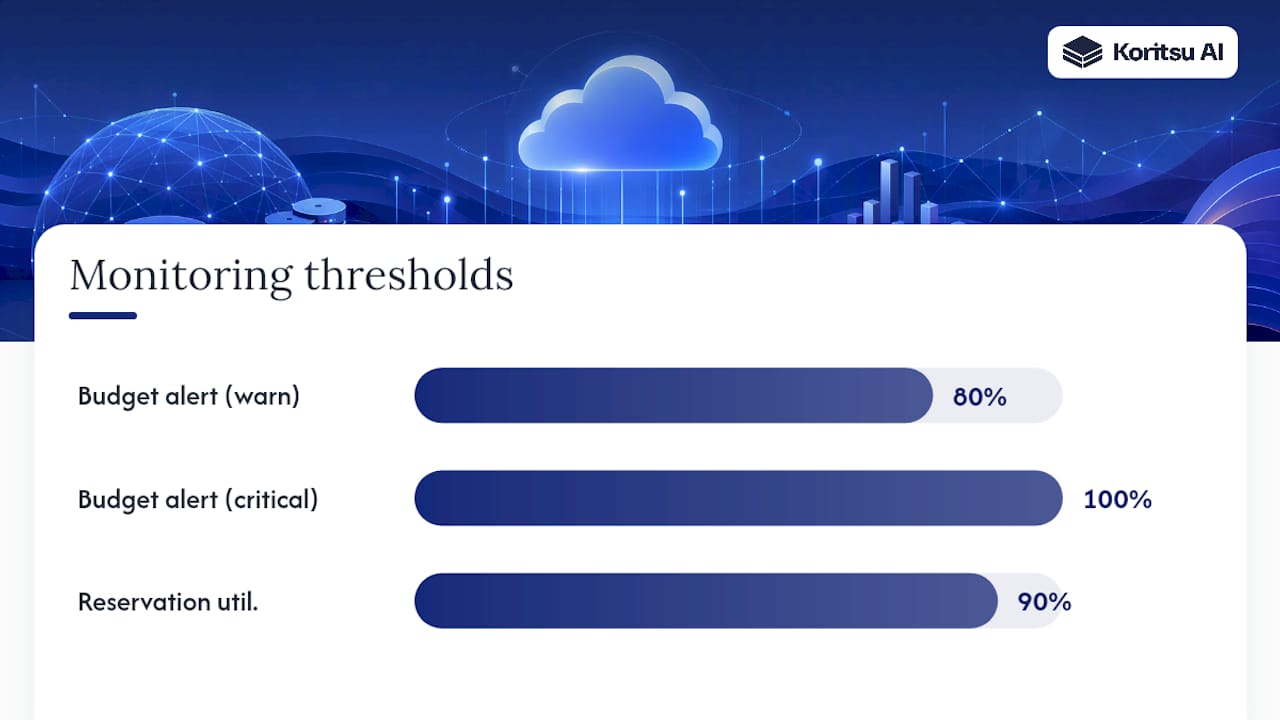
- Build budgets with alert thresholds at 80% and 100% of expected spend, so a runaway cost shows up as a notification instead of a shock invoice.
- Track reservation utilisation specifically; a reservation running below 90% utilisation is money committed and not being used.
- Watch for idle database and backup storage spikes as distinct signals, since they usually point to different root causes and different fixes.
Governance closes the loop. Tag every database by team, environment, and cost centre, publish a monthly showback report so teams see their own consumption, and write down the runbook for what happens when a budget alert fires, before it fires. Reviewing common idle cloud resource patterns is a useful exercise here, because Azure SQL idle waste tends to follow the same shapes as idle waste anywhere else in a cloud estate.
Pro Tip: Review reservation utilisation and Advisor recommendations on the same monthly cadence, side by side. A dropping utilisation number often means Advisor is about to flag the same resource for rightsizing, and catching both signals together saves a second investigation later.
Which engineering changes cut costs the most, long term?
Purchasing decisions cap what you pay per vCore. Engineering decisions determine how many vCores you actually need, and that second lever tends to move the bill further over a year than any pricing tweak.
- Find the expensive queries first. Query Store logs execution statistics over time, and sorting by total CPU or duration usually surfaces a small number of queries responsible for a disproportionate share of resource consumption.
- Fix indexing before you resize anything. A missing or poorly targeted index can force a full table scan that consumes far more compute than the workload actually needs; adding the right index sometimes cuts CPU load enough to drop a whole pricing tier.
- Introduce caching for read-heavy paths. Moving frequently-read, rarely-changed data out of SQL and into a cache layer reduces the compute Azure SQL needs to provision in the first place.
- Partition and archive to shrink the hot dataset. Smaller live tables mean faster queries, smaller backups, and lower backup storage bills simultaneously.
- Measure before and after every change. Capture CPU and DTU/vCore utilisation for a full week before a tuning change and the same window after, so you can attribute the saving to the actual fix rather than a lucky quiet period.
This is the tier of savings most billing reviews never reach, because it requires reading query plans rather than reading invoices. It’s also the tier that compounds: a query fixed once stays fixed, whereas a reservation needs renewing and a rightsizing decision needs revisiting as load patterns shift.
How do you estimate savings before you commit to a change?
Never buy a reservation or apply Hybrid Benefit on instinct. Model it first, then verify it actually happened once you’ve made the change.
- Build the scenario in the Azure Pricing Calculator. Enter your current vCore count, region, and tier, then compare the on-demand price against 1 year and 3 year reservation pricing side by side, and add Hybrid Benefit as a toggle to see the combined effect.
- Export a genuine billing baseline before touching anything. Pull at least 30 days of actual spend from Cost Management, broken down by meter (compute, storage, backup), so you have real numbers to compare against, not the estimate you started with.
- Apply one change, then verify against the baseline. Watch the next billing cycle specifically for the meter you targeted, check reservation utilisation reports to confirm the commitment is actually being consumed, and be wary of double-counting a saving that came from an unrelated usage drop instead of your change.
If you’re also modelling costs for anything calling external APIs alongside your Azure SQL estate, a general-purpose AI API cost calculator can help sanity-check that side of the bill using the same before-and-after discipline.
The 30/60/90 day plan to cut Azure SQL spend
Trying to fix everything simultaneously is how cost projects stall. A phased plan gets quick wins banked before the harder engineering work begins.
- Days 1 to 30, quick wins. Turn on Azure Advisor and action every idle-resource recommendation, resize the obviously oversized non-production databases, and export your billing baseline broken down by meter.
- Days 31 to 60, medium wins. Apply Azure Hybrid Benefit wherever your licensing team confirms eligibility, consolidate scattered small databases into elastic pools where their peaks don’t overlap, and commit your first, conservative round of 1 year reservations against confirmed baseline usage.
- Days 61 to 90, strategic work. Fix the top three costliest queries identified through Query Store, put an archiving policy in place for cold data, and automate the monitoring and alerting so the savings don’t quietly erode again in six months.
Each phase should end with a Cost Management comparison against the original baseline, not a guess at how well it went.
Where continuous analysis catches what a one-off review misses
Most Azure SQL cost reviews happen once, produce a slide deck, and get forgotten within two quarters, because the workload keeps evolving after the review ends. That’s the gap Koritsu AI was built to close: an AI platform that watches billing continuously, paired with engineers who act on what it finds, rather than a single point-in-time audit.
In one engagement, a UK bidding platform came to us with a cost profile that looked, on paper, reasonably well managed. Our analysis found otherwise: the case delivered a 52% reduction in overall cloud spend once the architectural root causes were addressed, not just the surface-level purchasing fixes.
That’s the practical difference between an automated recommendation and an engineering fix. Advisor will tell you a resource looks idle. It won’t tell you that your backup retention policy has been copy-pasted from a template for three years, or that a batch job nobody remembers writing is quietly forcing a bigger tier than the actual application needs. Automated tools find the first layer of waste efficiently. The second layer, buried in how the system was actually built, usually needs someone who reads architecture, not just invoices.
How Koritsu AI turns this checklist into realised savings
Everything above works, but working through vCore telemetry, reservation sizing, and Hybrid Benefit governance while also running your actual job is exactly why most of it stays on a to-do list. Koritsu AI exists for teams who want the 30/60/90 plan executed properly rather than started and abandoned at week three.

The model is straightforward: you start with a free assessment, our AI platform Kori analyses your Azure billing and architecture continuously to find where the money is actually going, and our specialists confirm which fixes are real and safe to make. We only charge a share of the savings we verify against your actual billing, so there’s no cost to finding out what’s there. After that initial engagement, teams typically move to an ongoing subscription so the monitoring keeps running and new waste gets caught before it compounds. The UK bidding platform case study shows what that looks like end to end, from the initial assessment through to a verified reduction in monthly spend. If your Azure SQL estate has grown without anyone reviewing it properly in the last year or two, start with the free assessment and see what a proper architectural read finds.
Where to check the details yourself
The levers in this playbook all trace back to Microsoft’s own documentation, which is worth bookmarking rather than taking on faith.
- Eight ways to optimize costs on Azure SQL, for the canonical list of levers straight from Microsoft’s product team.
- Plan and manage costs for Azure SQL Database, for exact billing meters and Cost Management steps.
- Azure SQL Database pricing, for live serverless and Hyperscale pricing mechanics.
- Azure Reservation Pricing, for reservation purchase steps and sizing examples.
- Azure Advisor cost recommendations, for the automated recommendation engine’s exact scope.
Sources
- Plan and manage costs for Azure SQL Database
- Azure Reservation Pricing | Microsoft Azure
- Azure Advisor cost recommendations