FinOps Inform
FinOps: Fix GCP Cost Allocation In 2–3 Weeks With BigQuery & GKE
FinOps guide to GCP cost allocation: enable detailed BigQuery export, turn on GKE allocation, enforce labels, and get Koritsu's free report.

Enable the detailed Cloud Billing export to BigQuery, enforce labels on every project, and switch on GKE cost allocation for any Kubernetes cluster where finance needs workload-level visibility. Before anything else, check two things: whether your detailed export is already running, and how consistently your resources carry the labels you need. Most teams find that second number embarrassing.
TL;DR:
- Enabling detailed billing export and GKE cost allocation can significantly improve workload-level cost visibility, but requires prior label consistency and resource tagging enforcement.
- GKE cost allocation introduces additional billing line items per pod, namespace, and workload, which can exponentially increase BigQuery export volume on large or highly microservices-driven clusters.
- Cost allocation accuracy depends heavily on upfront governance, including defining label policies, enforcing tags at resource creation, and continuous monitoring for label drift.
- The extra volume from detailed exports and GKE metadata may drive up storage and query costs, especially with high label cardinality and retention policies that retain extensive history.
- Effective cost attribution combines native GCP tools with structured policies and automation, and that is where an engineering-grade FinOps partner adds root cause analysis on top of basic visibility.
What is GCP cost allocation and how does GCP attach costs?
Every cost in Google Cloud starts life attached to a project. Projects sit inside folders, folders sit inside an organisation, and this hierarchy is the first and coarsest lever you have for allocation. If your organisation already separates workloads into projects per team or per environment, you get basic allocation almost for free. Most organisations don’t do this cleanly, which is exactly why labels exist.
Labels are key:value pairs attached to resources such as VMs, buckets, and BigQuery datasets. They’re the mechanism that makes fine-grained GCP cost allocation possible, because they flow through into your billing data and let you slice spend by team, environment, feature, or client. Google Cloud’s own Cost Management tooling is built around this same idea: use the resource hierarchy plus labels to structure and enforce how spend gets categorised.
The practical question is which export to use. Google Cloud offers two flavours of Cloud Billing export to BigQuery:
- Standard usage cost export gives you daily cost summaries at the SKU level, aggregated. It’s fine for finance reporting at a project level but too coarse for resource-level attribution.
- Detailed usage cost export includes resource-level cost information, which is what you need when allocation has to go deeper than “which project spent what”. This is the export you want if labels, GKE metadata, or per-resource SKU data matter to your reporting, according to Google Cloud’s export setup documentation.
Labels aren’t unlimited, though. GCP caps the number of labels per resource and the length of keys and values, and not every SKU supports labels at all. Some managed services attach cost to infrastructure you don’t directly label, which is why even a well-tagged environment will show some unallocated spend. Plan for that gap rather than being surprised by it later.
How do you enable GKE cost allocation for Kubernetes workloads?
Kubernetes breaks the labels-on-resources model because a single GKE node can run dozens of pods from different teams, all sharing the same underlying VM cost. Standard billing labels can’t see inside the cluster. GKE cost allocation solves this by injecting Kubernetes-level metadata, namespace, cluster name, and workload labels, directly into your detailed billing export.
Here’s how to turn it on and what to expect:
- Enable it per cluster, either through the Console or with
gcloud container clusters update CLUSTER_NAME --enable-cost-allocation. It is not organisation-wide or automatic; every cluster needs this switched on individually. - Verify
costManagementConfigis set to enabled on the cluster resource. This is the flag GKE checks before it starts writing Kubernetes metadata into billing data. - Wait for data to appear. New fields show up in your detailed export, including namespace, cluster name, and workload labels, but only from the moment you activate the feature onward.
- Expect placeholder values such as
goog-k8s-unknownorgoog-k8s-unsupported-skuon line items GKE can’t cleanly attribute, particularly around certain storage types and specialised hardware, per Google’s GKE cost allocation documentation.
The limitation that catches teams out most often: GKE cost allocation does not backfill. Whatever spend happened before you flipped the switch stays invisible at the workload level, with only a lag of up to three days before the new labels start populating exports reliably.
Pro Tip: Enable GKE cost allocation on a staging or non-production cluster first. Watch how much your BigQuery export volume grows over two or three weeks before rolling it out to production, where namespace and workload cardinality is usually far higher.
The other consequence is scale. Every pod, namespace, and workload combination becomes its own set of line items in your export. Larger clusters with many microservices and namespaces can multiply your daily billing rows several times over, which matters for the BigQuery costs covered later in this article.
How do you keep GCP labels reliable for finance?
Labels only work as an allocation system if people actually apply them, consistently, before the resource starts costing money. This is where most cost allocation by environment or by team quietly falls apart. Someone spins up a project without a team label, nobody notices for three months, and finance ends up with a growing pile of “unallocated” spend that nobody wants to own.
Getting this right is a governance problem before it’s a tooling problem. Four things need to happen in order:
- Define your allocation dimensions before you enforce anything. Decide whether you’re splitting by team, by environment, by product line, or by some combination, and nominate an owner for each cost centre so someone is accountable when spend spikes.
- Enforce tagging at provisioning, not after the fact. Policy-as-code, whether that’s Terraform validation rules or GCP Organisation Policies, should reject resource creation if mandatory labels are missing. Retrofitting labels onto live infrastructure is always slower and less accurate than preventing the gap in the first place.
- Restrict who can change tags or view cost data, using IAM roles scoped to billing and label-editing permissions. Unrestricted tag access is how “temporary” mislabelling becomes permanent.
- Monitor for label drift continuously. Run a scheduled query against your billing export that flags resources missing required labels, and route that list somewhere a human actually reads it.
Google Cloud’s own guidance on cost attribution backs this up directly: successful allocation depends as much on ownership and enforcement discipline as it does on the technical mechanics of labelling. Assigning owners early and automating enforcement through infrastructure-as-code cuts down the reconciliation work later, and that’s really the whole game with GCP budgeting tools: the fewer gaps you allow upfront, the less time finance spends chasing down mystery spend every quarter.
If you’re building out this ownership model from scratch, it helps to look at how cloud cost ownership engineering gets structured in practice, since the roles and escalation paths matter as much as the policy rules themselves.
How do you query allocated costs in BigQuery?
Once your detailed export is live and labels are flowing, the real work moves into BigQuery. This is where GCP cost allocation stops being a policy exercise and becomes something engineers and finance can both query directly.
Start with the schema. The detailed export table includes cost, usage, sku, project.id, labels (a repeated field of key:value pairs), and, once GKE cost allocation is enabled, additional fields for Kubernetes namespace, cluster name, and workload. Every report you build comes down to filtering and grouping on some combination of these.
A few query patterns cover most reporting needs:
- Cost by label. Unnest the
labelsarray, filter for your chosen key (say,team), and group by value. This is the backbone of showback reporting and the fastest way to answer “who’s spending what” without touching a dashboard tool. - Cost by GKE namespace or cluster. Once workload metadata is present, group by the namespace and cluster fields to see per-service spend inside a shared cluster, exactly the visibility standard labels can’t give you.
- Cost after credits. Sum
costalongside thecreditsarray (which captures committed use discounts, sustained use discounts, and promotional credits) to get the number finance actually cares about, rather than gross list-price spend. - Unallocated and unsupported SKU tracking. Filter specifically for
goog-k8s-unknown,goog-k8s-unsupported-sku, or null label values, and report that total separately rather than burying it inside a “miscellaneous” bucket. Reconciling this figure monthly stops it from silently growing.
For recurring reporting, don’t run these as manual queries. Schedule them as BigQuery scheduled queries writing into a reporting table, then connect that table to Looker Studio for dashboards your finance team can check without writing SQL themselves. This combination, detailed export plus scheduled queries plus a lightweight dashboard, covers most of what teams actually need for ongoing monitoring of GCP expenses, without requiring a separate analytics stack. Our guide to GCP billing export covers the setup and backfill mechanics behind this in more depth.
What are the cost trade-offs of detailed GCP exports?
Visibility isn’t free. Every additional label, every namespace, every GKE workload you track turns into more rows in your BigQuery export, and more rows mean higher storage costs and higher query costs if you’re scanning the full table on every report.
Enabling GKE cost allocation is the single biggest multiplier here. It increases the volume of billing data exported to BigQuery, and the exact impact depends on label cardinality and how long you retain historical data. A cluster with a handful of stable namespaces barely moves the needle. A cluster with hundreds of short-lived namespaces from ephemeral CI workloads can quietly balloon your export volume without anyone noticing until the BigQuery bill arrives.
The levers that matter most, in order of impact:
- Label cardinality. High-cardinality labels (unique build IDs, per-request identifiers, timestamps baked into label values) generate enormous numbers of distinct rows and should never be used as billing labels.
- Retention policy. Keeping years of granular billing history in a hot, partitioned table costs more to store and more to query than a table with a sensible expiration policy.
- Table partitioning and clustering. Partitioned tables clustered by label keys and ingestion date reduce query costs meaningfully when high-cardinality labels are present, because queries scan only the relevant partitions instead of the full history.
Google Cloud’s documentation is clear that enabling GKE cost allocation increases exported line items proportionally to workload and namespace count, rather than by a fixed rate, so the multiplier tracks how granular your Kubernetes labelling gets.
The decision heuristic is straightforward: if a team or product line represents a material share of your cloud bill, or if engineering constantly disputes which service caused a spend spike, the extra BigQuery cost of detailed visibility is trivial next to the savings it enables. If a cluster is small and stable, standard cost-by-project reporting is probably good enough, and you can defer the added complexity.
What allocation model should you use: showback, chargeback, or hybrid?
Most teams land on one of three models, and the right choice depends more on organisational maturity than on technology.
Showback reports allocated costs to teams without actually moving money between budgets. It’s the lowest-friction starting point: teams see what they’re spending, accountability improves, and nobody has to redesign their internal billing process. Chargeback goes further, actually debiting departmental budgets for their share of cloud spend. It drives sharper cost discipline but requires far more accuracy in your allocation rules, because someone will dispute a number if real money is on the line. Hybrid approaches showback most spend but chargeback a handful of high-cost, clearly attributable services, which is usually the pragmatic middle ground for organisations still building out their labelling discipline.
Shared infrastructure is where every allocation model gets tested. A shared Kubernetes cluster, a shared database, a shared networking layer, none of it maps cleanly to a single team. Three approaches handle this reasonably well:
- Proportional splits based on measured usage (CPU-seconds, storage consumed, request volume) divide shared costs fairly without needing perfect telemetry.
- Cellular or namespace-based attribution works well once GKE cost allocation is enabled, since namespace-level metadata gives you a natural boundary for shared cluster costs.
- Telemetry-based attribution ties cost to actual request or transaction volume for shared services like an internal API gateway, which is more accurate but requires more instrumentation to set up.
Discounts and commitments (committed use discounts, sustained use discounts) need an explicit internal rule too, either amortised proportionally across whoever benefits from the commitment, or allocated entirely to whichever team negotiated it. There’s no universally correct answer, only a rule your finance team agrees to and applies consistently.
A workable starter rule set: showback everything by default, proportional split for shared platform costs, amortised discount allocation, and chargeback only for the two or three biggest cost centres once your label coverage is solid. That gets most organisations to working accountability without months of design work. Our breakdown of cloud cost attribution methods covers how these rules apply in practice with worked examples.
Which tools handle GCP cost allocation, and where do native features fall short?
Google Cloud gives you most of the raw material for free. The Cost Management console covers budgets, alerts, and baseline recommendations at no extra charge. Detailed billing export to BigQuery, combined with Looker Studio dashboards, covers reporting. Budget alerts tied to allocated cost segments catch obvious overspend before it compounds into a quarterly surprise.
What native tooling doesn’t do well is continuous anomaly detection tied to root cause, engineering remediation, or verified tracking of savings once you’ve acted on a recommendation. It won’t tell you which specific query, misconfigured autoscaler, or orphaned disk caused it, and it certainly won’t fix it for you.
This is roughly where the decision splits for most engineering and finance teams:
- Keep it in-house if you have dedicated platform engineering capacity, your environment is relatively simple, and someone already owns cost governance as part of their role.
- Bring in managed support when spend has grown faster than your team’s ability to investigate it, when anomalies keep recurring without anyone tracing the architectural cause, or when you need savings verified against the actual bill rather than estimated from a dashboard.
Continuous AI analysis paired with engineers who implement the fix is a direct alternative for teams that have the allocation data but not the bandwidth to act on every finding it surfaces, tracing spend back to the architectural decisions that caused it rather than stopping at the label.
Practical checklist from a FinOps practitioner
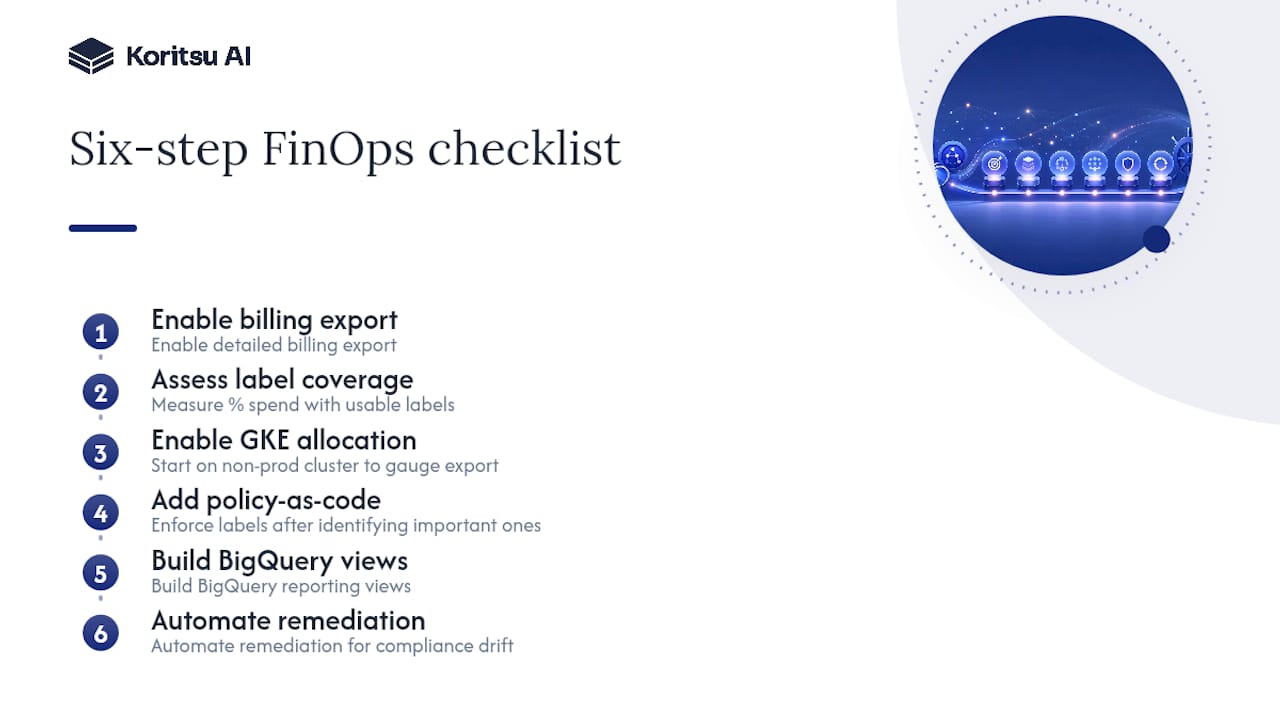
Sequencing matters more than most teams expect. Getting GCP cost allocation right, in order: enable the detailed billing export first, then run a coverage assessment to see what percentage of spend already carries usable labels before touching anything else. Only then enable GKE cost allocation, starting on a non-production cluster to gauge export growth. Layer policy-as-code enforcement in once you know which labels actually matter to your organisation, build the BigQuery reporting views, and finish with automated remediation for anything that drifts out of compliance.
The pitfall we see most often is teams enabling GKE cost allocation in production immediately, without checking export volume first, and being surprised by the BigQuery bill a month later. The second most common mistake is defining labelling policy after infrastructure already exists, which turns a five-minute provisioning rule into a months-long retrofit project.
How Koritsu AI helps with GCP cost allocation
Where Koritsu AI typically gets pulled in is right at the gap between having allocation data and knowing what to do with it: teams that can see exactly which team or namespace is overspending, but lack the engineering time to dig into why. That’s usually worth tracing back to the architecture, not the tagging.

Koritsu AI pairs Kori’s continuous analysis of your Google Cloud environment with engineers who trace findings back to the architectural decision driving the spend and implement the fix, then verify the saving on your actual bill. It starts with a free Savings Opportunity Report before you commit to anything. From there, Koritsu works on a success fee, taking a share only of the savings it actually delivers, and teams that want ongoing coverage can move onto a FinOps as a Service subscription across Monitor, Advisor, Embedded, or Premium tiers. Request the Savings Opportunity Report to see what’s currently sitting unallocated, or worth revisiting, in your Google Cloud bill.
Sources
- Cost Management | Google Cloud
- Set up Cloud Billing data export to BigQuery | Google Cloud
- Principles | FinOps Foundation
FAQ
How do you calculate GCP cost allocation?
You calculate it by grouping your detailed Cloud Billing export in BigQuery by label, project, or (for Kubernetes) namespace and workload, then summing cost minus applicable credits for each group.
How much does GCP typically cost?
Total spend varies enormously by workload, but most organisations only discover their real cost drivers once resource-level and label-based allocation is in place, which is why detailed export and labelling come before any serious cost reduction work.
How can you reduce GCP costs once they’re allocated?
Once spend is allocated by team, environment, or namespace, the biggest reductions usually come from architectural fixes such as rightsizing, eliminating idle resources, and correcting inefficient configurations, the root-cause work worth prioritising once allocation shows you where to look.
Does GKE cost allocation backfill historical billing data?
No. GKE cost allocation only populates Kubernetes metadata in your billing export from the moment you enable it, so any spend before activation stays invisible at the workload level permanently.