FinOps Inform
Kubernetes cost optimisation: an engineering runbook to cut spend
Discover how to optimize Kubernetes costs effectively. Implement a measurement-first strategy to save 20% to 60% on compute expenses.

Follow a measurement-first optimisation loop, measure, rightsize, autoscale, purchase, govern, and you can typically recover a significant share of your Kubernetes compute spend without touching reliability. Teams that implement this loop properly report compute reductions in the 40% range, with the full range spanning roughly 20 to 60% depending on how wasteful the starting point was.
Here’s what to do in the next 24 to 72 hours:
- Turn on cost visibility at the namespace level. You cannot fix what you cannot see.
- Rank namespaces by monthly spend and pull out the worst five.
- Run a rightsizing pass on those five only. Do not touch the rest yet.
- Set a rollback rule before you change anything: if OOMKilled events or latency alerts spike within 24 hours, revert.
Automation has to stay human-in-the-loop at this stage. A recommendation engine that opens a pull request is useful. One that silently changes production resource limits at 2am is a liability. Build the habit of reviewing before you build the habit of trusting.
TL;DR:
- Prioritize collecting 14 to 30 days of resource and load data before making any resource adjustments to ensure accurate rightsizing.
- Focus on rightsizing requests at p50 to p75 for stable workloads and p75 to p90 for bursty workloads, setting memory limits at 1.2 to 1.5 times p99.
- Route interruption-tolerant workloads to spot instances and keep steady workloads on reserved instances or savings plans for optimal cost efficiency.
- Use guardrails like dry-run recommendations, PR-based changes, and staged automation to prevent production incidents during cost optimization efforts.
- Obtain external help from continuous AI analysis and FinOps specialists, starting with a free assessment and a success-based fee structure.
What does kubernetes cost optimisation actually require first?
Kubernetes cost optimisation starts with data, not decisions.
The metrics that matter are p50, p95, and p99 CPU and memory usage per pod, PVC utilisation against allocated capacity, and load balancer plus network egress volume. p50 tells you the typical load; p95 and p99 tell you what you need to survive without throttling or eviction. Ignore either end and you either overpay for headroom nobody uses or you get paged at 3am.
Three sources give you this picture:
- Prometheus and kube-state-metrics for pod and node-level resource usage over time.
- Cloud billing APIs (AWS Cost Explorer, Azure Cost Management, GCP Billing) for the actual dollar figures behind that usage.
- OpenCost-style collectors, which map Kubernetes concepts like pod, namespace, and controller directly onto billing data, giving you real-time cost allocation without building the join yourself.
Once you have both sides, a simple query, spend per namespace divided by average CPU utilisation, will surface which teams are paying for compute they never use. That single number usually shortens your priority list from every namespace to about five.
Pro Tip: Run your first cost-per-namespace report before you touch a single deployment. It is the cheapest diagnostic you will ever run, and it tells you exactly where the next two weeks of engineering time should go.
How do you make teams accountable for cloud spend?
Visibility without ownership just produces a dashboard nobody acts on. The fix is a two-stage model: showback first, chargeback later.

Showback means every team can see what their workloads cost, without money actually moving between budgets. It is low friction and it works because most engineers will right-size their own services once they see the number attached to their name. Chargeback, where costs are formally billed back to a team’s budget, should wait until teams trust the allocation model. Roll it out too early and you spend months arguing about attribution accuracy instead of fixing waste.
Labels and tags are the backbone of both. Without a consistent team, service, or cost-centre label on every deployment, your allocation data is guesswork dressed up as precision.
Once ownership is clear, lock in the gains with governance:
- Apply
ResourceQuotaat the namespace level so no single team can silently consume a disproportionate share of a shared cluster. - Set
LimitRangedefaults so pods that omit requests and limits don’t get scheduled with unbounded assumptions. - Add admission policy guardrails (OPA Gatekeeper or Kyverno-style controls) to block deployments that skip resource specifications entirely.
A FinOps framework built this way turns cost control from a quarterly panic into a standing process.
What are the right requests and limits for your workloads?
Rightsizing is where most of the savings actually live, and it is also where most teams get nervous, because setting requests too low means throttled or evicted pods. The fix is procedural, not clever.
- Collect data for at least 7 to 14 days, with 14 to 30 days preferred, so you capture weekly cycles and peak traffic events rather than a quiet Tuesday.
- Set CPU and memory requests at p50 to p75 for stable, predictable services. These workloads rarely spike, so there is no reason to reserve headroom they never touch.
- Set requests at p75 to p90 for bursty workloads, batch jobs, request-driven APIs with variable traffic, anything with an unpredictable tail.
- Set memory limits at 1.2 to 1.5 times your observed p99. Memory cannot be throttled the way CPU can; get this wrong and pods get killed, not slowed down.
- Roll out one workload at a time. Apply the change, then watch OOMKilled counts and latency percentiles for a full 24 hours before moving to the next.
This mirrors the production rollout pattern that mature FinOps teams use: conservative floors, staged changes, and enough observation time to catch a bad call before it becomes an incident.
Should you use HPA, VPA, or KEDA for autoscaling?
These three tools solve different problems, and using the wrong one is a common source of both wasted spend and scaling thrash.
- HPA (Horizontal Pod Autoscaler) adds or removes pod replicas based on CPU, memory, or custom metrics. Use it for stateless services where traffic varies by time of day.
- VPA (Vertical Pod Autoscaler) adjusts the CPU and memory requests of existing pods. Use it for workloads where replica count is fixed but load per pod varies, though be cautious combining it with HPA on the same metric, they can fight each other.
- KEDA scales based on external event sources, queue depth, Kafka lag, cron schedules, making it the right choice for event-driven and batch workloads that don’t map cleanly to CPU thresholds.
On the node side, Karpenter-style provisioners that size nodes to actual pod requirements typically cut node costs by 20 to 40% compared with fixed-group Cluster Autoscaler setups, because they eliminate the pre-provisioned headroom that node groups tend to accumulate.
Pro Tip: Set generous scale-down cooldowns before you set aggressive scale-up thresholds. Most oscillation problems come from a cluster removing capacity too fast, then scrambling to add it back ten minutes later.
Can spot instances and reservations work together safely?
Yes, and cloud providers explicitly recommend combining them rather than picking one. The trick is matching each purchasing option to the right workload, not applying either universally.
- Classify workloads by interruption tolerance first. Batch jobs, CI runners, and stateless processing queues tolerate interruption; customer-facing APIs generally do not.
- Route interruption-tolerant workloads to spot or preemptive instance pools, where substantial discounts off on-demand pricing are commonly available.
- Cover your steady, predictable baseline load with savings plans or reserved instances, locking in a lower rate for capacity you know you’ll use regardless.
- Build in graceful termination handling: drain nodes properly, requeue in-flight work, and set pod disruption budgets so a spot reclaim doesn’t take down a whole service at once.
Where do hidden storage and network costs come from?
Compute gets the attention, but storage and network charges accumulate quietly and rarely get reviewed.
- Audit persistent volume claims regularly. Orphaned PVCs from deleted deployments keep billing long after anyone remembers why they exist.
- Set claim size maxima and snapshot lifecycle policies so nobody provisions a 500GB volume for a 10GB workload.
- Replace internal-only
LoadBalancerservices withClusterIPwherever external exposure isn’t needed, each unnecessary load balancer is a recurring monthly charge. - Use topology-aware routing and pod affinity to keep traffic within an availability zone; cross-AZ traffic charges are one of the most common five-figure surprises in large clusters.
What should you expect from a kubernetes cost optimization tool?
Not every tool in this category does the same job, and confusing them leads to disappointment. There are three distinct layers.
- Visibility tools show you where money goes, cost allocation by pod, namespace, or controller. OpenCost is the reference implementation here, open source and built specifically for Kubernetes cost concepts.
- Recommendation engines analyse that data and suggest changes, new request values, workloads to move to spot, quotas to tighten, but don’t touch anything themselves.
- Remediation tools actually make the change, ideally through a pull request a human reviews rather than a live, unattended edit.
The safest pattern combines all three with guardrails: dry-run everything first, generate a PR rather than a direct change, restrict early automation to an allowlist of low-risk namespaces, and expand scope only once a workload has shown stable behaviour across several cycles. This advisory-first model is deliberately conservative, and that conservatism is the point, not a limitation.
Pro Tip: If a tool offers “fully automated optimisation” with no review step, ask what happens when its recommendation is wrong. If the answer is “nothing, it just applies it,” that’s a production incident waiting for a bad training day in the model.
What does a 30 to 90 day kubernetes cost optimization plan look like?
A phased runbook keeps this from becoming an open-ended project with no clear finish line.
- Week 0 to 1: Deploy cost visibility tooling, tag every deployment with an owning team, and run a top-waste report. KPI: your top 10 namespaces ranked by monthly spend.
- Week 2 to 4: Pilot rightsizing on the two or three highest-impact namespaces from that list, following the p50/p95/p99 rules above. KPI: percentage compute reduction achieved in the pilot group.
- Month 2 to 3: Expand spot usage to eligible workloads, commit to savings plans for your now-stable baseline, and lock in
ResourceQuotaandLimitRangedefaults across the cluster. Establish a recurring monthly review so gains don’t erode as new services get deployed.
Each phase produces a number you can report upward, which matters as much as the savings themselves when you’re asking for engineering time to keep this going.
How much does cluster architecture affect your bill?
Cluster topology decisions made at setup time often outlast every rightsizing effort that follows, because they’re expensive to unwind later.
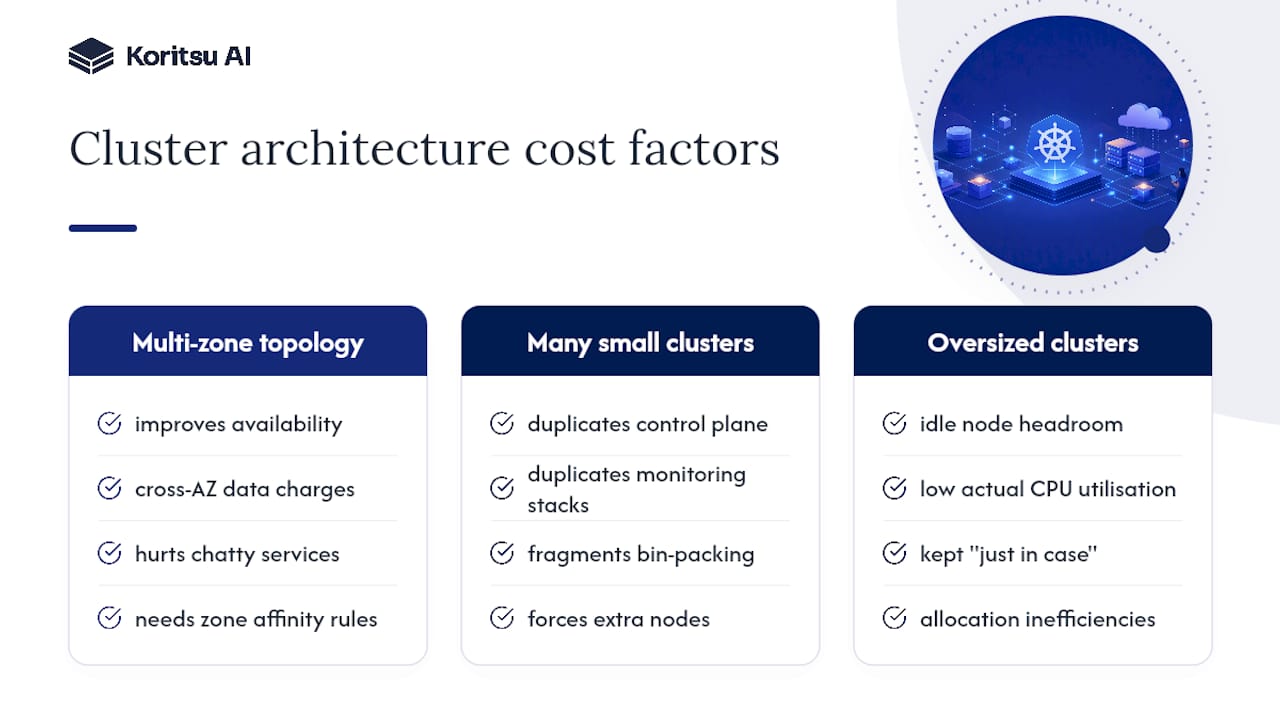
Multi-zone clusters improve availability but introduce cross-AZ data transfer charges on every pod-to-pod call that crosses a zone boundary. For chatty microservice architectures, this can add a meaningful line item to your monthly bill that has nothing to do with compute at all. Topology-aware routing and zone-affinity rules reduce this, but the underlying trade-off, resilience versus network cost, doesn’t disappear.
Cluster count matters just as much as cluster size. Running many small clusters (one per team, one per environment) multiplies control plane overhead, duplicates monitoring stacks, and fragments your ability to bin-pack workloads efficiently across shared capacity. A single pod that needs 2 vCPUs might force a new node in a small, isolated cluster when it would have fit into existing headroom on a larger, shared one. Consolidation, where security and compliance boundaries allow it, generally improves utilisation.
Oversized clusters carry their own tax: idle node headroom kept “just in case” is one of the most common sources of the low actual CPU utilisation seen across many production environments, where allocation inefficiencies, not raw demand, explain most of the waste. The right cluster count and size depends on your workload mix, but the decision deserves the same measurement discipline you apply to rightsizing a single pod. Get it wrong at the architecture level and no amount of workload-level tuning fully compensates.
Managed or self-managed control plane: which costs less?
Most teams overthink this decision, and the honest answer is that for the vast majority of workloads, a managed control plane, EKS, AKS, or GKE, costs less once you account for engineering time.
Self-managing a control plane means running etcd, the API server, and the scheduler yourself, patching them, and handling failover. That’s not free labour. It’s ongoing engineering time that could otherwise go toward the optimisation work covered throughout this article. Unless you have a specific regulatory or air-gapped requirement forcing self-management, the managed control plane fee, typically a small flat hourly charge, is cheap insurance against an entire category of operational risk.
High availability is where the real cost decision sits. A single-control-plane setup is fine for development and staging. Production workloads generally warrant a highly available control plane, spread across multiple availability zones, which most managed offerings provide by default at a modest premium. The mistake to avoid is paying for HA control planes on environments where an hour of control-plane downtime has no real business impact, sandbox and test clusters rarely need it.
Where self-managed control planes still make sense: extremely large clusters where the managed service’s API rate limits or node count ceilings become a genuine constraint, or environments with strict data residency rules that managed offerings can’t satisfy. For everyone else, the calculation is straightforward: your control plane spend should be a rounding error next to your compute spend. If it isn’t, that’s a sign of over-engineering the wrong layer.
Does multi-cloud Kubernetes actually save money?
Multi-cloud Kubernetes strategies get pitched as a cost play, but the honest picture is more mixed than the marketing suggests.
The genuine cost benefit is workload arbitrage: running batch or stateless workloads on whichever provider has the cheapest spot capacity at a given moment, or negotiating better committed-use pricing because you have credible leverage to move volume elsewhere. For organisations with genuinely portable, containerised workloads and no deep dependency on a single provider’s managed services, this can meaningfully reduce compute costs, particularly for elastic, ephemeral workloads that don’t care which cloud they run on.
The hidden cost is complexity. Running Kubernetes across AWS, Azure, and GCP means duplicating observability tooling, managing separate networking and identity models, and often maintaining separate cost allocation pipelines for each provider’s billing API. That engineering overhead frequently exceeds the arbitrage savings for anyone below a certain scale, generally teams running dozens of clusters rather than a handful.
Hybrid cloud, keeping steady-state, predictable workloads on-premises or on a committed cloud footprint while bursting variable demand to public cloud spot capacity, tends to produce a cleaner cost story than full multi-cloud. It avoids duplicating your entire platform stack while still capturing the elasticity benefit for the workloads that actually need it.
The practical rule: don’t adopt multi-cloud or hybrid Kubernetes for cost reasons alone unless you’ve already exhausted single-cloud optimisation. Most organisations chasing multi-cloud savings would recover more, faster, by properly rightsizing and rightsourcing their existing footprint first.
How does sustainability intersect with cost optimisation?
Energy consumption and cloud spend are more tightly linked than most engineering teams assume, because the same waste that inflates your bill also inflates your carbon footprint.

An idle pod reserving CPU it never uses isn’t just costing you money; it’s holding a physical server core active that could otherwise be powered down or reallocated. Cloud providers increasingly publish carbon intensity data by region, and workloads scheduled in regions running on cleaner grid mixes can reduce both emissions and, in some pricing models, cost simultaneously. Scheduling non-urgent batch workloads to run during off-peak grid hours, when a region’s energy mix leans more renewable, is a genuinely underused lever.
Rightsizing, autoscaling to zero for idle workloads, and consolidating fragmented clusters all reduce the physical compute footprint your workloads demand, which is precisely the mechanism through which cloud providers report reduced energy draw. There’s no meaningful tension between the FinOps goal and the sustainability goal here. The practices covered throughout this article, tighter requests and limits, scale-to-zero for idle capacity, consolidated cluster architecture, serve both objectives at once without requiring a separate sustainability initiative bolted on top.
What matters most in Kubernetes cost optimisation?
The conventional advice in this space overindexes on purchasing decisions, reserved instances, spot bidding strategies, savings plan calculators, because they’re easy to quantify and easy to sell. They’re also the smallest lever available to most teams. Buying discounts on waste is still waste, just cheaper waste.
What the evidence actually supports is that allocation inefficiency, not pricing, is the dominant driver of overspend. Research on cluster scheduling consistently finds single-digit actual CPU utilisation in poorly measured environments, which means the gap between what’s requested and what’s used dwarfs any discount you could negotiate on the requested portion.
If you take one thing from this article, prioritise measurement before any purchasing conversation. A team that rightsizes first and buys reservations second will always outperform a team that does it the other way round, because reservations lock in whatever inefficiency already exists in your requests. The second thing worth internalising: automation should earn trust incrementally. Start with recommendations, move to PR-based changes, and only automate live remediation once a workload has behaved predictably across several review cycles. That discipline is slower than a fully automated pitch promises, but it’s the difference between sustainable savings and an outage you’ll be explaining in a postmortem.
— Kori
Get hands-on help cutting your Kubernetes bill
Most of what’s covered above takes an engineering team weeks to implement properly, and that’s the actual barrier for most organisations, not lack of knowledge but lack of spare capacity to do the measuring, rightsizing, and rollout work while also shipping product. Koritsu AI closes that gap by pairing continuous AI-driven analysis with specialists who do the implementation work alongside your team, rather than handing you another dashboard and leaving you to act on it alone.

Kori, Koritsu AI’s analysis agent, runs the measurement and rightsizing detection described throughout this article continuously, surfacing wasteful namespaces, orphaned volumes, and overprovisioned workloads as they appear rather than in a one-off audit. Koritsu AI’s FinOps consultants then work through the fixes with your engineers, and the commercial model reflects that Koritsu AI only earns when it finds real savings: engagements start with a free assessment, and Koritsu AI takes a share of the savings actually realised and verified against your billing. If the runbook above sounds right but the time to execute it doesn’t exist on your team’s roadmap, start with a free assessment to see what’s currently being overpaid for.
Key Takeaways
Kubernetes cost optimisation works when teams measure actual usage before changing anything, then rightsize, autoscale, and purchase in that order, with governance locking in each gain.
| Point | Details |
|---|---|
| Measure before acting | Collect 14 to 30 days of p50/p95/p99 CPU and memory data before touching any resource requests. |
| Rightsize with conservative rules | Set requests at p50 to p75 for stable services, p75 to p90 for bursty ones, memory limits at 1.2 to 1.5x p99. |
| Layer purchasing correctly | Cover steady baseline load with savings plans and route interruption-tolerant workloads to spot capacity. |
| Automate with guardrails | Use dry-run recommendations and PR-based changes before allowing any tool to remediate live production workloads. |
| Get expert execution support | Koritsu AI combines continuous AI analysis with FinOps specialists, starting with a free assessment and a success-fee model tied to verified savings. |
Sources
- Cost management guidance for AKS and EKS migration (Azure docs)
- OpenCost — open source cost monitoring for cloud native environments
- cluster-optimizer (guardrailed Kubernetes cost & capacity optimiser)
- Academic research on resource allocation inefficiencies (arXiv)