FinOps Inform
Set Up Azure Budget Alerts in 5 Minutes, Then Automate With API & IaC
Set up Azure budget alerts in five minutes, then automate them with the Budgets API, ARM/Terraform and CI. Includes action-group patterns and low-noise.

Azure budget alerts notify a team or trigger an automated action the moment spending or a forecasted cost crosses a threshold you define. Set them up correctly and you get early warning, action-group escalation, and governance enforcement instead of a surprise invoice. This guide takes you from a five-minute portal setup through to full automation with the Budgets API and infrastructure-as-code.
TL;DR:
- Most organization-wide budgets should have three to four thresholds, including early forecast warnings and hard spending limits, to avoid noise and maintain clarity.
- Proper setup of permissions, scope, and inheritance is critical to ensure budget alerts function reliably and are delivered to the responsible teams.
- Automating budgets via the API, Infrastructure-as-Code, or CI pipelines ensures consistent deployment across many subscriptions, minimizing manual errors.
- Combining budget alerts with anomaly detection and reservation utilization alerts provides comprehensive coverage for planned and unexpected cost overruns.
- Regular review and recalibration of thresholds are necessary to prevent persistent unwarranted alerts and improve overall cloud cost governance.
Prerequisites and permissions for Azure budget alerts
Before you touch the portal, confirm you have the right access. Budgets sit inside Cost Management, and permissions are stricter than most engineers expect.
- Owner, Contributor, or Cost Management Contributor at the scope you want to budget (subscription, resource group, or management group).
- Reader access to Cost Management is not enough to create or edit budgets, only to view them.
- Scheduled Actions (recurring exports or automated recipient lists) need the same role at the scope where the schedule runs, plus permission to create the action group itself.
- Budgets can be created at management group, subscription, or resource group scope, but anomaly detection is currently limited to subscription scope only.
- Email notifications have a limit on the number of recipients per budget in the portal, and locale settings affect how currency and date formats render in the alert email.
Get the scope and role wrong and the budget either fails to save or silently stops sending alerts, which is one of the more common Azure cost governance pitfalls teams hit in their first month.
How do you create a budget with actual and forecasted alerts?
Creating the budget itself takes a few minutes. Getting the thresholds right is where most of the value lives.
- Open Cost Management and select the scope: subscription, resource group, or management group.
- Choose a time grain (monthly, quarterly, or annual) and set the budget amount based on historical spend plus planned growth.
- Add one or more Actual cost thresholds — these fire once real, billed spend crosses the percentage you set.
- Add one or more Forecast thresholds — these use Azure’s cost projection to warn you before the money is actually spent.
- Attach an action group (or use email-only notification for a quick first pass) and save.
The distinction between Actual and Forecast thresholds matters more than it looks. Microsoft’s tutorial on creating and managing budgets covers the mechanics of setting up both threshold types.
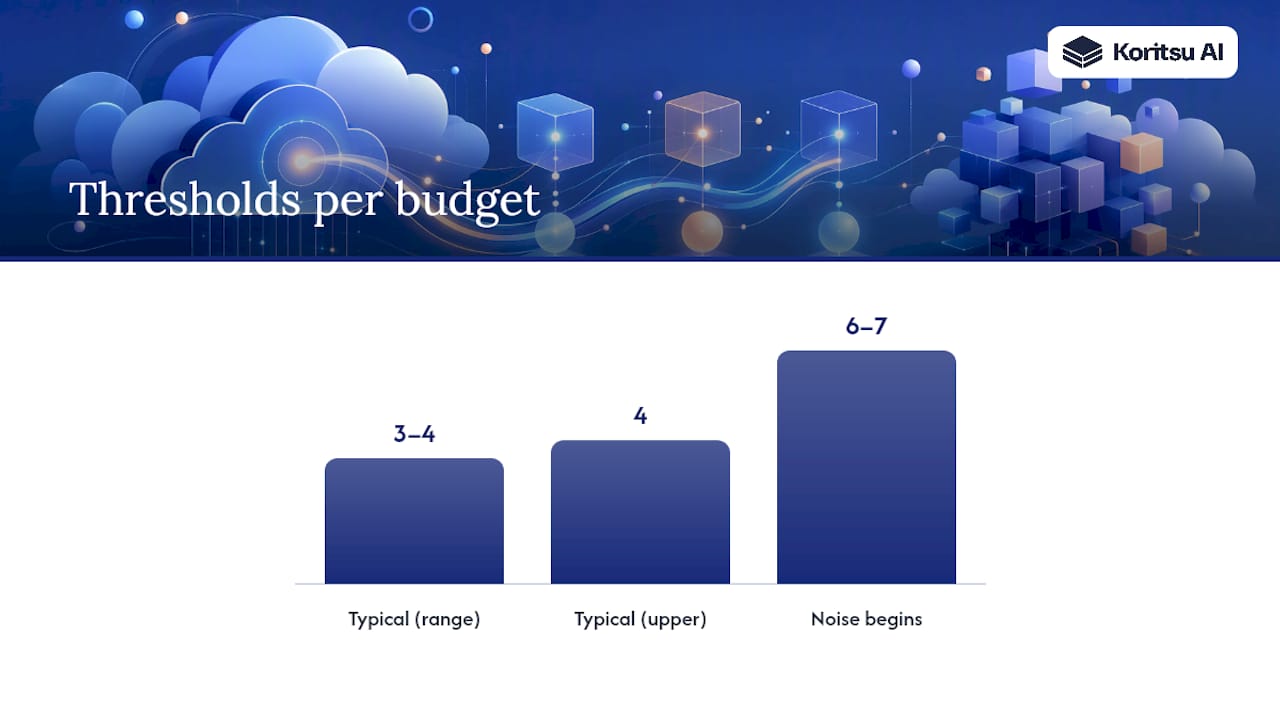
There’s no hard limit on the number of thresholds you can add per budget, but past six or seven you start generating noise rather than signal. Most mature FinOps teams settle on three to four thresholds per budget: an early forecast warning, a mid-range actual alert, and a hard ceiling.
Configuring action groups, recipients, and notification limits
The portal’s limit on the number of email recipients is fine for a small team. It breaks down fast once budgets need to reach on-call rotations, finance, and multiple engineering leads across a large estate.
Action groups solve this by decoupling the trigger (the budget threshold) from the delivery mechanism (email, SMS, webhook, or app). Common patterns include:
- Email plus webhook, so a human gets notified and an automated system logs the event simultaneously.
- Teams adaptive cards, delivered via a Logic App that formats the alert payload into a readable card in the right channel.
- ITSM integration, where a Logic App receives the webhook and opens a ticket in ServiceNow, tagging it with the budget name and threshold breached.
- Distribution lists, useful when you want to avoid re-editing the budget every time team membership changes.
A practical example: connect the budget’s action group to a webhook, point that webhook at a Logic App, and have the Logic App create a ServiceNow incident with the budget scope, threshold percentage, and a direct link back into Cost Management. This turns a passive email into a tracked, assignable piece of work, and it sidesteps the five-recipient cap entirely by fanning out through your existing incident tooling rather than a fixed list of addresses.
Scopes, tags, and cost allocation for meaningful alerts
A budget alert is only useful if the person who receives it can act on it. That means scoping budgets to match how your organisation actually assigns ownership, not just how the Azure hierarchy happens to be structured.
- Use management group scope for org-wide guardrails, subscription scope for a business unit or environment, and resource group scope for a specific product or feature team.
- Enable tag inheritance so subscription and billing-account tags automatically apply to child resource usage records, which lets you build tag-filtered budgets without manually tagging every resource. Tag inheritance typically takes 8 to 24 hours to propagate after you turn it on.
- Filter budgets by tag (for example
team:paymentsorenv:production) once inheritance has propagated, so alerts route to the team actually responsible for the spend. - Remember that cost allocation rules reshape reporting, not billing. They redistribute shared costs for visibility, but they never change what appears on the actual invoice.
The most common pitfall here is creating a tag-filtered budget the same day you enable inheritance, then wondering why it shows zero spend. Give it the full propagation window before you trust the numbers.
Automating budgets with the API, ARM, and Terraform
Manually clicking through the portal for every subscription doesn’t scale past a handful of teams. The Budgets REST API is the practical path to consistent, repeatable budget deployment across an estate.
- Call the create-or-update endpoint with the budget
amount,timeGrain,category, and anotificationsobject defining thresholds and recipients. - Pass the current eTag on update calls so concurrent edits don’t silently overwrite each other, a real risk once budgets are managed by both a pipeline and a human.
- Wrap the API call in an ARM template or Terraform module and deploy it alongside the subscription or resource group it protects.
- Run the deployment through a CI pipeline authenticated with a service principal, so budgets get created automatically for every new subscription rather than depending on someone remembering to do it.
| Automation layer | What it handles | Typical trigger |
|---|---|---|
| Budgets REST API | Create/update budget, thresholds, notifications, eTag concurrency | Direct call or pipeline script |
| ARM / Terraform template | Declarative budget definition tied to subscription lifecycle | Infrastructure deployment |
| CI pipeline with service principal | Non-interactive, repeatable rollout across many subscriptions | New subscription provisioning |
Treating budgets as code, deployed the same way as any other resource, is the single biggest shift that separates teams who chase missing alerts from teams whose new subscriptions inherit cost controls automatically.
Do you need anomaly detection alongside budget alerts?
Budgets catch planned overruns. They’re a poor fit for sudden, unexpected spikes, because a threshold you set last quarter has no concept of “this looks unusual for a Tuesday.”
- Anomaly detection evaluates subscription spend daily against a rolling 60-day forecast and flags atypical deviations, catching the misconfigured autoscale rule or the forgotten test cluster that a fixed threshold would miss for weeks.
- Reservation utilisation alerts notify you when a reserved instance’s utilisation drops below a set percentage over a chosen time grain, such as the last seven days, flagging wasted commitment spend that budgets don’t track at all.
- The two are complementary, not competing: budgets enforce planned governance and monthly discipline, anomaly alerts catch the spike nobody planned for, and reservation alerts protect the money you already committed. Running all three is closer to defence-in-depth than belt-and-braces.
Best practices for reliable, low-noise alerting
An alert nobody trusts is worse than no alert at all. A few habits keep the signal-to-noise ratio high:
- Stagger thresholds and lean on Forecast alerts for early warning rather than waiting for Actual alerts to confirm the money is already spent.
- Assign a named cost owner per budget scope, not a shared inbox, so accountability doesn’t dissolve the moment an alert fires.
- Build a recurring review cadence (monthly is typical) tied into existing incident or change-review processes, rather than treating budgets as a set-and-forget control.
- Deploy budgets through the same provisioning pipeline as the infrastructure they protect, following the cloud engineering efficiency practices that keep governance from lagging behind delivery.
Pro Tip: If a budget alert has fired three months running without anyone changing behaviour, the threshold is wrong, not the process. Recalibrate it rather than muting it.
Why didn’t my budget alert fire?
Missed alerts almost always trace back to one of a handful of causes. Work through them in order before assuming Azure is at fault.
- Check whether the underlying usage data has caught up; cost data and email delivery are not instant, and evaluation runs on a schedule rather than in real time.
- If the budget is tag-filtered, confirm tag inheritance has had its full 8 to 24 hour propagation window before you trust the filter.
- Re-verify the RBAC role at the exact scope the budget targets, and check the notification configuration hasn’t been edited since the last threshold breach.
- Open Cost Management > Cost alerts to see the full alert history, including the reason each alert was generated and a direct link back to the budget for further investigation.
Koritsu’s view: alerts are the start of FinOps, not the finish
Budget alerts tell you something is wrong. They don’t fix it. That’s the gap most teams underestimate: an alert firing every month on the same subscription, with nobody assigned to investigate the root cause, isn’t governance, it’s noise with a timestamp.
Alerting should be treated as the trigger for a continuous FinOps workflow, not the end state. An AI agent can watch for the architectural reasons behind the threshold breach, and specialists can step in when a team needs help turning that finding into an actual fix rather than another dashboard.
How Koritsu can help you act on the alerts, not just receive them
Setting up thresholds and action groups solves the notification problem. It doesn’t solve the harder question: once an alert fires, does anyone on your team actually know what to change? Some FinOps platforms analyse Azure spend to find where money is actually going, from oversized compute to inefficient architecture, and some offer specialist support to help engineers fix the issues.

Some providers use success-fee pricing models and offer free initial assessments, meaning there can be no cost to discovering inefficiencies in your cloud bill. If your team is already fielding budget alerts every month without a clear owner or fix, that’s a signal worth acting on. Get your free cloud cost assessment and find out what’s driving the spend behind the threshold.
Sources
For deeper reference, Microsoft’s budget creation tutorial covers step-by-step setup, the cost alerts overview explains the alerts dashboard, and the Budgets REST API reference documents automation fields. For platform-specific cost context, Microsoft Fabric’s pricing guide is worth a read.
- Tutorial: Create and manage budgets