FinOps Inform
Cut Azure Storage Costs in 90 Days: An Engineer's Prioritized Runbook
Engineer runbook to cut Azure Storage costs: 72-hour quick wins, a prioritized 90-day rollout, reservation break-even checks, and a free Koritsu assessment.

Start with three moves: enforce lifecycle policies or smart tier, delete orphaned storage, and check your redundancy settings against actual recovery needs. Many teams find a significant portion of their storage spend sitting in the wrong tier or attached to nothing at all. Weigh retrieval charges and rehydration penalties before you shift archive data, and if internal bandwidth is the bottleneck, a partner like Koritsu AI can move faster than a stretched platform team.
TL;DR:
- Most teams find the largest savings in Azure Storage come from removing orphaned resources, implementing lifecycle rules, and enabling smart tiering for unpredictable access patterns.
- Major cost drivers include small-file operations, frequent data rehydration from archive, and high churn of versioned or soft-deleted objects, which should be monitored and optimized.
- Using a combination of precise lifecycle policies, compression, caching, and TTLs can significantly reduce storage and operation costs without requiring architectural redesigns.
- Reserved capacity only makes sense for very stable workloads exceeding 100 TiB per tier, and often does not justify costs for smaller or fluctuating data estates.
- External tools like Koritsu AI can accelerate cost savings by continuously analyzing and automating storage optimizations, freeing internal teams from time-consuming audits.
Quick wins: what to fix in the next 72 hours
Azure Storage cost optimization rarely needs a redesign to show results. Most engineering teams find the biggest savings sitting in plain sight: orphaned disks, forgotten snapshots, and containers nobody has touched in a year. The fixes below take a few days, not a quarter, and they compound with everything else in this guide.
Here is the order we’d work through it, starting with the highest ratio of savings to effort:
- Audit for orphaned resources. Pull a list of unattached managed disks, stale snapshots, and containers with no recent read or write activity. These accumulate silently after VM deletions, failed deployments, and abandoned test environments, and they bill at full rate with zero business value attached.
- Apply lifecycle rules wherever access patterns are predictable. If you know logs age out after 30 days or backups only get touched during incident response, write the rule and let Azure move the data automatically.
- Turn on smart tier where patterns are not predictable. Unpredictable access is exactly where manual lifecycle rules fail. Smart tier handles the guesswork for you, which we cover in more detail below.
- Pin genuinely hot objects. Anything queried constantly, dashboards, active session data, live application state, should stay in Hot deliberately, not by accident. Everything else is a candidate for a cooler tier.
- Batch small files before upload. If you are writing thousands of small objects per hour, package them. Fewer, larger objects mean fewer billed operations.
- Set a temporary budget alert now. Even a rough threshold catches the next unexpected spike before it becomes a line item you have to explain to finance.
None of this requires a re-architecture. It requires someone spending an afternoon in the Azure Cost Management portal and acting on what they find.
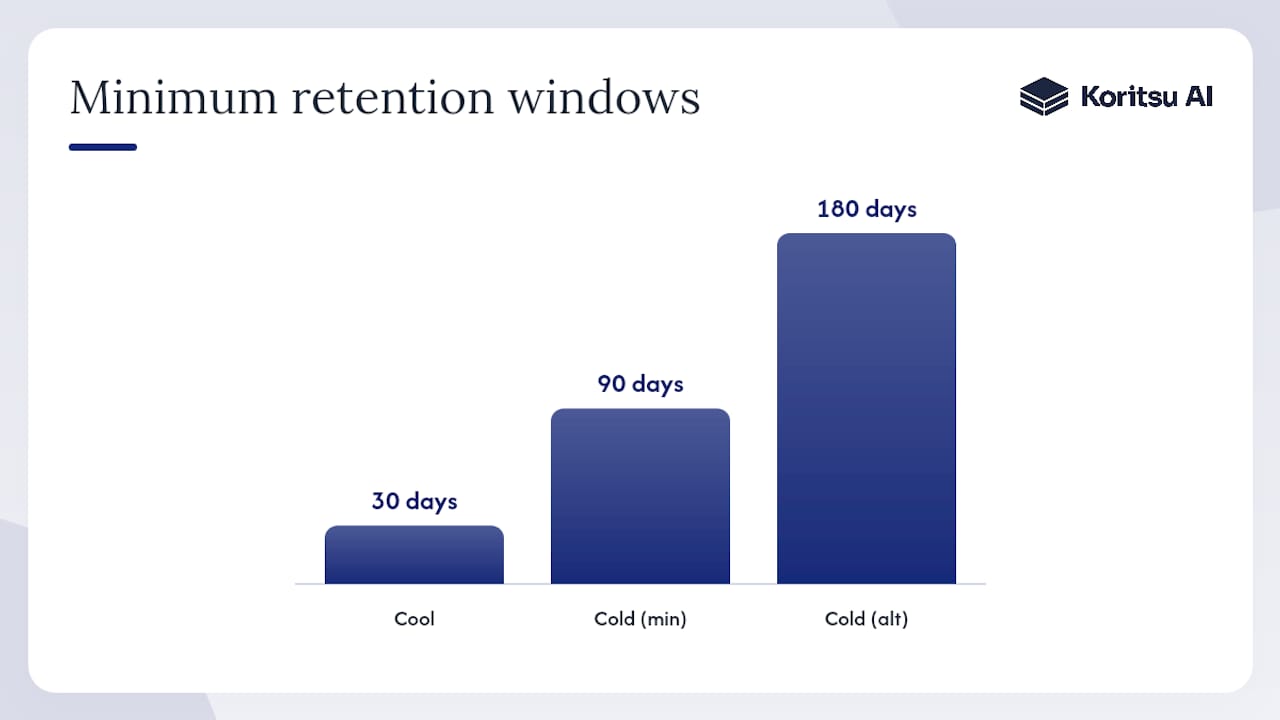
Pro Tip: Before you delete anything, tag it and wait 48 hours rather than deleting immediately. Early deletion penalties on tiered blobs can turn a “quick win” into an unexpected charge if the object you removed was less than 30, 90, or 180 days old, depending on its tier.
How does Azure Storage billing actually work?
Every Azure Storage bill is built from four meter types, and misreading any one of them is how teams get blindsided. Microsoft Learn’s billing guidance breaks these down clearly, but the practical reality is messier than the documentation makes it sound.
The four meters that matter:
- Capacity, billed per GB per month and priced differently across Hot, Cool, Cold, and Archive tiers.
- Operations, billed per 10,000 read, write, or list requests, and this is where small-file workloads quietly rack up cost.
- Data retrieval and network egress, charged per GB when you read data back out, particularly expensive from Archive.
- Feature meters, covering things like SFTP endpoints (billed hourly whether you use them or not) and monitoring fees for automated tiering.
The interactions between these meters are where bills spike unpredictably. Moving an object between tiers is not free. It triggers an operation charge, and if the object has not sat in its current tier long enough, you also pay an early deletion penalty. Archive data carries this the hardest: pull something back from Archive and you are paying rehydration costs on top of the retrieval fee, and priority rehydration (the fast option) costs considerably more than standard.
Three scenarios account for most of the “why did our bill jump” conversations we see:
- Changing the default access tier at the storage account level. This reclassifies every object without a specific override, which can trigger a wave of tier transition charges across an entire estate overnight.
- Enabling blob versioning or soft delete without a retention plan. Both features keep historical copies of every change. On high-churn data, this multiplies your effective storage footprint without anyone noticing until the invoice arrives.
- High-frequency small writes. Logging pipelines and IoT ingestion are the usual suspects. Thousands of tiny operations per hour add up in ways that per-GB capacity pricing never will.
None of these are edge cases. They are the three most common causes of unexpected line items, and all three are avoidable once you know to look for them.
Choosing the right access tier and lifecycle strategy
The tier decision comes down to a simple trade: cheaper storage against more expensive, slower access. Hot costs the most per GB but the least per operation. Archive flips that completely, cheap to hold, expensive and slow to retrieve, with retrieval taking hours rather than milliseconds. Cool and Cold sit in between, each with their own minimum retention windows that penalise you for moving data out early.
The Well-Architected Framework’s cost optimisation guidance frames this correctly: tier selection should follow data priority, not habit. Ask what the data is actually for before deciding where it lives.
Building lifecycle rules that do not backfire takes a bit more care than the interface suggests:
- Define selectors precisely. A rule based on blob prefix or last-modified date behaves very differently from one based on last-accessed date. Know which one your workload actually needs.
- Respect minimum retention windows. Moving data out of Cool before 30 days, or Cold before 90 or 180 depending on configuration, triggers early deletion charges that erase the saving you were chasing.
- Run mock evaluations before going live. Lifecycle policies support a dry-run mode that reports what would happen without actually moving anything. It costs a small scan fee, but it is far cheaper than discovering your rule just rehydrated half your archive by accident.
- Validate against a sample first. Apply new rules to a subset of containers, watch the billing impact for a cycle, then roll out estate-wide.
Smart tier changes this calculation for anyone with unpredictable access patterns. Rather than writing rules based on assumptions about how data will be used, smart tier monitors actual last-access behaviour and moves objects continuously between Hot, Cool, and Cold without you touching a policy. It charges a monitoring fee, but it also removes tier transition and rehydration charges for objects it manages, and automatically promotes anything re-accessed back to a warmer tier. For datasets where you genuinely cannot predict access, and most user-generated content and shared file stores fall into this category, the operational time saved usually outweighs the monitoring fee on its own.
Pro Tip: Smart tier keeps objects under 128 KiB in Hot permanently and does not charge monitoring fees on them. If your dataset is dominated by small files, check this threshold before assuming smart tier will help. It might already be doing nothing for a large share of your objects.
For a deeper look at when cold and archive tiers genuinely make sense, our guide to cold storage tiering covers the decision criteria in more depth.
Is Azure Storage reserved capacity worth it for your estate?
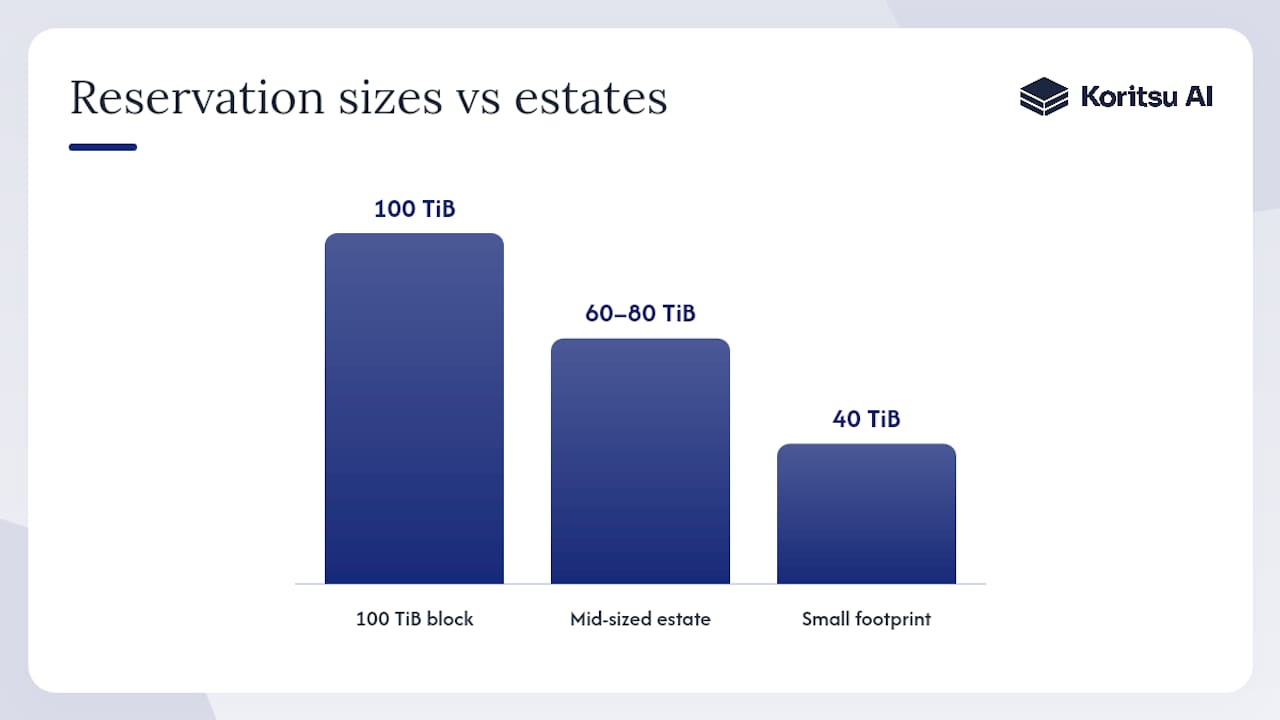
Reserved capacity only pays off when your baseline usage is stable and large enough to justify locking in a commitment. Microsoft’s reserved capacity documentation sets the entry points at 100 TiB or 1 PiB blocks, purchased for one or three years, and the discount applies at subscription, shared, or management group scope.
Running the break-even calculation properly means working through this sequence:
- Establish your true baseline. Pull the last three to six months of capacity billing for the specific tier and redundancy combination you are considering. Seasonal spikes do not count toward the reservation’s baseline value.
- Price both scenarios in the Azure Pricing Calculator. Run the pay-as-you-go monthly rate against the reserved rate for the same region, tier, and redundancy setting side by side.
- Check that your data will not move. Reservations are tier and redundancy specific. If you plan to shift data from Hot to Cool over the reservation period, or change from LRS to GRS, the reservation does not follow it and the discount evaporates.
- Remember what reservations do not cover. Operations, egress, and early deletion penalties are billed separately regardless of your reservation. A reservation reduces the capacity line only.
- Compare against your minimum block size. If your stable Hot-tier footprint is 40 TiB, a 100 TiB reservation is not a discount, it is overspend disguised as a saving.
For mid-sized estates, this is where reservations frequently disappoint. A team with 60 to 80 TiB of genuinely stable data, split across two tiers and two redundancy configurations, often cannot fill a single reservation block cleanly in either tier. The arithmetic only works when one tier and redundancy combination alone crosses the 100 TiB threshold with room to spare. Below that, you are usually better served by rigorous tiering discipline than by a capacity commitment that does not fit your actual usage shape.
Architectural changes that beat operational tweaks
Lifecycle rules and tier selection fix where data sits. They do not fix how much data you are generating or how expensively you are reading it, and that is where the larger, harder-won savings live.
Small-file syndrome is the most common structural cost driver we see. Every read or write operation is billed per 10,000, regardless of file size, so a workload writing a million tiny log entries per day pays the same operation cost as a million large ones, but stores a fraction of the useful data. Batching small objects into larger archives before upload collapses that operation count directly, and for high-throughput ingestion pipelines it often saves more than any tiering adjustment could.
Beyond batching, four changes consistently outperform tier tuning on their own:
- Compress before you store. Log data and structured exports compress well, often by 70% or more, which directly cuts the capacity meter regardless of tier.
- Choose columnar formats for analytical data. Parquet and ORC store and query far more efficiently than raw CSV or JSON for anything you intend to analyse later, reducing both storage footprint and read operation counts.
- Introduce a caching layer for frequently read objects. If the same blobs get requested repeatedly, a cache in front of storage turns dozens of billed read operations into one. Our caching strategy guide covers implementation patterns for exactly this.
- Set TTLs on ephemeral data. Session artefacts, temporary exports, and processing intermediates rarely need to persist. Expire them automatically instead of letting them accumulate as forgotten capacity.
One habit worth breaking deliberately: enabling versioning or soft delete on every storage account by default. Both are genuinely valuable for data you cannot afford to lose, but on high-churn objects, temporary files, cache artefacts, frequently overwritten state, they multiply your stored capacity with every change. Route high-churn workloads into accounts where these features stay off, and reserve versioning for the data that actually needs the protection.
Pro Tip: Run a quick operation count audit before assuming compression is your biggest lever. If your ratio of operations to GB stored is unusually high, batching and format changes will outperform compression. If it’s the reverse, compression wins first.
What should you monitor to catch storage waste early?
Cost visibility fails less often because the tools are missing, and more often because nobody assigned an owner to check them. Azure Cost Management covers most of what you need out of the box: cost analysis for trend spotting, exports for deeper modelling in Power BI or Excel, and Advisor recommendations that flag idle or oversized resources automatically.
The KPIs worth tracking on a recurring basis:
- GB stored by tier, tracked monthly, to catch tier drift before it compounds
- Operations per month, segmented by storage account, to catch small-file regressions early
- Egress volume, since this is the meter most likely to spike from an application bug rather than genuine growth
- Count of orphaned resources, reviewed on a fixed schedule rather than only when someone remembers
| KPI | Recommended check frequency | Alert trigger |
|---|---|---|
| GB by tier | Monthly | Unexplained shift of more than 10% month on month |
| Operations per account | Weekly | Spike above rolling 4 week average |
| Egress volume | Weekly | Sudden increase with no corresponding traffic growth |
| Orphaned resources | Monthly | Any unattached disk or snapshot older than 30 days |
Alerts only work if someone acts on them, so wire them into the workflow your engineers already use. A budget threshold breach should open a ticket automatically, not sit in an inbox. Tie the runbook for “unexpected storage spike” to the same alert, so whoever picks it up knows the first three things to check without having to reconstruct the process from memory. Our broader piece on reducing cloud infrastructure costs covers how this fits into a wider FinOps governance model, and idle resource waste is not unique to storage. License governance for platforms like Microsoft 365 follows the exact same pattern of quiet, compounding waste that nobody owns.
Your first 90 days: a practical rollout plan
Sequencing matters here. Do the cheap, safe things first, validate before automating, and save the structural changes for once you understand your actual usage patterns.
- Days 0 to 7: inventory and guardrails. Run the orphaned resource audit, set a budget with alert thresholds, and delete anything with zero ambiguity about its uselessness. This alone typically surfaces the fastest wins.
- Weeks 2 to 6: pilot the automation. Trial lifecycle rules on a sample of predictable-pattern data, and run smart tier against unpredictable workloads in parallel. Batch your worst small-file offenders during this window too, since it is isolated, low-risk work that pays off regardless of what else you decide.
- Months 2 to 3: tackle the structural questions. Run the reservation break-even analysis now that you have real usage data from the previous phase. Implement the architectural fixes, compression, caching, format changes, that the operation count audit flagged as worthwhile. Measure savings against your original baseline.
| Phase | Primary owner | Success measure |
|---|---|---|
| Days 0 to 7 | Platform engineer | Orphaned resources removed, budget alert live |
| Weeks 2 to 6 | Engineering team lead | Lifecycle/smart tier piloted on target datasets |
| Months 2 to 3 | FinOps or platform lead | Reservation decision made, savings measured against baseline |
Report savings monthly against the baseline you captured on day one, not against the previous month, so the trend stays honest. Stakeholders sign off faster when they can see a number that started at zero and is now measurably lower, rather than a percentage that resets every reporting cycle.
How Koritsu approaches Azure Storage savings
Most of what separates teams that fix this quickly from teams that circle it for a quarter is not knowledge. It is bandwidth. Engineers already know lifecycle rules exist. What they lack is the uninterrupted time to audit an entire estate, model a reservation break-even properly, and push the changes through review without dropping other priorities.
That is the gap Koritsu AI’s model is built for. Kori, our AI agent, continuously analyses billing and usage data to surface exactly where storage spend is misallocated, orphaned, or sitting in the wrong tier. Our specialists then work alongside your engineers to validate and implement the fixes, rather than handing over a report and disappearing. External help tends to accelerate outcomes most when internal teams have the right instincts but not the calendar space, or when the estate has grown complex enough that nobody has full visibility across every account.
How Koritsu AI helps you act on this without the internal lift
Everything in this guide works. The honest constraint is time: most platform teams know they should audit tiers and hunt orphaned resources, but it competes with everything else on the roadmap and keeps losing.

Koritsu AI starts with a free assessment: a full billing analysis, a quick-wins report covering exactly the orphaned resources and mistiered data outlined above, and a concrete savings estimate before you commit to anything. From there, we work on a success-fee basis, taking a share of the savings we actually verify against your billing, so the incentive is aligned from day one rather than buried in a retainer you pay regardless of outcome. Teams that want ongoing coverage can move to a subscription once the initial engagement proves the value. If your estate is complex enough that a proper audit keeps sliding down the backlog, start with a free assessment and get a savings estimate before you commit engineering time to anything else.
Sources
- Plan and manage costs for Azure Blob Storage | Microsoft Learn
- Optimize object storage costs automatically with smart tier—now generally available | Microsoft Azure Blog