FinOps Inform
Cloud Savings Playbook: Rank 7 Tactics Before Buying Discounts
Rank seven cloud savings tactics by impact and effort, avoid premature commitment discounts, and follow a 30 to 90 day plan for verified savings.

Start with rightsizing, autoscaling and a short triage of your top-spend services. These moves typically produce the fastest verified savings, ahead of Spot adoption, storage tiering and commitment discounts. Run a quick assessment of your biggest cost centres this week, build a top-10 backlog, and sequence the rest from there. Koritsu offers a verified, pay-for-results route if you want external delivery alongside your own team.
TL;DR:
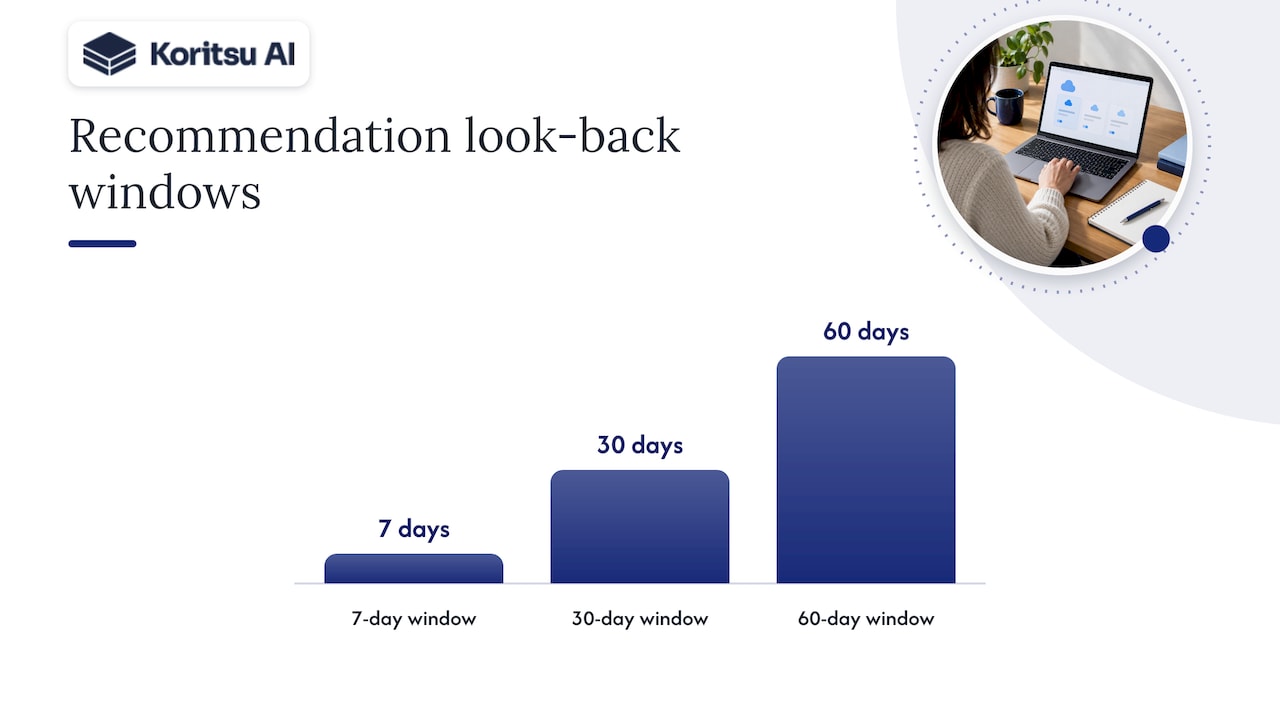
- Native tools base recommendations on periods of 7, 30, or 60 days; extend analysis for seasonal workloads and manually review advice based on less than 30 days.
- Rightsize and remove idle resources before buying commitments; otherwise, discounts can lock in inefficiency, while overlapping savings plans and reservations may leave capacity stranded.
- Use Spot capacity for interruptible batch jobs, build pipelines, and stateless services, with automatic rescheduling and a fallback pool sized for minimum capacity.
- Track a top 10 backlog with owners, effort, and monthly and annual estimates, then close each task only after savings appear on the actual invoice.
Ranked cloud savings strategies by impact and effort
Not every tactic deserves the same attention in week one. Some deliver savings within days; others take months of coordination and carry more risk if rushed. Ranking tactics by typical impact and effort helps you sequence the work instead of attacking everything at once.
The list below draws on the staged approach in ThoughtWorks’ cloud economics playbook, which lists rightsizing, commitment discounts and migration programmes among the core levers practitioners reach for first.
- Compute rightsizing and autoscaling: low effort, high impact; owned by engineering, since idle CPU and oversized instances are usually the single biggest source of inefficiency.
- Spot and Preemptible adoption: medium effort, high impact for fault-tolerant workloads; owned by engineering, best suited to batch jobs, CI pipelines and stateless services.
- Commitment discounts (savings plans, reserved instances): low effort once usage is stable, medium to high impact; owned by FinOps and procurement together, since overcommitting locks in cost rather than cutting it.
- Storage tiering and lifecycle policies: low effort, medium impact; owned by engineering, particularly for logs, backups and infrequently accessed data.
- Orphaned resource cleanup: very low effort, medium impact; owned by engineering, covering unattached disks, idle load balancers and forgotten snapshots.
- License and hybrid benefit optimisation: medium effort, medium impact; owned by procurement and IT, relevant where existing on-premises licences can offset cloud rates.
- Migration and modernisation opportunities: high effort, potentially high impact; owned jointly by engineering leadership and finance, since re-platforming or rehosting can unlock structural savings but takes time.
Migration accelerator programmes and private pricing agreements sit at the high-effort, high-impact end of this list. They can be worth pursuing once your usage data is clean and stable, but they reward patience. Buying a commitment or negotiating a discount before you have addressed obvious inefficiency usually just locks in an inflated number.
How to triage spend and build a priority backlog
Before you commit to any tactic, you need a way to compare opportunities on the same footing. A simple scoring framework turns a messy cost report into a backlog you can actually work through.
Score each candidate opportunity on five axes:
- Spend concentration: how much of your total bill this service or resource group represents.
- Volatility: whether usage is steady enough that a recommendation based on historical data will still hold next month.
- Remediation effort: the engineering hours and coordination needed to act.
- Ownerability: whether a specific team or individual can be assigned the action without cross-team sign-off delays.
- Business risk: what happens to performance, reliability or compliance if the change goes wrong.
Native recommendation engines are a useful starting point, but they come with a structural limitation worth understanding before you trust them. Microsoft’s guidance on calculating cost savings and AWS’s reservation recommendation documentation both confirm that these tools typically use look-back windows of 7, 30 or 60 days. That works well for stable, predictable workloads. It works badly for anything spiky, seasonal or frequently stopped and restarted, because a short window can mistake a quiet period for a permanent drop in demand, or miss a recurring spike entirely.
Adjust for this by extending your own analysis window where usage is irregular, and by flagging any recommendation built on fewer than 30 days of data for manual review before you act on it.
Pro Tip: Run the scoring exercise on your highest-spend items first, not your whole estate. You will usually find that many realistic savings sit inside a much shorter list.
The output you want from this exercise is a top-10 backlog, each line carrying an estimated monthly and annual saving, an effort rating, an owner and a suggested sequence. That backlog becomes the single source of truth for the next 90 days. Our own write-up on scoring and verifying cloud savings goes into more depth on how to keep that backlog honest as execution progresses.
Compute tactics: rightsizing, autoscaling, Spot and commitments
Compute is usually where the money is, and it is also where missteps are most visible. Getting the sequencing right matters more than any single technique.
- Rightsizing: trust CPU, memory and I/O utilisation together, not CPU alone; a service can look idle on CPU while still under memory pressure. Choose conservative cuts for anything customer-facing and aggressive cuts for internal or batch workloads, then verify savings by comparing the actual billed cost for the resized instance class over the following billing cycle, not just the sticker price difference.
- Autoscaling: stateless services should scale on request rate or CPU with short cooldown windows; stateful services need more conservative scale-down policies and health checks, since removing capacity too quickly can cause cascading failures under load.
- Spot and Preemptible adoption: best suited to batch processing, CI/CD runners, rendering jobs and other fault-tolerant workloads. Pair Spot instances with an orchestration layer that can reschedule interrupted work automatically, and keep an on-demand fallback pool sized for your minimum viable capacity.
- Commitments versus savings plans: recommendation engines simulate different commitment combinations against your historical usage and recommend the mix that maximises estimated savings. AWS Cost Explorer updates these recommendations at least every 24 hours but does not forecast future usage, so buying immediately after a usage spike can lock in a commitment sized for a temporary peak.
Sequence commitment purchases after rightsizing, not before. A right-sized fleet produces a smaller, more stable baseline, and buying commitments against that baseline avoids the common trap of reserving capacity you are about to shrink. Azure’s cost management recommendations follow the same logic: Advisor typically monitors VM usage for around seven days and flags low-utilisation instances before suggesting resizing or shutdown as the first move.
Storage playbook: lifecycle, tiering and cleanup
Storage inefficiency accumulates quietly. Nobody notices an unattached disk until someone totals up the bill, and by then there can be dozens of them scattered across accounts and regions.
- Find unattached disks and aged snapshots using your provider’s resource inventory tools, filtered by “no attachment” or “last accessed” metadata; export the list before deleting anything, and hold it for a short grace period in case a resource is tied to a disaster recovery plan rather than genuinely unused.
- Apply lifecycle policies that automatically transition objects from standard storage to cooler tiers after a defined period of inactivity, and to archive tiers once access becomes rare enough that retrieval latency no longer matters.
- Test on a subset first: apply a new lifecycle policy to one bucket or one project for a full billing cycle, confirm the saving shows up on the actual invoice, then roll the policy out more broadly.
The safest sequence is cleanup, then tiering, then broader policy rollout. Cleanup removes resources nobody is using at all; tiering reduces the ongoing cost of resources that are still needed but accessed rarely. Running both in the reverse order, or skipping the subset test, is how teams end up with a support ticket about a file nobody could retrieve.
Rate optimisation: using reservation and savings recommendations responsibly
Reservation and savings plan tools are powerful, but they are simulations built on the past, not forecasts of the future. Treating their output as a forecast is where overcommitment usually starts.
Commitment recommendations rely on usage data spanning 7, 30 or 60 days, according to Microsoft’s documentation on how Azure simulates reservation purchases against historical hourly usage. That window is enough to catch a stable baseline, but not enough to catch a seasonal pattern or a planned infrastructure change further ahead.
- Avoid buying conflicting commitments at once: purchasing a savings plan and a reserved instance for overlapping capacity in the same window can leave one of them stranded, since both are competing for the same discounted usage.
- Let tools refresh after each purchase: AWS Cost Explorer updates recommendations at least every 24 hours, so wait for a refreshed recommendation before buying the next tranche rather than acting on stale data.
- Use private pricing and enterprise discounts for genuine growth, not as a lever on inflated projections; a common antipattern is overstating expected spend growth to justify a larger discount tier, which then obliges the business to actually spend that much to make the deal worthwhile.
Our commitment management guide covers how FinOps teams can verify that a purchased commitment is actually being consumed as planned, rather than sitting half-utilised on the bill.
The FinOps operating model that keeps savings from eroding
A one-off cleanup can save money temporarily. An operating model keeps savings in place for the long term. The FinOps Framework organises this into three phases: Inform, Optimize and Operate, and each one maps to specific activities and owners rather than staying abstract.
- Inform: engineering and finance jointly build a shared view of spend, allocated by team, service and feature, so everyone is arguing from the same numbers.
- Optimize: engineering executes the ranked tactics from this playbook, with FinOps tracking progress against the backlog.
- Operate: FinOps and engineering leadership maintain guardrails, budgets and anomaly detection so that savings achieved this quarter are not quietly undone next quarter.
That third phase is where most organisations lose ground. The FinOps Foundation notes that optimisation only holds when governance activities continue after the initial push, since cost creep from new services, forgotten test environments and ad hoc scaling decisions is constant.
Practical guardrails include runtime budgets tied to specific services, automated anomaly detection that flags a spend spike promptly rather than waiting for a periodic review, and a clear escalation path when a budget is breached. Reporting cadence matters as much as the tooling: a weekly spend review during active optimisation, moving to monthly once the backlog stabilises, keeps the bill as the source of truth rather than a dashboard estimate.
Pro Tip: Tie every “completed” item in your savings backlog to a specific line on the next invoice before you mark it closed. A recommendation applied is not the same as a saving verified.
Our post on balancing cloud cost and performance looks at how engineering teams keep these guardrails from becoming friction that slows delivery.
A 30 to 90 day plan for quick wins and verified savings
You do not need a year-long transformation programme to see results. A tightly sequenced 90 days, built around the backlog from your triage, gets you from discovery to verified savings on the bill.
- Days 0 to 7: run the triage, identify your top-spend services, shut down anything obviously idle, and assemble the top-10 backlog with owners assigned.
- Days 8 to 30: execute the low-risk quick wins, cleanup of orphaned resources, rightsizing of non-production environments, and rollout of storage lifecycle policies on tested buckets.
- Days 31 to 60: pilot Spot adoption on a fault-tolerant workload and begin modelling commitment purchases against the now-stabilised baseline.
- Days 61 to 90: coordinate with procurement on any commitment or private pricing decisions, automate the guardrails and anomaly detection from the Operate phase, and report verified savings against the original backlog estimates.
This sequencing matters because it defers the riskiest, least reversible decisions, commitments and private pricing, until after the baseline has stabilised. Our guide to shifting cost management left for DevOps teams and our guardrails framework both work from this same structure, extended with more detail on the engineering side of execution.
Our practitioner view on delivering verified savings
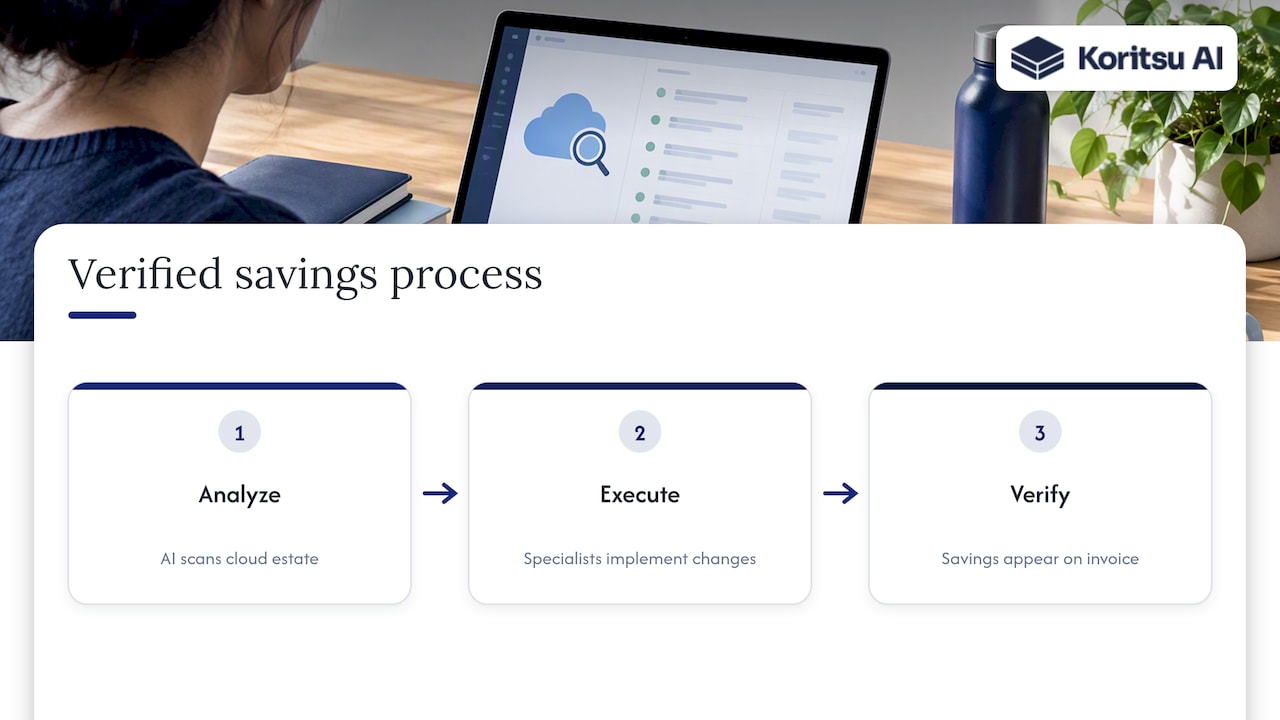
We built our platform because dashboards tell you where spend sits, not why it got there or what to do about it. Our AI agent, Kori, runs continuous analysis across your cloud estate, and our specialists pair that analysis with hands-on execution, so recommendations turn into changes that show up on the actual invoice.
We charge a success fee equal to two months of verified realised savings, confirmed against your own billing data, which means our incentive matches yours: find real inefficiency, address it, and prove it on the bill. For teams with a backlog already in hand but limited engineering capacity to execute it, bringing in a specialist to run point on implementation is often faster than waiting for a quarter of internal bandwidth to open up.
A saving that has not shown up on the invoice is not a saving. It is a recommendation.
What we see most often in cloud savings work
The pattern we see most often is buying discounts before optimising usage. A savings plan locks in a rate against a baseline, and if that baseline carries idle resources, the commitment just makes the inefficiency cheaper per unit, not gone.
Verified savings have to be measured on the bill, not estimated from a dashboard. Engineering ownership matters more than finance pressure here, because engineers are the ones who can actually change how resources are provisioned. Keep a backlog, keep a cadence, and treat optimisation as routine maintenance rather than an annual project.
Get a verified savings assessment from Koritsu
Running this playbook internally takes engineering time most teams are already short of. We offer a free assessment that starts with our Savings Opportunity Report, which surfaces where spend can be optimised across your AWS, Azure or GCP estate and gives you a near-term, ranked backlog similar to the one described above, built from your actual billing and resource data rather than generic benchmarks.

- We only charge a success fee when we deliver verified savings, so there is no upfront cost to start.
- Once the initial assessment is done, teams can move onto FinOps as a Service for ongoing monitoring, with Monitor, Advisor, Embedded and Premium plans available depending on how much hands-on support you want.
- Our security approach provides more information.
If you would rather see the platform first, you can explore Koritsu AI directly and get a sense of how the analysis and reporting work before committing to an engagement.
FAQ
What is a cloud savings playbook?
A cloud savings playbook is a ranked, sequenced set of cost reduction tactics, such as rightsizing, Spot adoption and commitment discounts, mapped to a repeatable process like the FinOps Framework’s Inform, Optimize and Operate phases. It gives teams a priority order and ownership model rather than a loose list of tips.
How much can companies typically save on cloud costs?
Savings vary widely by starting point, but ThoughtWorks’ cloud economics playbook notes that rightsizing and commitment strategies can substantially reduce compute spend when applied together with governance. The actual figure depends on how much inefficiency exists in your current environment.
Why do native cloud recommendation tools sometimes miss savings?
Native tools from AWS and Azure typically base recommendations on 7, 30 or 60-day look-back windows, which works well for stable workloads but can miss opportunities, or suggest a sub-optimal action, for workloads with spiky or seasonal usage patterns.
Should we fix usage before buying reservations or savings plans?
In most cases, yes. Buying commitments against an unoptimised baseline locks in inefficiency at a discounted rate rather than removing it. Rightsizing and cleanup first gives you a stable, smaller baseline to commit against, which reduces the risk of stranded or underused commitments.
How does Koritsu’s pricing work for cloud savings engagements?
Koritsu charges a success fee equal to two months of verified realised savings, confirmed against your actual bill, so there is no upfront cost for the initial assessment. Ongoing work can move to a subscription through FinOps as a Service once the initial savings are realised.
Sources
A handful of primary references are worth bookmarking if you want to go deeper than this guide or verify a specific claim before presenting it internally.
If migration or rehosting is on your roadmap, specialists such as Epicloud’s cloud migration and IT audit service can help assess readiness before you commit engineering time to a move. And if fragmented vendor relationships are complicating your procurement decisions around commitments and private pricing, Strategic Concierge’s analysis of supplier fragmentation is a useful read before your next negotiation.