FinOps Inform
Continuous Cloud Cost Monitoring: A Guide for UK CTOs
How continuous cloud cost monitoring works, what to track, where dashboards fall short, and how UK engineering teams turn alerts into verified savings.

Continuous cloud cost monitoring means watching spend at resource level, daily or hourly, tying it to the team and service that caused it, and acting on changes while they are still small. A monthly invoice review does none of that. If your bill is a surprise at month end, you are monitoring too late and too coarsely.
This guide covers what to monitor, how to set it up on AWS, Azure and Google Cloud, why dashboards alone rarely cut the bill, and how to turn monitoring into savings that show up on the invoice.
TL;DR:
- Continuous monitoring is only useful if cost is allocated to teams, services and features. Totals by account tell you nothing you can act on.
- Native tools from the three major providers give you budgets and anomaly alerts. They do not fix the architecture that creates the waste.
- Most waste is built in at design time, so cost visibility has to reach engineers before deployment, not after.
- Measure success on the actual bill. A saving that cannot be verified against billing data is a forecast, not a saving.
- Start with a short list of signals and owners, then widen. A noisy alert channel gets muted within weeks.
What continuous monitoring covers that monthly reviews miss
Cloud spend is variable by design. A deployment, a new feature flag, a forgotten test cluster or a change in traffic can move your daily cost within hours. Google’s cost optimisation guidance for its Well-Architected Framework tells teams to monitor resource usage and costs continuously and adjust proactively, so inefficiencies are caught before they compound. TechTarget’s best-practice list makes the same point: watch spend in real time, not once a month.
In practice, continuous monitoring should answer five questions every day:
- What did we spend yesterday, and how does that compare with the expected run rate?
- Which team, service or feature drove any change?
- Is the change a normal traffic effect or a genuine anomaly?
- Which resources are idle, oversized or running on the wrong pricing model?
- Who owns the fix, and has it been made?
If your tooling answers the first question and stops there, you have reporting, not monitoring.
The signals worth tracking
Resist the urge to build forty charts. These are the signals that tend to matter for engineering leaders running production workloads.
Spend against a baseline
Track daily cost by service and compare it with a rolling baseline that allows for weekday and seasonal patterns. A flat budget line is too blunt for a system whose load follows customers.
Unit cost
Total spend rising is fine if revenue, requests or active users are rising faster. Unit cost (cost per transaction, per tenant, per thousand API calls) separates healthy growth from waste. It is also the number your finance director will ask for.
Allocation coverage
Measure the percentage of spend you can attribute to an owner. Tagging gets you part of the way. Shared platforms, Kubernetes clusters, data transfer and support charges usually need an allocation model on top. Until coverage is high, every other metric carries an asterisk.
Idle and oversized resources
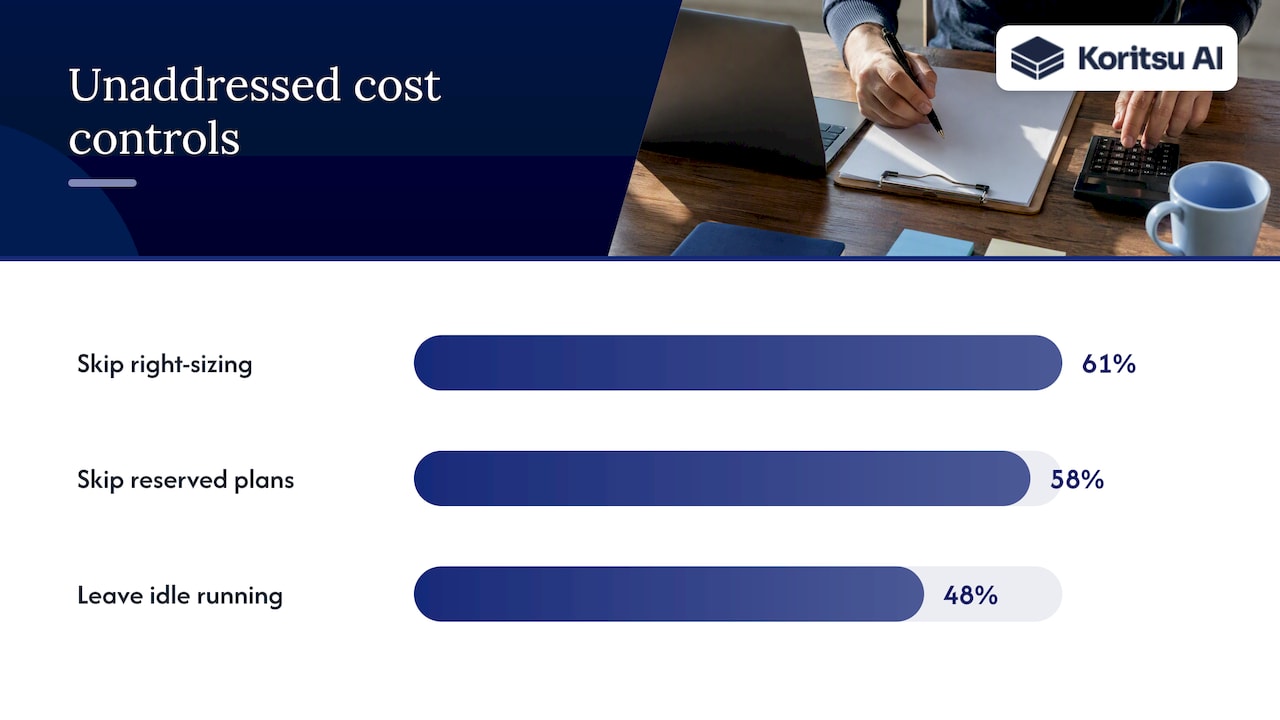
Idle instances, unattached volumes, oversized databases and non-production environments that run overnight are the classic leaks. The FinOps in Focus 2025 findings, from a survey of 700 engineering leaders and developers in the US and UK, show how rarely these are acted on: 61% of developers do not right-size instances, 58% do not use reserved instances or savings plans, and 48% do not shut down idle resources.
Commitment utilisation and coverage
Savings plans, reserved instances and committed use discounts only pay off if they are used. Monitor utilisation and coverage weekly, and review commitments before they expire. Our guide to commitment management explains how to verify those savings rather than assume them.
Anomalies
An anomaly is a cost change you did not plan. Good detection separates the routine from the real. Research on AI-driven anomaly detection across multi-cloud environments finds that anomaly patterns depend heavily on provider-specific billing models, so one generic threshold across AWS, Azure and GCP will either miss things or flood your team with false alarms.
Setting it up on AWS, Azure and Google Cloud
You can start with what the providers already give you. It costs nothing to switch on, and it forms a useful baseline.
| Layer | What to do | Native starting point |
|---|---|---|
| Budgets | Set budgets per account, project or team, with alerts at several thresholds | Budgets in each provider’s billing console |
| Anomaly alerts | Route alerts to the owning team’s channel, not a shared inbox | AWS Cost Anomaly Detection, Azure Cost Management alerts, Google Cloud billing alerts |
| Billing export | Send detailed billing data to a warehouse you control | Cost and usage reports, Azure exports, BigQuery billing export |
| Allocation | Enforce tags or labels; allocate shared costs explicitly | Tag policies, management groups, folders and projects |
A few details matter. AWS explains that its anomaly service uses machine learning to learn your spend patterns, and that an alert only fires when an anomaly’s total cost impact meets or exceeds the threshold you set. Anomalies below the threshold stay visible in the console without notifying anyone, so set thresholds with intent. Microsoft’s guidance on Cost Management best practices takes a staged approach: plan, analyse, then reduce.
The billing export is the step teams skip and later regret. It is the raw material for everything else: unit costs, allocation of shared services, verification of savings. If you run more than one provider, normalise the exports into a common schema early. Our post on reporting from canonical exports walks through the approach.
Why dashboards alone do not lower the bill
Most companies that complain about cloud cost already have a dashboard. Few have a process that turns the dashboard into change. We see the same pattern repeatedly:
- The finance team sees the number but cannot see which design decision caused it.
- Engineers see an alert, but the fix competes with the roadmap and has no owner.
- The saving is estimated, never verified, so nobody trusts the next recommendation.
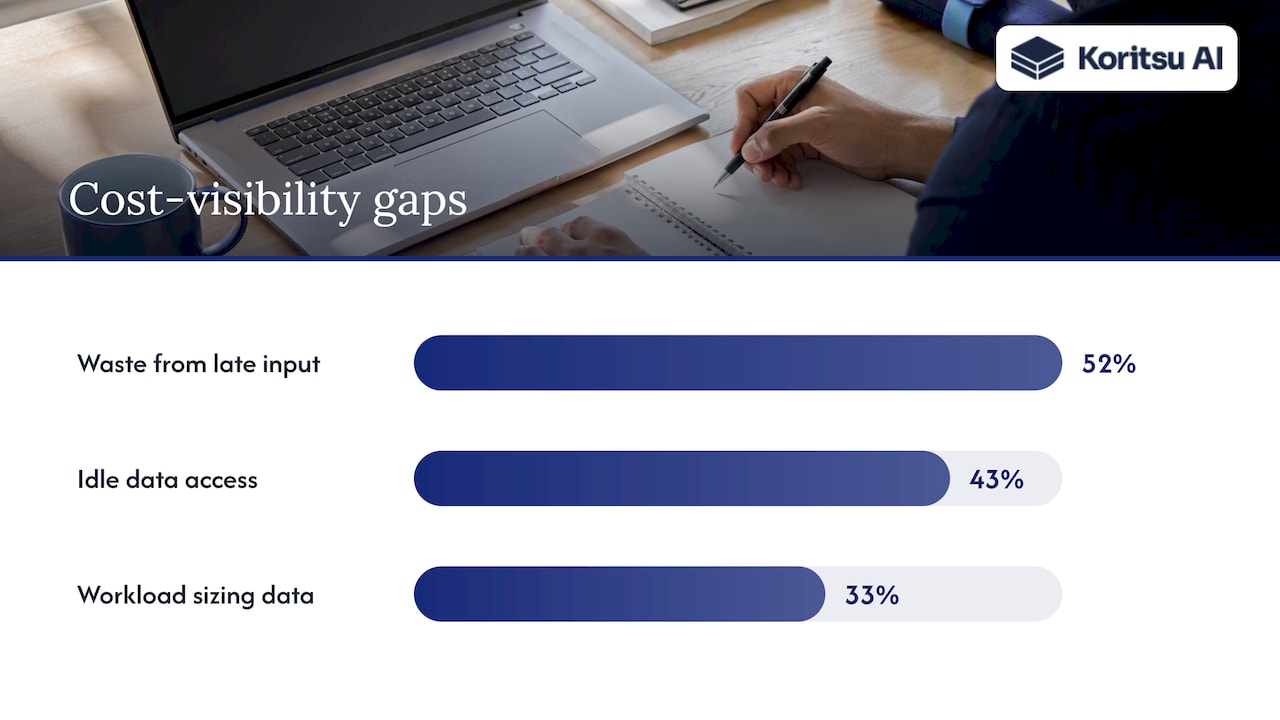
The survey data supports this. According to the same FinOps in Focus 2025 report, 52% of leaders say wasted infrastructure spend comes from bringing developers into optimisation too late. Only 43% of developers have access to data on idle resources, and just 33% can see over- or under-provisioned workloads. The people who can fix the problem are often the ones without the data.
Cloud cost is not a technology problem, it is a process problem. Monitoring is the first half of that process. The second half is ownership, prioritisation and verification.
Shift cost visibility left
The teams that do this well put cost in front of engineers while they are designing. Martin Reynolds, Field CTO at Harness, argues in an SD Times Q&A that the strongest engineering teams treat cloud cost as a shared business outcome, and that developers should see cost impact early rather than receive error reports after deployment.
What that looks like in practice:
- Cost estimates on infrastructure-as-code pull requests, so a reviewer sees the monthly impact of a change before merging.
- Policy as code that blocks the most expensive mistakes, such as untagged resources, oversized instance families in non-production, or public data transfer paths. We outline three rules worth starting with.
- Cost per feature visible to the product team. Feature flags that quietly multiply compute are a real source of waste, which we cover in our post on feature flag costs.
- Non-production environments scheduled to sleep. In our experience, dev environments are one of the quickest places to cut spend.
If you want a structured route, our 90-day plan for shifting cost left sets out what to do in each phase.
From alert to root cause in an hour
An alert says spend went up. It does not say why. The useful question is what changed in the architecture or the workload.
A workable triage order:
- Identify the service, account, region and usage type driving the increase.
- Match it to deployments, configuration changes or traffic events in the same window.
- Decide whether it is expected growth, a defect or a design flaw.
- Assign an owner and a due date, and record the expected saving.
- After the fix, check the billing data to confirm the saving landed.
The root cause triage approach we describe on the blog uses the FOCUS billing format to do the first pass quickly across providers. Step five is the one most teams drop, and it is the step that builds trust with finance.
Do you need the hyperscaler for every workload?
Monitoring will sometimes tell you something uncomfortable: a workload costs far more on a hyperscaler than its requirements justify. Steady, simple workloads such as a Windows remote desktop host or a small Linux VM may not need the full managed-service stack. For those, it is worth looking at fixed per-VM pricing alternatives to AWS before committing to another year of reserved capacity. Most production systems at mid-sized and enterprise companies will stay put, but the question is cheap to ask when the data is in front of you.
Our perspective: monitoring is where savings start, not where they end
We built Koritsu because we kept meeting engineering teams with good dashboards and stubborn bills. The savings are rarely in the obvious places like buying discounts. They are buried in how the software and infrastructure were built: chatty services paying for cross-zone traffic, over-provisioned databases sized for a launch that happened years ago, logging pipelines that cost more than the thing they log.
Dashboards cannot see those. They need resource-level analysis and someone who understands the architecture well enough to propose a change an engineer will accept.
That is why we combine two things. Kori, our AI agent, continuously analyses cloud spend and surfaces where money is being lost. Our specialists then work with your engineers to act on it. We would rather hand you a short, ranked list of changes that can be verified on the bill than a hundred recommendations nobody owns.
Our advice to any CTO setting up monitoring this quarter: pick the five signals above, name an owner for each, and agree in advance how a saving will be verified. Everything else is refinement.
How Koritsu helps
If you would rather not build this alone, we start with a free assessment and take a share of the savings we actually find, verified against your billing. You pay nothing upfront and nothing if we deliver nothing. The Savings Opportunity Report is a good first step: it shows where your spend is leaking and what to change first. The success fee model explains how we charge.
Once the first round of savings is in, teams can move to FinOps as a Service, with Monitor, Advisor, Embedded and Premium plans, for continuous monitoring and ongoing specialist support across AWS, Azure and Google Cloud. You can also look at the platform directly at app.koritsu.ai.
A 30-day plan to get started
Week 1. Turn on billing exports and native anomaly alerts on every provider. Agree who receives them.
Week 2. Measure allocation coverage. Fix tagging gaps and write down how shared costs are split.
Week 3. Build the five signals into one view: daily spend against baseline, unit cost, idle resources, commitment utilisation, anomalies.
Week 4. Run your first triage. Pick the three largest avoidable costs, assign owners, and record the expected saving for each.
Then repeat monthly. The UK market is moving the same way: MarketsandMarkets values the UK cloud FinOps market at $555.8 million in 2025, heading to $960.6 million by 2030. More companies are investing in this discipline, which means your peers’ cost per unit is falling while yours may not be.
Frequently asked questions
How often should cloud costs be monitored?
Daily at minimum for spend and anomalies, with alerts routed to owners as they happen. Commitment utilisation and idle resource reviews can run weekly. Monthly reviews should be for decisions and verification, not discovery.
What is the difference between cloud cost monitoring and cloud cost optimisation?
Monitoring shows what you spend, where and when it changes. Optimisation is the work of reducing it: rightsizing, removing waste, changing architecture, managing commitments. Monitoring without optimisation produces reports. Optimisation without monitoring produces savings that quietly erode.
Are the native provider tools enough?
They are a sound starting point for budgets and anomaly alerts, and they cost little to enable. They tend to be weaker at cross-provider allocation, unit costs and explaining architectural root causes. Teams with significant production workloads usually need analysis at resource level and engineering support to act on it.
Who should own cloud cost monitoring?
Shared ownership works best. Engineering owns the resources and the fixes, finance owns forecasting and reporting, and a FinOps lead or equivalent keeps the process running. If nobody owns an alert, it will not be acted on.
Sources
- Enterprises set to waste USD $44.5bn on cloud by 2025, IT Brief
- Q&A: The growing divide between developers and FinOps, SD Times
- AI-powered anomaly detection for serverless cost governance across multi-cloud environments
- UK Cloud FinOps Market, MarketsandMarkets
- Well-Architected Framework: Cost optimization pillar, Google Cloud
- What is cloud cost optimization? 16 best practices, TechTarget
- AWS Cost Anomaly Detection FAQs
- Optimize your cloud investment with Cost Management, Microsoft Learn