FinOps Inform
Autoscaling for Cost and SLO Control: One Framework Cut Spend 18%
See how SLO first autoscaling combines latency, backlog, and lightweight forecasting to cut costs, protect service targets, and limit operational risk.
Cost-aware autoscaling scales capacity against your SLOs while holding spend inside explicit cost guardrails. In one SLO-driven framework study, pairing AI forecasting with SLO-aware control cut infrastructure costs by 18% and SLO violation duration by up to 31% against reactive CPU-threshold scaling. Start with multi-signal, SLO-first policies, not a lower CPU target.
TL;DR:
- Pilot on a high cost, high variance service; steady workloads gain less, while bursts, inference, and event driven demand expose threshold scaling’s limits.
- Track p95 latency alongside cost per request or prediction, backlog, saturation, and scheduling feasibility; CPU alone can miss the bottleneck that requires capacity.
- In Kubernetes, VPA should own requests, HPA replicas, and node autoscaler capacity; scale to zero requires object or external metrics, not CPU alone.
- Rightsize before scaling, align baseline capacity with reservations or savings plans, and use Spot instances for variable demand to avoid idle committed spend.
- Tuning conservative cluster scale down defaults can cut node counts by 20–40% without harming availability, but verify savings against your bill.
What is cost-aware autoscaling and why does it matter?
Utilisation-driven autoscaling asks one question: is CPU above a threshold? Cost-aware autoscaling asks a better one: what is the cheapest capacity that still meets the SLO right now, and what will demand look like in a few minutes? The first reacts to a symptom. The second treats every scaling event as a financial decision.
Reactive scaling fails in predictable ways:
- It overprovisions, because teams set low thresholds to stay safe and never revisit them.
- It reacts late to bursts, so latency breaches the SLO before new capacity is ready.
- It scales on CPU while the real bottleneck is queue depth, memory or a downstream dependency.
- It leaves expensive nodes half empty after a spike because scale-down is too cautious.
Spiky services, ML inference and event-driven systems benefit most. Their demand moves faster than a threshold loop can follow, and idle capacity is costly. Steady, flat workloads gain less, so pilot where variance and spend are both high.
Which principles and signals should drive scaling decisions?
The control logic is simple to state and hard to do carelessly. Make the SLO the constraint and cost the objective you minimise inside it. The FinOps Foundation recommends treating scaling as a financial decision, pairing performance SLOs such as p95 latency with financial KPIs such as cost per request.
- Set SLOs as the primary constraint. Use latency and error rate, not utilisation, as the line you must not cross.
- Attach a cost KPI. Track cost per request or cost per prediction so a scaling policy can be judged on spend as well as speed.
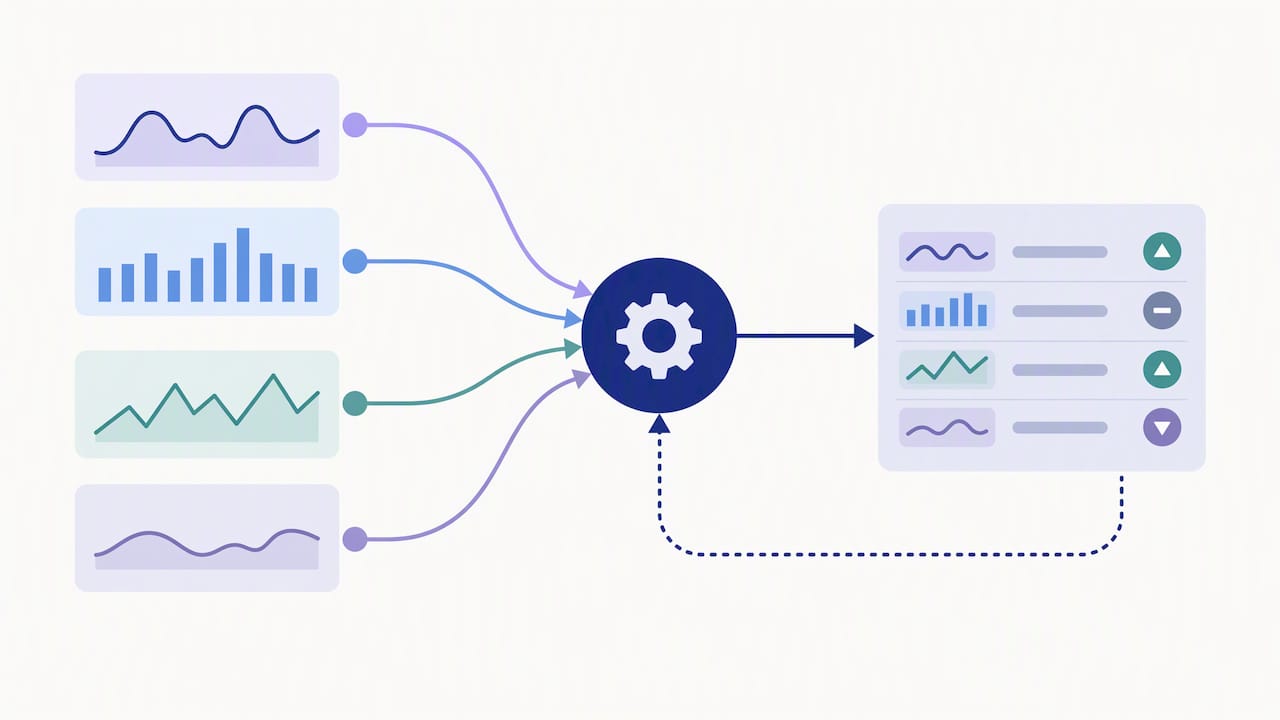
- Combine signals. Read latency trends, backlog depth, resource saturation and scheduling feasibility together. A pod that cannot be scheduled needs a node, whatever CPU says.
- Bound every action. Cap step sizes, rate-limit changes and use stabilisation windows so the controller cannot oscillate.
The SLO-first framework layers this multi-signal logic on top of native Kubernetes autoscalers, and reports a 24% improvement in scaling response time alongside the cost and SLO gains. Keeping decisions explainable matters as much as the numbers: an on-call engineer must see why a scale event happened.
Pro Tip: Log the signal values and the chosen action for every scaling decision. When someone asks why you scaled at 03:10, the answer should be one query away.
Which tactics cut cost without breaking SLOs?
Order matters. Rightsize first, then scale, then buy.
- Rightsize before autoscaling. Autoscaling a pod that requests far more than it uses just multiplies waste. Our container cost monitoring runbook covers the telemetry needed to validate requests continuously.
- Forecast lightly. A short-horizon forecast starts capacity before the burst lands, which shortens overload. DeepScaling combines forecasting with a reinforcement-learning policy to stabilise CPU utilisation in production at large scale.
- Mix Spot and committed capacity. Set the baseline to match your reservations or savings plans, and let Spot absorb the variable layer. FinOps guidance on EC2 autoscaling warns that misaligned policies can leave committed spend underused. Our guide to commitment management goes deeper.
- Pack tightly. Fill existing nodes before adding new ones and use a least-waste expander so fewer nodes sit partly empty.
- Coordinate cooldowns. Align scale-up and scale-down policies across layers so they do not flip-flop.
Cost and SLO gains in one study: 18% lower infrastructure cost and up to 31% shorter SLO violation duration versus reactive CPU-threshold scaling. The saving came from scaling earlier and wasting less, not from running closer to the edge.
What should you tune in Kubernetes?
Map the tactics onto the controllers you already run. The goal is to stop HPA, VPA and the node autoscaler fighting each other.
- Coordinate the layers. Let VPA own requests, HPA own replica count and the node autoscaler own capacity. Avoid HPA and VPA both reacting to the same CPU metric.
- Use richer metrics. The HPA control loop supports resource, pods, external and custom metrics, and takes the highest desired replica count when several are set. Scale-to-zero needs object or external metrics.
- Tune behaviour. In the HPA API reference, the scaleUp and scaleDown policies, stabilizationWindowSeconds and tolerance fields set velocity and smoothing. Set minReplicas deliberately, not by default.
- Shorten scale-down delays. AWS best-practice guidance notes that conservative cluster autoscaler defaults can be tuned, and practitioners report 20–40% lower node counts without harming availability.
Pro Tip: Change one setting per service per week and compare cost per request before and after. Bundled changes make it impossible to know which one helped.
If you run several clusters, multi-cluster management tooling helps keep these settings consistent.
How do ML inference, batch and GPU workloads differ?
These workloads break the assumptions behind CPU-based scaling, so they need their own rules.
- Measure unit cost directly. Track cost per request or per prediction. FinOps guidance on GenAI capacity says vendor TPM estimates are often unreliable and recommends load tests with representative input and output token mixes.
- Pre-warm and schedule. GPU nodes start slowly, so warm capacity ahead of known peaks and run batch jobs in scheduled windows.
- Plan the Spot fallback. Interrupted batch work needs checkpoints and a defined fallback to on-demand capacity.
- Match scaling to the SLO type. A latency-bound endpoint wants headroom and fast scale-up. A throughput-bound batch queue tolerates delay and should favour the cheapest capacity.
What does the evidence say about measured impact?
The strongest numbers come from controlled comparisons, and they point the same way. The SLO-driven study reports an 18% cost reduction and up to 31% shorter SLO violation duration. A cost-availability scaling evaluation found lower average cost and better availability than CPU-based autoscalers. Earlier workload-prediction work laid the ground for forecast-led scaling.
Practitioner result: tuning conservative scale-down defaults commonly yields 20–40% lower node counts with availability intact.
For a business case, lead with these figures, then verify against your own bill.
A practical adoption checklist
Pick one high-cost, high-variance service as the pilot. Record cost per SLO-compliant request before touching anything, then change one control at a time and compare. Trust bill-verified savings over dashboard estimates, which is why we lean on canonical cost exports. Write down rollback rules and keep every scaling decision explainable, so teams stay in control. Then monitor continuously, because workloads drift and tuned settings go stale.
How Koritsu helps teams get cost-aware autoscaling right

We pair our AI agent, Kori, with hands-on FinOps and engineering support. Start with a Savings Opportunity Report: it finds autoscaling and other savings, and you pay nothing upfront. We charge a success fee only on savings verified against your bill. Our Monitor and Advisor plans under FinOps as a Service keep your scaling tuned over time. Request your assessment today.
FAQ
Can HPA scale to zero?
Not with resource metrics alone. Scale-to-zero needs object or external metrics, as the Kubernetes HPA documentation describes, and your minReplicas setting must allow it. Check cold-start time against your SLO first.
Does Kubernetes support auto scaling?
Yes. It offers HPA for replica count, VPA for resource requests and a cluster autoscaler for nodes. Tuned together, they form the base for cost-aware autoscaling.
What is the best way to reduce autoscaling cost?
Rightsize first, then scale on SLO-linked signals rather than CPU alone. Add lightweight forecasting and shorten conservative scale-down delays. Keep every change bounded so the cost-aware autoscaling loop stays stable.
Is AWS auto scaling always free?
Check your provider’s pricing for the exact charges. What you pay for is the capacity it launches. Misaligned policies can also waste committed spend, as FinOps guidance explains.
Sources
- An SLO Driven and Cost-Aware Autoscaling Framework for …
- Scaling Kubernetes for AI/ML Workloads with FinOps
- Docs