FinOps Inform
Automated Cost Recommendations: What to Trust and Act On
Automated cost recommendations show where cloud spend leaks, but they are hypotheses, not savings. See how to validate, route and verify them on the bill.

Automated cost recommendations are system-generated suggestions for cutting cloud spend: delete this idle volume, rightsize that instance, commit to this usage level. They are useful. They are also hypotheses. Each one estimates a saving, and none of them proves it. The teams that cut their bill treat a recommendation as the start of an engineering review, with an owner, a rollback plan and a check against the invoice at the end.
This guide is for UK CTOs and engineering leaders who already have recommendations flowing from AWS, Azure or Google Cloud and want to know why so few turn into pounds saved.
TL;DR:
- Native tools (AWS Cost Optimization Hub, Azure Advisor, Google Cloud FinOps hub) generate good recommendations, but they estimate savings. They do not implement or verify them.
- The gap is rarely detection. It is the time between a recommendation appearing and an engineer acting on it.
- Before approving any change, check the lookback period, implementation effort, restart requirement and rollback possibility.
- A recommendation backlog becomes a cost programme only when each item has an owner and the realised saving is compared with the estimate.
- Judge any platform on whether it reaches resource level, spans your clouds and helps you execute, not on how many alerts it produces.
What automated recommendations actually cover
Most systems draw from the same short list of levers:
- Removing idle resources: unattached disks, unused IP addresses, idle VMs and clusters.
- Rightsizing compute and databases to observed usage.
- Commitment discounts, such as Savings Plans, reserved instances and committed-use discounts.
- Storage and database tier changes.
- Autoscaling and scheduling of non-production environments.
- Architecture changes.
Google’s catalogue illustrates the range. Its FinOps hub surfaces idle VMs, disks, IP addresses, GKE clusters and Cloud SQL instances, plus overprovisioned Cloud SQL, machine-type changes and committed-use discounts, using historical billing and Recommender data. AWS’s Cost Optimization Hub covers rightsizing, idle resource deletion, Savings Plans and Reserved Instances in one dashboard.
Notice the order of that list. The first items are cheap to find and cheap to fix. The last item is where the larger savings usually sit, and no automated score can resolve it on its own, because it depends on how your software was built.
What a good recommendation looks like
A bare line saying “save £400 a month” is not enough to approve a change. Look at what the providers expose.
AWS lets you rank and filter recommendations by account, region, resource type, action type, implementation effort, restart requirement, rollback possibility and tags. A recommendation can carry the current and recommended configuration, estimated monthly cost and savings, a savings percentage, lookback periods and a refresh timestamp. Recommendation IDs are refreshed daily and valid for a maximum of 24 hours, so anything sitting in a spreadsheet for a fortnight is stale by definition.
Those fields are the minimum evidence a reviewer should read:
| Field | Question it answers |
|---|---|
| Lookback period | Does the usage window include your month-end, quarterly or seasonal peaks? |
| Implementation effort | Is this a console click or a change to infrastructure-as-code and a deployment? |
| Restart required | Will it cause downtime, and when is the safe window? |
| Rollback possible | If latency rises, can you undo it quickly? |
| Estimated saving | Is it gross or net of the new configuration’s cost? |
| Tags and account | Which team owns the resource and will approve the change? |
If a tool shows you only a headline saving, it is asking you to take the number on trust.
Why recommendations stall
The tools are not the bottleneck. Providers give recommendations away free, and the commercial market is crowded. What goes missing is everything after the alert.
The FinOps Foundation frames optimisation as a collaborative operating practice, where engineering, finance and business owners share timely data, thresholds and accountability. Without that, automation produces alerts and nobody acts on them. Its guidance calls for automated triage and tracking from identification through to resolution.
In practice, we see the same four failure points:
- No owner. The recommendation names a resource, not a team. Finance can see it, engineering never does.
- No capacity. A rightsizing change competes with the roadmap and loses every sprint.
- No trust. An engineer who was once burned by an overzealous rightsizing suggestion rejects the next fifty.
- No verification. Nobody checks whether the bill moved, so the programme cannot prove its value and loses sponsorship.
Cloud cost is not a technology problem, it is a process problem. The good news is that process problems are fixable.
Treat every recommendation as a hypothesis
Microsoft makes the point plainly in its guidance on cost implications. A recommendation can improve reliability or performance while increasing cost. In the preview labelling, High means an estimated cost increase above 100%, Medium 30% to 100%, Low up to 30%, and No cost impact 0%. Microsoft also states that actual impact varies with agreement, subscription and usage, and that only selected recommendations carry labels during the preview.
The lesson holds on every cloud: an automated score should trigger a review, not replace one.
Azure also illustrates a failure mode that catches careful teams. Compute savings are easy to count. Continuing charges are easy to miss. Microsoft warns that storage can remain billable after compute is stopped. Its Azure Data Explorer guidance separately distinguishes stopped resources that still hold data from resources safe to delete. So before you act on any automated recommendation, run three checks:
- Dependencies. What calls this resource? What breaks if it disappears?
- Retention. Does anyone need the data, for operations or for regulatory reasons?
- Rollback. What is the exact route back, and how long does it take?
AWS’s own guidance adds a useful counterweight. Its Cloud Financial Management practice aims for the right balance between agility and control, and for confirmation that technology investment delivers expected value. The cheapest configuration is not automatically the best engineering decision.
Building the loop that turns advice into savings
The difference between a recommendation backlog and a cost programme is a closed loop. Here is a pattern that works for engineering teams without adding a heavy process.
1. Filter by value and effort
Sort opportunities on estimated saving against implementation effort. Quick wins, such as deleting unattached disks or scheduling non-production shutdowns, go first. Large, high-effort items get a proper design discussion. If dev and test environments are a big share of your estate, our write-up on cutting dev environment cloud costs shows where those savings tend to hide.
2. Route to the owning team
Use tags and account structure to send each accepted item to the team that owns the resource, as a ticket in the tool they already use. AWS’s FinOps Agent documentation, for instance, describes Jira ticketing and scheduled review as a practical pattern for surfacing and filtering recommendations from Cost Optimization Hub and Compute Optimizer. If your tagging is patchy, fix allocation first. Recommendations with no owner go nowhere.
3. Validate before changing
Run the dependency, retention and rollback checks above. For anything touching production, make the change through infrastructure-as-code so it is reviewed, versioned and repeatable. A console tweak will be reverted by the next deployment.
4. Record and compare
Log what was implemented and when. After one full billing cycle, compare the realised saving with the estimate. Where they differ, find out why. That feedback is what earns engineers’ trust in the next batch. Our post on scoring and verifying cloud savings covers this scoring approach in more detail.
5. Keep commitments for last
Buying discounts before removing waste locks in a bill that is too large. Rank the tactics first: our cloud savings playbook sets out seven in order, and our piece on commitment management explains how to verify what a commitment actually saves.
Perspective: where the money really is
We work with engineering teams on AWS, Azure and Google Cloud, and the pattern is consistent. The savings that move a bill materially are rarely the ones a native recommender lists first. They sit in how the software and infrastructure were built: a service that over-fetches data, a pipeline that runs hourly when daily would do, a data store kept hot that nobody reads.
No checklist finds these. Finding them takes resource-level analysis and an engineer who can read the architecture. That is why we pair Kori, our AI agent that continuously analyses cloud spend, with specialists who help your team act on what it finds.
Our view on automated recommendations is simple:
- Use the native ones. They are free and a sensible starting point.
- Do not mistake a list of alerts for a plan.
- Insist on a saving that is verified against the actual bill, not an estimate.
- Look for root causes, so the same waste does not return next quarter. Our guide to triaging cost root causes in hour one shows how we approach it.
Choosing a platform: a checklist for engineering leaders
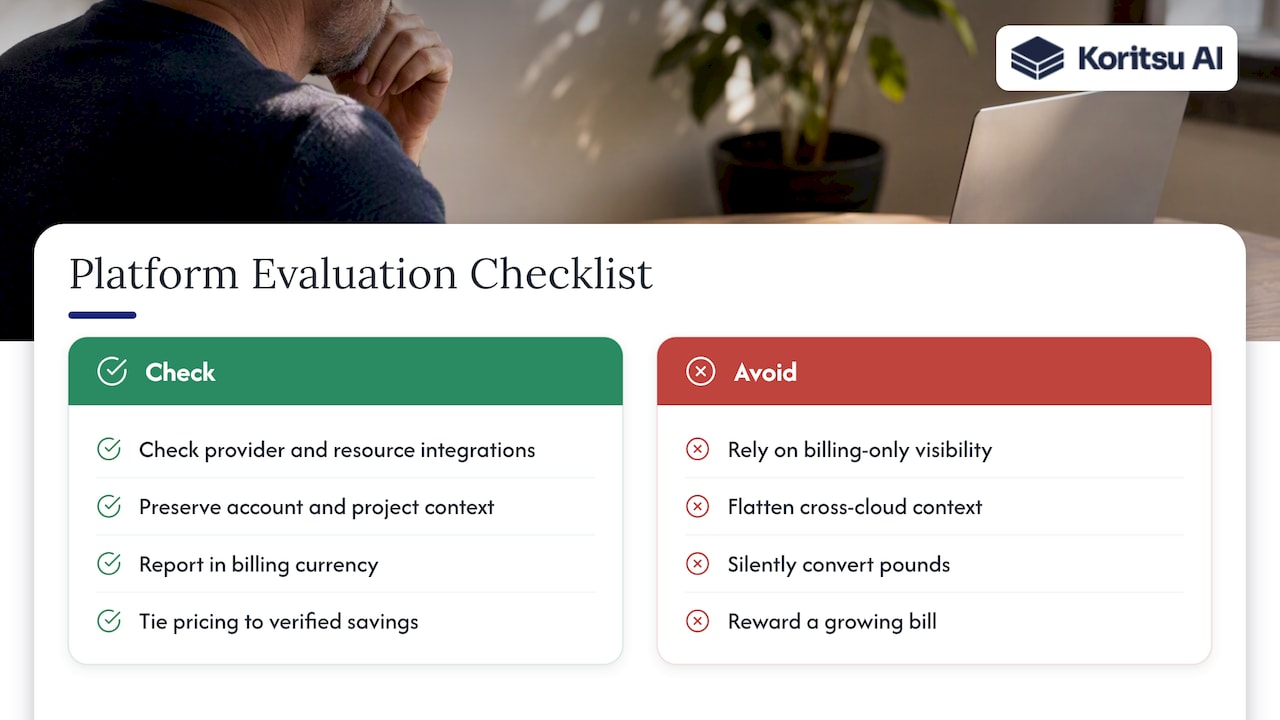
If you are evaluating a tool that promises automated cost recommendations, ask these questions.
Does it go beyond billing data? Datadog’s documentation lists provider-account integration, billing data, resource collection and, where applicable, agent telemetry as prerequisites for recommendations across AWS, Azure, GCP and AI providers. That is a good checklist for any vendor. Billing-only visibility cannot reliably produce resource-level rightsizing or implementation guidance.
Does it preserve context across clouds? Google’s FinOps hub shows why this matters: commitment recommendations can span billing-account and project-level costs, so filtering to a subset of projects can give misleading summaries. A cross-cloud platform should keep account, subscription, project, commitment and currency context rather than flattening everything into one saving figure.
Does it handle sterling? If you are billed in pounds, check that the tool reports in your billing currency and does not silently convert.
Who implements? A dashboard that tells you the bill went up is not a fix. Ask who does the work and how the saving is proved.
How is it paid for? Percentage-of-spend pricing rewards a growing bill. Pricing tied to realised, verified savings aligns the vendor with your result.
Does it connect to unit economics? Recommendations make more sense against cost per customer, service or feature. See our piece on cloud cost per customer and the foundations in engineering-grade cost reporting.
Native tools versus a combined platform and advisory approach
| Native recommenders | Tool-only FinOps dashboards | Platform plus hands-on specialists | |
|---|---|---|---|
| Cost to start | Free | Subscription | Free assessment, fee on realised savings (Koritsu) |
| Scope | One cloud each | Often several clouds | AWS, Azure and GCP |
| Depth | Resource-level within that provider | Varies, often billing-led | Resource-level plus architectural root cause analysis |
| Implementation | You do it | You do it | Specialists help your team act |
| Verification | Estimate | Usually estimate | Checked against the actual bill |
Native tools remain worth using alongside any of these. They are a data source, and a good one.
How Koritsu can help
If your team has recommendations but not the capacity to act on them, start with a Savings Opportunity Report. It begins with a free assessment and ranks the savings we find in your environment. We take a share of the savings we deliver, so there is no upfront cost, and charge only on results. Teams that want continuous coverage can move to FinOps as a Service, which offers Monitor, Advisor, Embedded and Premium plans. You can also see the platform at app.koritsu.ai.
If you need to make the internal case first, our FinOps business case walks through a 60 to 90 day pilot with verified savings.
FAQ
Are automated cost recommendations accurate?
They are good at flagging candidates and less good at predicting outcomes. Estimates depend on the lookback window, your agreement and your usage patterns, and Microsoft notes that actual impact varies. Treat the figure as a prioritised hypothesis and confirm it against the bill after the change.
Should we apply recommendations automatically?
Only for low-risk, reversible actions, such as removing clearly orphaned resources in non-production, and only with clear rules. Anything that restarts a production service or alters data should go through review, with dependency, retention and rollback checks.
What are the four pillars of cost optimisation?
It depends on the model. AWS’s Cloud Financial Management guidance uses See, Save, Plan and Run. The FinOps Foundation’s framework uses four domains: Understand Cloud Usage & Cost, Quantify Business Value, Optimise Cloud Usage & Cost, and Manage the FinOps Practice. They overlap but are not identical.
Why do our recommendations never turn into savings?
Usually because nobody owns them or has time to act. The fix is a loop: filter by value and effort, assign an owning team, implement through code, then compare the realised saving with the estimate.
Sources
- Optimize costs with FinOps hub (Google Cloud)
- Identifying opportunities with Cost Optimization Hub (AWS)
- ListRecommendations (AWS)
- GetRecommendation (AWS)
- Usage Optimization capability (FinOps Foundation)
- Evaluate cost implications of recommendations (Microsoft Learn)
- Workload optimization (Microsoft Learn)
- Azure Advisor for Azure Data Explorer (Microsoft Learn)
- Cloud Financial Management practice (AWS Well-Architected)
- Surfacing cost optimization recommendations (AWS FinOps Agent)
- Cloud cost recommendations (Datadog)
- Review and apply FinOps hub Recommendations (Google Cloud)
- FinOps Framework Overview (FinOps Foundation)