FinOps Inform
GPU Cost Optimisation: A Guide for UK Engineering Leaders
How UK CTOs cut GPU cloud costs: fix idle capacity, share GPUs, use spot safely, and track cost per inference. Practical steps for AWS, Azure and GCP.
Most GPU inefficiency is not a pricing problem. It is a utilisation problem, and it sits in how workloads were built and scheduled. The fastest savings come from five moves: find idle and oversized accelerators, share GPUs between small workloads, run interruptible work on spot capacity with checkpointing, commit only to the baseline you can prove, and measure cost per inference or per training job so you know what the spend buys.
This guide is written for CTOs and engineering leaders in the UK running production GPU workloads on AWS, Azure or Google Cloud. It covers what to check first, what to change, and what to be careful about.
TL;DR:
- Utilisation is the biggest lever. Many organisations run GPUs at single-digit utilisation, so rightsizing and GPU sharing usually beat renegotiating rates.
- Spot capacity cuts training costs sharply, but only with frequent checkpointing and preemption-aware scheduling. Without them it can cost more.
- Commitments should cover the steady baseline only, and be verified against the actual bill.
- Track unit economics (cost per inference, cost per training job), not just total spend.
- UK power costs and data centre demand are a rising background pressure on GPU pricing, so build efficiency in now.
Why GPU spend gets out of hand
A GPU instance costs many times what a CPU instance does per hour. On AWS, the top-tier p5.48xlarge with eight H100 GPUs is listed at $98.32 an hour on demand, which is roughly $71,770 for a month of continuous use. At that rate, a cluster left running over a weekend is a real line item, not a rounding error.
Three patterns drive most of the inefficiency we see in GPU estates:
- Idle accelerators. Notebooks, experiments and staging endpoints keep a GPU allocated long after anyone used it.
- Oversized hardware. A small model that needs 10 GB of VRAM is placed on a large accelerator because that is what the node pool offers. NVIDIA describes exactly this gap: lightweight speech models may need only 10 GB of VRAM yet occupy an entire GPU in production Kubernetes environments.
- Full-price on-demand for work that could be interrupted, or for steady work that should be committed.
None of these is a technology problem. They are process gaps: nobody owns the allocation model, nobody sees cost per workload, and nobody is asked to justify the instance type at design time.
Start with a utilisation audit
Before you change anything, find out what is actually happening. You need the answers at resource level, not account level.
What to measure
- GPU utilisation and GPU memory utilisation per workload, over at least two weeks, so you capture training bursts and inference peaks.
- Allocated hours versus active hours. A GPU that is allocated 24 hours a day and busy for three is a scheduling problem.
- Cost by team, service and feature. If you cannot say which product feature drives GPU spend, you cannot make a trade-off about it.
- Requested versus used resources in Kubernetes. Requests set by habit are often far above need.
A word on what a utilisation number means. A figure of 90% can still hide inefficiency if the job is memory-bound or waiting on data loading. A low figure can be healthy for latency-sensitive inference that must hold headroom. Read utilisation alongside throughput and latency targets, not instead of them.
Clean billing data is the foundation. If your cost exports are inconsistent, the analysis will be too. Our write-up on engineering-grade cloud cost reporting explains why we start from canonical exports, and the root cause triage guide shows how to get from a spike to a cause in the first hour.
Quick wins from the audit
| Finding | Typical fix | Risk |
|---|---|---|
| GPU allocated, near-zero activity | Schedule shutdown, idle timeouts, TTL on notebooks | Low |
| Small model on large GPU | Move to smaller instance type or share the GPU | Low to medium |
| Dev and test on production-grade accelerators | Use smaller or older GPU families, spot capacity | Low |
| Steady inference on on-demand | Commitment sized to baseline | Medium (lock-in) |
| Training on on-demand | Spot with checkpointing | Medium (needs engineering) |
Share GPUs instead of buying more
If your workloads are small relative to the accelerator, sharing is often the single largest saving. Google’s engineering team frames it directly: GPU sharing on GKE lets multiple containers use one physical GPU, which helps when workloads leave most of it unused.
There are three main approaches, and they are not interchangeable. The GKE documentation on GPU sharing strategies covers multi-instance GPUs, time-sharing and NVIDIA MPS, and the right choice depends on isolation needs.
| Approach | How it works | Strength | Weakness |
|---|---|---|---|
| Multi-instance GPU (MIG) | Hardware partitions one GPU into isolated slices | Predictable performance, fault isolation | Fixed partition sizes, supported GPUs only |
| Time-slicing | Software switches workloads on and off the GPU | Higher density, flexible | Noisy-neighbour effects, no memory isolation |
| MPS | Lets processes share GPU compute concurrently | Good throughput for cooperating processes | Weaker fault isolation |
For production inference, NVIDIA’s guidance leans towards hardware isolation: hardware partitioning gives deterministic quality of service and fault isolation, whereas software time-slicing trades that for density. Our practical rule is simple. Use time-slicing for development and low-stakes batch work. Use MIG or dedicated slices wherever a latency SLO or a customer-facing endpoint is involved.
Before you share, check three things: whether your model fits in the slice’s memory, whether your serving framework handles the partition correctly, and whether your autoscaler understands fractional GPU resources. Skipping that last point is a common reason a sharing project quietly stalls.
Use spot capacity, but engineer for preemption
Spot and preemptible GPUs are the biggest discount available for interruptible work. One AWS pricing guide puts spot savings at 60 to 90% across GPU families, though availability and discount vary by instance type and region, so check the current figures for the London region before you plan around them.
The catch is that preemption destroys work if you are not ready for it. Research on mixing spot and on-demand capacity for deep learning clusters, DeepVM, is built around the fact that spot instances can be revoked and that training must tolerate that. In practice:
- Checkpoint often. Save model and optimiser state to persistent storage on a schedule tuned to how much work you can afford to lose.
- Make jobs resumable. A restart should pick up from the last checkpoint with no manual steps.
- Diversify. Allow several instance types and zones so one capacity pool drying up does not stall the run.
- Keep a small on-demand floor for anything with a deadline.
- Count the redone work. If preemptions force you to repeat large chunks of training, the real discount is smaller than the headline one.
Spot is a poor fit for latency-sensitive inference unless you have a fast fallback to on-demand. It is an excellent fit for hyperparameter sweeps, batch scoring, fine-tuning and evaluation runs.
Commit to the baseline, not the peak
Once you have removed idle capacity and moved interruptible work to spot, what remains is your steady baseline. That is what savings plans, reservations or committed use discounts should cover.
The pattern we see most often is committing before the clean-up. If you buy a commitment against today’s footprint, idle capacity included, you lock in the inefficiency. Sequence matters:
- Rightsize and share first.
- Move interruptible workloads to spot.
- Measure the remaining steady-state hours over a meaningful window.
- Commit to a portion of that baseline, leaving headroom for model changes.
GPU generations move quickly, so a long commitment on a specific accelerator family carries real obsolescence risk. Favour flexible commitment types where your provider offers them, and review coverage and utilisation every month. We cover the verification side in our guide to commitment management for FinOps teams.
Is a specialist GPU provider the answer?
Sometimes. One comparison reports that specialised GPU clouds charge $1.19 to $1.99 per GPU-hour for H100s, against $6.88 to $11.06 at major hyperscalers, based on mid-2026 pricing. Treat any such figure as a snapshot and check current rates.
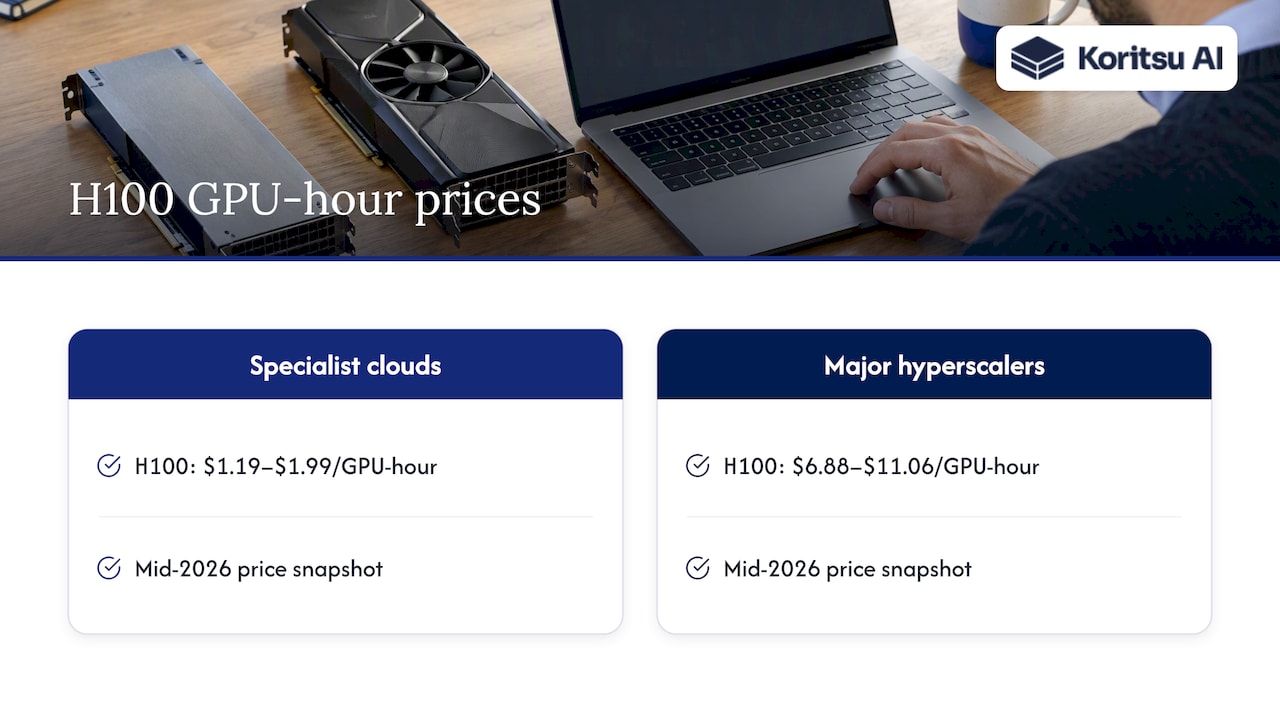
The headline gap is real, but the total cost is not just the hourly rate. Ask what it costs to move data, whether your security and compliance posture allows it, what happens to your integrations with managed storage, identity and networking, and whether capacity is guaranteed. For UK teams, data residency and your existing contractual commitments matter too. If most of your estate is on one hyperscaler, a split-cloud GPU setup adds operational overhead that can eat the saving.
A sensible approach is to price the alternative for one specific, portable workload, such as batch training, rather than assuming a wholesale migration. And address utilisation first: a 5x cheaper GPU that sits idle 90% of the time is still inefficient.
Measure unit economics, not just the bill
A falling GPU bill is not automatically good news. If traffic fell, or a model was quietly degraded, the bill falls for the wrong reasons. The better metric ties spend to output.
For inference, track cost per thousand requests, cost per generated token or cost per transcription minute. For training, track cost per training run or per evaluation cycle. The GPU FinOps framing from Mean CEO makes the same point: the goal is to connect GPU spend, model use, inference volume and training jobs, not simply to get cheaper GPUs in isolation.
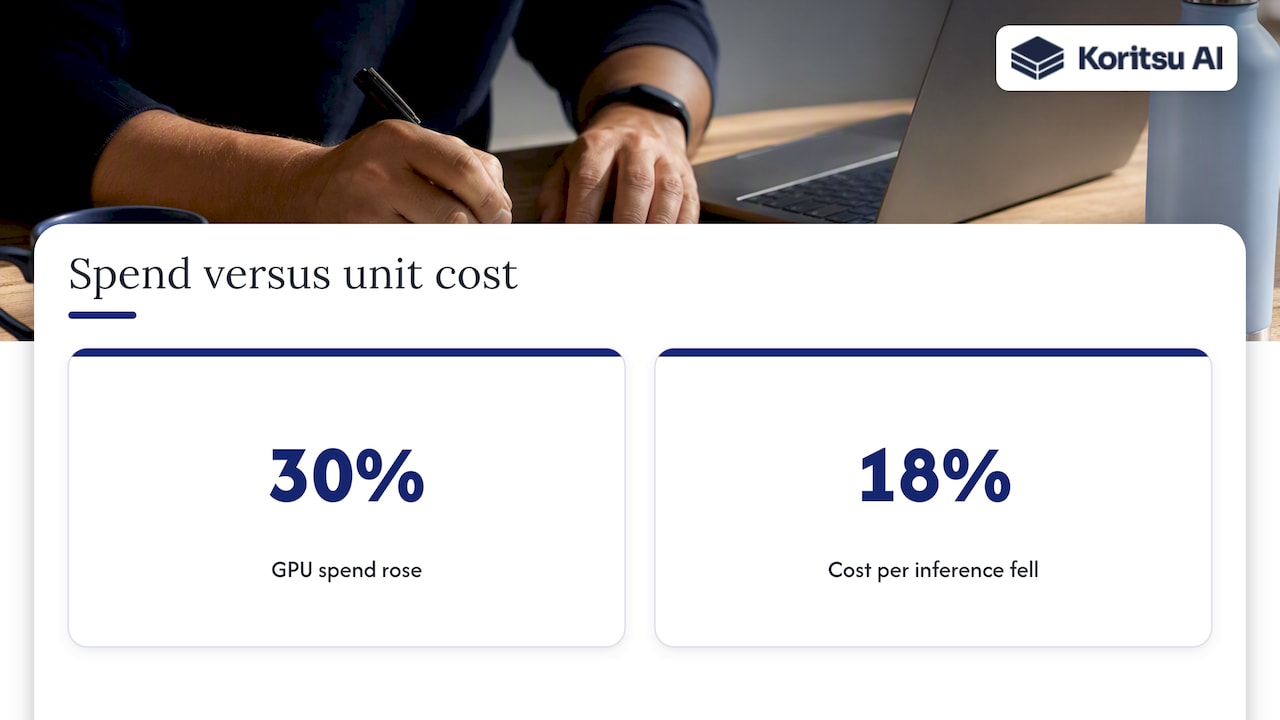
This changes the conversation with finance and product. Instead of “GPU spend rose 30%”, you can say “cost per inference fell 18% while volume doubled”. It also shows which customers or features are unprofitable at current pricing, which is a product decision, not an infrastructure one.
To get there you need allocation by team, service and feature. Tagging alone rarely gets you all the way for shared GPU nodes, so you will need allocation rules for shared clusters. Our 90-day DevOps cost management approach and the piece on balancing cost and performance set out how to do that without slowing delivery.
Ownership belongs at executive level
GPU spend is now large enough that it cannot sit with a junior analyst. Agenture argues that FinOps is now an executive governance framework, and that leaders who control the budget or the GPUs should sponsor it personally. We agree with the direction. In practice, that means:
- One named owner for GPU cost, usually the CTO or VP Engineering.
- Cost per workload visible to the engineers who design it.
- A review cadence that includes engineering and finance together.
- Cost as a design input when someone proposes a new model or a larger instance, not a surprise at month end.
The UK factor: power and capacity
UK teams face a background pressure that is easy to miss. Data centre electricity demand is projected to rise sharply, driven in large part by AI and GPU deployments. A National Grid study cites Oxford Economics projections of 26.2 TWh by 2030, about 8.8% of total UK demand. Commentary on UK power costs and their effect on AI strategy points to the same strain on energy pricing.
We cannot tell you how that will move your cloud invoice, and providers do not pass energy costs through line by line. But it is a reasonable planning assumption that efficient GPU use becomes more valuable, not less, over the next few years. Teams that build sharing, rightsizing and unit tracking into their platform now will be better placed than those who rely on cheap capacity staying cheap.
Our perspective
We built Koritsu around one observation: the savings in cloud estates are rarely where the discount-buying tools look. They sit in how software and infrastructure were built. GPU workloads are the sharpest example. A commitment or a price renegotiation touches the rate. It does nothing about a model that holds a whole accelerator while using a tenth of it.
That is why we pair two things. Our AI agent, Kori, continuously analyses spend and surfaces where spend can be optimised at resource level. Our specialists then work with your engineers to act on it, because a finding that never reaches the backlog saves nothing. We think dashboard-only FinOps stops one step short: it tells you that GPU spend is up, then leaves the engineering to you.
Our view is that GPU cost is not a technology problem, it is a process problem. It is fixable. It needs someone to look at the resource-level data, ask why each accelerator is sized as it is, and change it with the team that owns the code. And every saving should be verified on the actual bill, not on a projection.
How Koritsu can help
If you suspect your GPU estate has room to optimise, the lowest-risk start is a free assessment. We analyse your spend across AWS, Azure and GCP and produce a Savings Opportunity Report that lists specific, actionable findings. Our success-fee model means our fee is two months of the verified realised savings we deliver, confirmed against your own billing, with nothing to pay upfront. If you then want continuous monitoring and hands-on support, FinOps as a Service offers Monitor, Advisor, Embedded and Premium plans. You can also see the platform at app.koritsu.ai.
A 30-day plan to start
- Week 1: export billing data and pull GPU utilisation for every workload. List allocated hours against active hours.
- Week 2: switch off idle resources, add shutdown schedules to notebooks and dev environments, and identify models that fit on smaller slices.
- Week 3: pilot GPU sharing on one non-critical inference service, and move one training job to spot with checkpointing.
- Week 4: define unit metrics for your top two workloads, assign an owner, and decide what baseline is safe to commit.
Verify each saving against the bill the following month. If it does not show up there, it did not happen. Our guide to scoring and verifying cloud savings explains how we do that.
FAQ
Why is GPU compute so expensive?
Demand for high-end accelerators, especially for large model training and inference, has outpaced supply, and the hardware itself is costly to buy, power and cool. Hyperscalers also add a premium for managed services and integration. That is why utilisation matters so much: you are paying a high hourly rate for every idle minute.
What does cost optimisation mean for GPUs?
It means paying less for the same useful output, not simply spending less. The levers are removing idle capacity, matching accelerator size to workload, sharing GPUs, using spot for interruptible work and committing to the proven baseline. The measure of success is unit cost, such as cost per inference.
Is 90% GPU utilisation bad?
Not necessarily. For training jobs it is often a good sign. For latency-sensitive inference it may leave no headroom for spikes, and a high figure can also mask a bottleneck in data loading or memory. Judge it against throughput and latency targets.
Should we use spot instances for GPU workloads?
Typically yes for interruptible work such as training, fine-tuning and batch jobs, provided you checkpoint frequently and can resume automatically. Research on spot-based training shows that revocation is the central design problem. Without preemption-aware scheduling, repeated work can cancel the discount.
Can GPU sharing hurt performance?
It can. Software time-slicing may cause noisy-neighbour effects, while hardware partitioning such as MIG gives predictable performance and fault isolation. Use hardware isolation for production inference and time-slicing for development.
Sources
- AWS GPU Instance Pricing: P5, P4d, G5, Inf2
- Maximize AI Infrastructure Throughput by Consolidating Underutilized GPU Workloads, NVIDIA Technical Blog
- GPU sharing with Google Kubernetes Engine, Google Cloud Blog
- About GPU sharing strategies in GKE, Google Cloud Documentation
- DeepVM: Integrating Spot and On-Demand VMs for Cost-Efficient Deep Learning Clusters in the Cloud
- Best GPU cloud providers comparison, GPUHosted
- GPU FinOps, Mean CEO’s Blog
- Who Owns FinOps in 2026? Agenture
- Data Centre Impact Study, National Grid DSO